Knowing how to clean earbuds properly takes about ten minutes, and it fixes the most common complaint people have with them: one side going quiet. Earwax, dust and skin oil collect on the speaker mesh, the sound turns dull and muffled, and dirty charging contacts stop the buds from topping up in the case. The steps below work for true wireless buds, wired in-ears and open-fit models that sit on the ear instead of in it. Everything here uses basic household supplies, and the whole job is dry or nearly dry by design, because water inside an earbud is what actually kills it.
What you need, and what to keep away from your earbuds
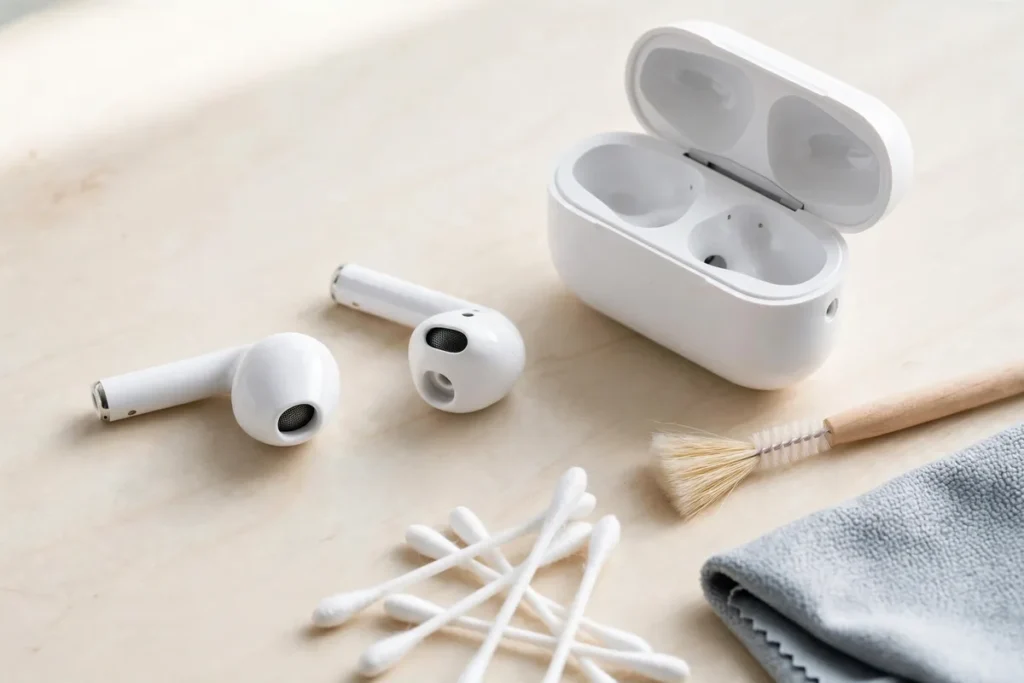
Gather these before you start:
- A soft-bristled brush. A clean, dry toothbrush works well.
- A microfiber cloth, the kind sold for glasses and screens.
- Cotton swabs.
- Mild dish soap and a small bowl of warm water, for removable tips only.
- Cleaning putty (poster putty is the same idea) for stubborn wax on the mesh. Optional, but nothing pulls wax out of mesh holes better.
- 70% isopropyl alcohol, used sparingly and applied to a cloth or swab, never poured or sprayed onto the bud.
Keep these away from your earbuds:
- No soaking and no rinsing the buds themselves. A splash-resistance rating covers sweat and rain, not a tap. Our guide to IP ratings on headphones explains what those numbers actually protect against.
- No pins, needles or SIM tools in the mesh. A point pushed into the grille shoves wax deeper and can puncture the mesh or reach the driver behind it. That driver is the part that makes the sound, and it sits closer to the surface than most people expect, as our explainer on how earbuds work shows.
- No compressed air blasted straight into the mesh. It can drive debris further in instead of clearing it.
- No bleach, peroxide or household sprays. They attack coatings, glues and the foam in tips.
- No alcohol on foam tips. It dries the foam out and shortens its life.
Step 1: Take the tips off
Start with the buds out of the case and powered off. Grip each ear tip and pull with a slight twist. Most silicone tips pop straight off the nozzle; some brands twist off. Work over a table or a cloth so a dropped tip does not roll away. Separating the tips from the buds matters because the two parts get cleaned in completely different ways: tips can meet soapy water, the buds cannot.
Step 2: Clean the tips, by material
Silicone tips are the easy ones. Drop them in warm water with a drop of dish soap, let them sit for a few minutes, then rub each one between your fingers to lift the wax and oil off the surface and out of the sound bore. Rinse them under the tap, shake off the water and set them on a clean cloth. They need to be fully dry before they go back on, inside and out, so leave them for at least an hour.
Foam tips (the squishy memory-foam kind) never get soaked. Water breaks the foam down and ruins the seal it makes in your ear. Wipe them with a cloth that is barely damp, then let them air dry. If a foam tip is torn, permanently flattened or stays grimy after a wipe, replace it. Foam tips are wear items, and no amount of cleaning restores a dead seal.
No-tip and open-fit buds skip this step entirely. There is nothing to remove, so go straight to the mesh.
Step 3: Clear the speaker mesh
This is the step that brings quiet earbuds back. Hold the bud with the mesh facing down, so anything you loosen falls away from the driver instead of into it. Brush across the mesh with the dry brush in short, light strokes. You are sweeping debris off the surface, not scrubbing, so let the bristles do the work.
For wax that is packed into the mesh holes, take a small ball of cleaning putty, press it gently against the mesh, hold it there for a second and peel it away. The putty grabs the wax and pulls it out of the holes without pushing anything deeper. Repeat with a fresh patch of putty until it comes away clean. If you have no putty, a cotton swab that is only just damp with isopropyl alcohol, rolled lightly across the mesh, softens surface wax so the brush can clear it. Keep the swab damp, not wet, and never dig the tip of it into the grille.
Step 4: Wipe the shells and stems
With the mesh clear, wipe the whole outside of each bud with the microfiber cloth. For greasy marks and disinfection, dampen a corner of the cloth with a little isopropyl alcohol first. Keep liquid away from the microphone holes, the speaker mesh you just cleaned, charging contacts and any seams in the plastic. Wipe the sensor window too, the small dark panel that detects when the bud is in your ear. Oil on that sensor is a common cause of auto-pause misbehaving. Finish with the dry part of the cloth so no moisture is left sitting on the surface.
Step 5: Clean the charging case
The case collects pocket lint and skin oil, and its contacts are small, so be gentle. Use a dry cotton swab to sweep out each earbud well, working around the charging pins at the bottom rather than pressing on them. If the pins look dull or a bud has been charging unreliably, use a swab that is barely damp with isopropyl alcohol and let the well dry completely before the bud goes back in. A dry brush clears dust from the USB-C or Lightning port; do not poke anything metal into it. Wipe the outside of the case with the microfiber cloth, and clean around the hinge, where grit gathers.
The rule that matters most: everything dries before charging
Most cleaning damage happens after the cleaning, when damp parts go back together. Moisture trapped under a tip or sitting on case contacts can corrode the pins and work its way toward the battery. So: tips fully dry before reattaching, buds dry before they return to the case, and the case left open for a while if any part of it got a damp swab. When in doubt, wait longer. Nothing in this routine needs the buds back in your ears within the hour.
How often to do it
A quick wipe of the shells and a brush of the mesh after workouts, or once a week for daily users, stops most buildup before it starts. Do the full routine, tips off and case included, every month or two, or sooner if one side sounds quieter than the other. That volume imbalance is almost always wax on the mesh, and Step 3 is the fix.
One tool that makes the mesh step easier
Everything above works with household supplies, and for most people that is enough. The fiddly part is the mesh and the bottom of the case wells, where a toothbrush is slightly the wrong shape. A cleaning pen built for earbuds puts a fine brush, a flocking sponge for the case wells and a soft pick in one pen-sized tool, which makes the two awkward steps quicker and gentler. This is the one we would point to:

GOALSEN Dual-Brush Earbud Cleaning Pen (4-in-1)
Why you: it covers the two awkward jobs in this guide, brushing wax off the mesh and reaching the bottom of the case wells, with tools sized for earbuds instead of adapted from a bathroom cabinet.
Trade-off: it is a convenience, not a requirement. The household method above costs nothing, and the pen’s pointed end still needs a light hand, because any pick used carelessly can push wax deeper instead of lifting it out.
4-in-1 cleaning pen · Dual brushes · Flocking sponge for case wells · Fits AirPods, Galaxy Buds and other true wireless earbuds
FAQ
Can I wash my earbuds under the tap?
No. Wash only the removable silicone tips under the tap. The buds themselves should never be held under running water or submerged, whatever their splash rating says, because water that gets past the mesh or seams reaches the driver and battery.
Why does one earbud sound quieter than the other?
Almost always wax packed into the mesh on the quiet side. Hold that bud mesh-down, brush it dry, then press and lift cleaning putty against the grille until it comes away clean. If the imbalance survives a proper clean, the problem is the bud, not the dirt.
Is isopropyl alcohol safe on earbuds?
Used the right way, yes: 70% isopropyl on a cloth or swab, applied to hard plastic shells and case contacts, then allowed to dry. Keep it off foam tips, do not pour or spray it onto the bud, and keep it out of ports and the speaker mesh.
How do I clean foam ear tips?
Wipe them with a barely damp cloth and let them air dry. Never soak foam tips, because water breaks the foam down and destroys the seal. Torn or permanently flattened foam tips should be replaced rather than cleaned.
How often should I clean my earbuds?
Wipe the shells and brush the mesh weekly if you use them daily or work out in them. Do the full routine with the tips off and the case cleaned every month or two, or whenever one side starts sounding dull.

I am the founder of Sound Mavericks, where I provide the polite truth about audio equipment. I started this site because consumer electronics reviews are often too technical. Instead of using a silent lab, I test headphones, earbuds, and Bluetooth speakers in the real world – like on a noisy subway or in a busy coffee shop.
To stay independent, I buy my own review units (mostly from the United States) rather than accepting free gifts from brands. Once I finish testing a product, I sell it locally to our community. My goal is to help you understand sound quality, active noise cancellation (ANC), and battery life without the marketing hype.