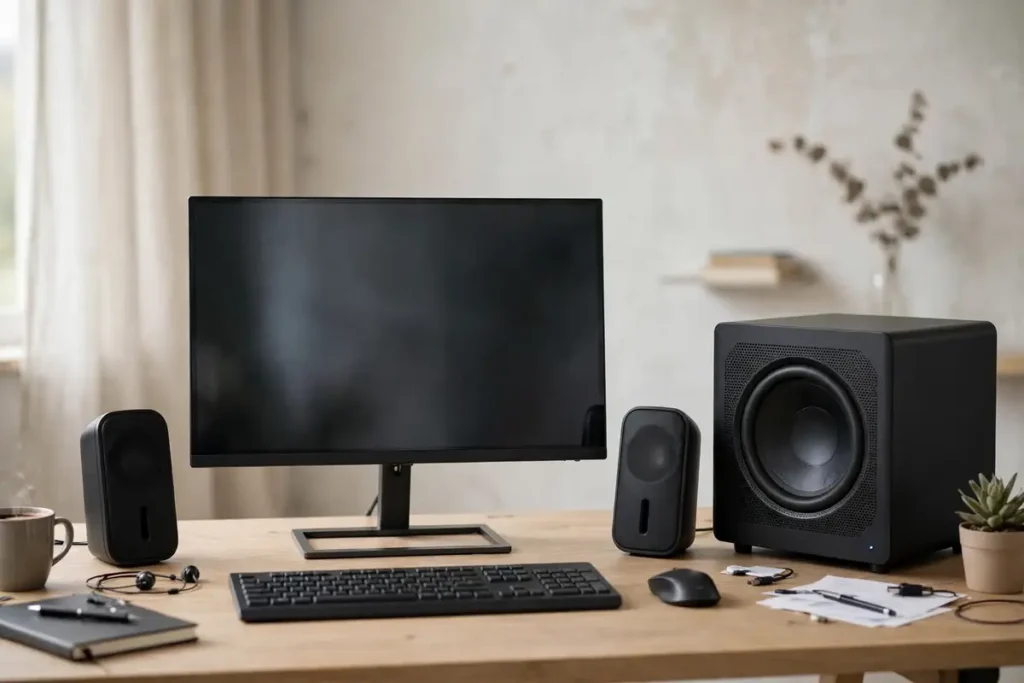
This Logitech Z623 review covers Logitech’s long-running 2.1 desktop speaker system: two satellite speakers and a large powered subwoofer, THX-certified, rated at 200 watts RMS in total. The subwoofer alone accounts for 130 watts of that figure, with 35 watts for each satellite, and the whole system is wired and analogue only. There is no Bluetooth, no optical input and no remote control. What the Z623 offers instead is output and low-end weight that small desktop speakers cannot match, from a design that has stayed on sale because it does one job well. This review judges it on that job: games, films and music at a desk, against the smaller and more modern systems it now shares the shelf with.
A note on method. This is a research review, built from Logitech’s published specifications, the verified Amazon US listing for this exact model, and independent coverage. We have not had a unit on the desk, so nothing here claims hands-on testing, and speaker products on this site carry no scores.
The Z623 remains the desktop 2.1 system to beat for buyers who measure a speaker by impact. The 130-watt subwoofer produces the kind of bass you feel in the desk and the floor, and THX certification means the system was built and tested to a defined standard for output and response rather than a marketing wattage figure alone. Two 3.5mm inputs plus RCA let a PC, a console and a phone stay connected at once. The limits are plain: the satellites use single full-range drivers with no separate tweeters, so top-end detail is softer than on good two-way speakers, and the system is wired only. As the heavyweight option in our best computer speakers coverage, it still earns its place. Check Price on Amazon

Why you: A THX-certified 2.1 system with 200W RMS, a 130W subwoofer and three wired inputs, built for film and game impact at a desk.
Trade-off: Wired only with no Bluetooth or optical input, single-driver satellites give up some top-end detail, and the big subwoofer needs floor space.
Logitech Z623 specifications
| Spec | Logitech Z623 |
|---|---|
| Product | Logitech Z623, 2.1 speaker system with two satellites and a powered subwoofer, Black |
| Power | 200W RMS total (400W peak): 130W subwoofer, 35W per satellite |
| Certification | THX certified |
| Frequency response | 35 Hz to 20 kHz (manufacturer rated) |
| Inputs | Two 3.5mm inputs and one RCA input, up to three devices connected at once; 3.5mm headphone output on the right satellite |
| Controls | Power, volume and bass level on the right satellite; no remote, no Bluetooth |
| Size and weight | Satellites 7.7 x 4.6 x 5.0 inches each; subwoofer 11.2 x 12.0 x 10.5 inches, 15.4 lb |
Sound: built for impact, and honest about the trade
The Z623’s character is set by its power split. Nearly two-thirds of the system’s output sits in the subwoofer, a large front-firing unit in a heavy cabinet that lives on the floor under the desk. Explosions, engines and kick drums arrive with physical weight that no satellite-and-small-sub set can copy, and the dedicated bass dial on the right satellite lets you pull that weight back for late sessions or push it forward for a film. THX certification backs the headline figures: the system was tested against a standard covering output and response, which is more than most desktop speakers at any size can claim.
The trade sits in the satellites. Each one uses a single full-range driver rather than a separate woofer and tweeter, so the top end is smooth rather than sparkling, and fine detail in cymbals, strings and room ambience is softer than on a good two-way pair. At desk distances and for games and films, where dialogue, effects and score dominate, the balance works and the midrange stays clear. For close, critical music listening, a two-way powered pair will show more of the recording. That split explains the Z623’s long life: it was never aimed at the studio desk, and the entertainment desk is a much bigger market. The distinction between a woofer and a subwoofer, covered in our woofer vs subwoofer explainer, is exactly what this system exploits, a true sub handling the bottom so the satellites can stay small.
Setup, controls and the cables to plan for
Setup is analogue and quick. The satellites connect to the subwoofer, the subwoofer connects to the mains, and your sources plug into the subwoofer’s inputs or the satellite’s second 3.5mm socket. With two 3.5mm inputs and one RCA input, a PC, a console and a phone or tablet can stay wired at once, and switching is a matter of pausing one source and playing another rather than swapping cables. A headphone jack on the right satellite covers private listening without reaching behind the machine.
Two practical points deserve space in any honest review. First, the right satellite connects with a thick multi-pin cable that carries its controls, so the distance between the subwoofer and the right satellite is fixed by that cable; measure a wide desk before assuming the layout works. Second, there is no remote and no standby trickery: power, volume and bass are physical controls on the right satellite. Most desk users will find that a virtue, since the controls are always where the hand expects them, but a Z623 used as a small-room TV system will mean walking to the speaker to change volume.
Placement is worth a few minutes. The subwoofer works best on the floor, where the room reinforces its output, and sliding it closer to a corner adds low-end weight without touching the bass dial, which is useful if the system sounds thin at your seat. The satellites want to sit at ear height, angled in toward the listening position, with a clear line to your ears rather than tucked behind a monitor. None of this needs measuring equipment: move the sub a foot, play a familiar scene, and keep the position that sounds fullest at the desk.
Z623 or the newer alternatives?
Logitech sells a near-identical sibling, the Z625, which uses the same drivers and the same power ratings and adds an optical input for a TV or console. If optical is on your list, that model is the one to price against this one; the sound hardware is the same. The wider competition has moved toward compact two-way desktop speakers with USB and Bluetooth, such as the model in our Creative Pebble Nova review, which take far less space and connect to everything. None of them matches the Z623 for low-end output, because none of them carries a 130-watt subwoofer. The choice is size and connections against impact, and our best speakers coverage keeps both kinds on the list for that reason.
Who should buy the Logitech Z623
Buy the Z623 if your desk is an entertainment station first: games, films and bass-heavy music, with wired sources that stay put, and floor space under the desk for a subwoofer the size of a small cabinet. It is also the right pick for a small room that wants film impact without a soundbar or receiver.
Skip it if you need Bluetooth or optical, if your listening is close and analytical, or if your desk cannot give the satellites a clear line to your ears and the floor cannot take the sub. Compact modern pairs serve those desks better, even though they give up the Z623’s low-end weight.
Frequently asked questions
Does the Logitech Z623 have Bluetooth?
No. The Z623 is wired only, with two 3.5mm inputs and one RCA input. A phone or tablet connects by cable, or through a separate Bluetooth receiver plugged into one of the inputs.
What does THX certification mean on the Z623?
It means the system was built and tested to THX’s standard for output and frequency response for its class. It is a measured performance claim, not surround decoding: the Z623 plays stereo from its 2.1 layout.
Can the Logitech Z623 connect to a TV?
Yes, by cable. Use the RCA input or a 3.5mm cable from the TV’s headphone or analogue output. There is no optical or HDMI input, so TVs with only an optical output need the Z625 or a converter.
How is the Z623 different from the Z625?
The two systems share the same drivers, power ratings and THX certification. The Z625 adds an optical TOSLINK input. Sound hardware is otherwise the same, so the choice comes down to that one input.
Does the Z623 have a headphone jack?
Yes. A 3.5mm headphone output sits on the right satellite, next to the volume and bass controls, so headphones plug in at the desk without reaching the subwoofer or the PC.

I am the founder of Sound Mavericks, where I provide the polite truth about audio equipment. I started this site because consumer electronics reviews are often too technical. Instead of using a silent lab, I test headphones, earbuds, and Bluetooth speakers in the real world – like on a noisy subway or in a busy coffee shop.
To stay independent, I buy my own review units (mostly from the United States) rather than accepting free gifts from brands. Once I finish testing a product, I sell it locally to our community. My goal is to help you understand sound quality, active noise cancellation (ANC), and battery life without the marketing hype.