With the 3.5mm headphone jack gone from nearly every modern phone, the tiny dongle in your pocket is doing far more work than it looks. The USB-C vs Lightning headphone adapter debate isn’t really about the shape of the plug — it’s about the DAC hidden inside each one, which phones each adapter fits, and which one keeps your music, calls, and wired headphones working properly. We dug through lab measurements, compatibility lists, and real-world quirks so you can stop guessing and just pick the right one.
Quick Verdict: Which Adapter Should You Get?
SoundMavericks’ take: sound quality is not the deciding factor — both official adapters measure well enough that no one can reliably hear the difference. The right adapter is simply the one that matches your phone’s port. iPhone 14 or older? Get the Lightning adapter. iPhone 15 or newer, or any Android? Get the USB-C adapter. Everything else in this article is the detail behind that one sentence — including the traps (passive USB-C adapters, EU volume limits) worth knowing before you buy.
How USB-C and Lightning Headphone Adapters Actually Work
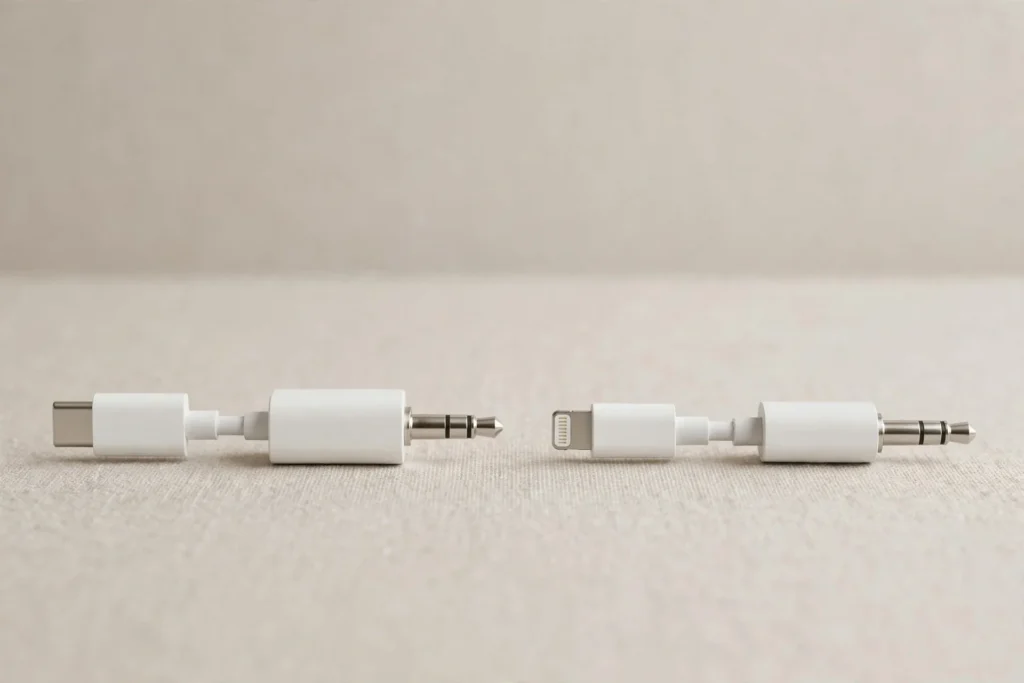
Both USB-C and Lightning ports output digital audio, while your wired headphones need an analog signal. That means every one of these adapters contains a miniature digital-to-analog converter (DAC) and a small amplifier crammed into the plug housing. The DAC’s quality — not the connector shape — is what determines how clean and loud the sound is.
This is also where USB-C has a genuine trap: some cheap third-party USB-C “adapters” are passive, meaning they contain no DAC at all and only work with phones that still output analog audio over USB-C. If your phone doesn’t, a passive adapter simply produces silence. Apple’s own USB-C and Lightning adapters are both active — they include their own DAC — which is why they work universally.
USB-C vs Lightning Headphone Adapter: Side-by-Side Comparison
| Feature | USB-C to 3.5mm Adapter | Lightning to 3.5mm Adapter |
|---|---|---|
| Connector | USB-C (reversible, universal standard) | Lightning (Apple proprietary) |
| Built-in DAC | Yes, active DAC in official adapters | Yes, active DAC (Apple model A1749) |
| Audio support | Up to 24-bit/48kHz on Apple adapter | Up to 24-bit/48kHz |
| Works with | iPhone 15 and newer, iPad Pro/Air/mini (USB-C), Android phones, laptops | iPhone 14 series and older, Lightning iPads |
| Mic & calls | Supported on genuine/active adapters | Supported on genuine/MFi adapters |
| Inline remote controls | Supported (volume/play/pause) | Supported (volume/play/pause) |
| Charge while listening | No (needs a splitter hub) | No (needs a splitter adapter) |
| Third-party options | Wide choice; watch out for passive (no-DAC) models | Smaller choice; MFi-certified ones are safest |
| Future-proofing | Yes — the industry standard going forward | Legacy — only for older Apple devices |
Sound Quality: Is There a Real Difference?
Here is our honest finding: no meaningful one. Lab measurements published by the Audio Science Review community put Apple’s USB-C adapter at roughly 0.001% THD+N with excellent channel separation — essentially transparent for everyday listening. The Lightning adapter (model A1749) uses an identical audio architecture and measures negligibly differently; in some community tests the Lightning variant even measured marginally cleaner. Google’s USB-C adapter, for comparison, measured slightly worse (around 0.006% THD+N), and Samsung’s bundled adapters showed higher output impedance that can shift the frequency response of sensitive earphones.
One real-world caveat: EU versions of Apple’s adapters are volume-limited to comply with regional loudness regulations (roughly 0.9V output on mobile devices), so an EU-bought adapter may play quieter than a US one. On non-mobile devices such as laptops, the full 1V output is typically unlocked.
The bottom line on sound: both support 24-bit/48kHz audio, both are audibly transparent with efficient headphones and IEMs, and neither will bottleneck a lossless file in any way you could hear. If you want genuinely better sound, the upgrade path isn’t switching connectors — it’s a dedicated portable DAC, which we cover below.
Compatibility: Which Adapter Fits Your Phone?
This is the entire decision in one list:
- iPhone 15, 16, or newer — USB-C port. Use the USB-C adapter. A Lightning adapter physically cannot plug in.
- iPhone 14, 13, 12, 11, X, 8, 7 — Lightning port. Use the Lightning adapter.
- Android phones — virtually all use USB-C now. Use the USB-C adapter (active, with DAC — not a passive cable).
- iPads — check the port: iPad Pro, newer Air and mini are USB-C; older base iPads are Lightning.
There is no cross-compatibility hack worth buying: USB-C-to-Lightning audio chains introduce extra connections and failure points, so just buy the adapter that matches your device.
Microphone, Calls and Inline Controls
Both official adapters fully support wired headphone microphones, phone calls, and inline remotes (volume up/down, play/pause). This is exactly where cheap uncertified adapters fall apart — a common failure mode is music playing fine while the mic and call audio simply don’t work, or the adapter dying after an iOS update. For calls specifically, note that wired audio still beats Bluetooth for voice clarity, which is one more reason these adapters remain relevant for our call-focused picks.
Battery Drain and the No-Charging-While-Listening Problem
Because the DAC is active, it draws a small amount of power from your phone whenever connected. The draw is minimal — negligible impact on battery life in practice. The bigger practical limitation: you can’t charge and listen at the same time with a single-purpose adapter. If that matters to you, look for a USB-C hub with audio passthrough (USB-C side only) or a Lightning splitter — just know those multi-function gadgets sometimes trade a little audio purity for convenience.
When Should You Upgrade to a Dedicated DAC or Amp?
The bundled-style adapters are tuned for efficient headphones and IEMs. If you own hard-to-drive headphones — high impedance or low sensitivity — the tiny amp inside a dongle runs out of headroom, and you’ll get thin sound at max volume. That’s the signal to step up to a portable DAC/amp from brands like FiiO or iFi, which deliver more power, lower noise, and proper high-resolution support. Our impedance explainer covers exactly when an amp becomes necessary, and our sound quality guide walks through the rest of the chain.
The SoundMavericks Verdict
USB-C vs Lightning headphone adapter comes down to one rule: match your phone’s port. Sound quality between the two official adapters is effectively identical, features are identical, and the only meaningful differences are compatibility and future-proofing — USB-C wins the future, Lightning serves the older iPhone fleet. Buy the official or a certified active adapter, avoid passive USB-C cables, and spend any leftover budget on better wired earbuds — that’s where you’ll actually hear the difference.
USB-C vs Lightning Adapter: Frequently Asked Questions
Does using a USB-C or Lightning adapter reduce sound quality compared to a built-in headphone jack?
No. Both adapters contain high-quality DACs that measure as well as or better than most built-in phone headphone outputs. With efficient headphones, you will not hear a difference versus a native 3.5mm jack.
Can I use a Lightning headphone adapter on an iPhone 15 or newer?
No. The iPhone 15 and newer use USB-C, so a Lightning adapter physically won’t connect. You need the USB-C to 3.5mm adapter instead.
Can I use a USB-C adapter on an older iPhone with a Lightning port?
Not directly. The connectors are incompatible, and daisy-chaining converters isn’t reliable for audio. Buy the adapter that matches your phone’s port.
Why is my USB-C adapter silent or extremely quiet on my Android phone?
You probably bought a passive adapter — one with no DAC inside. Passive adapters only work on the few phones that still output analog audio over USB-C. Replace it with an active (DAC-equipped) USB-C adapter and it will work.
Do these adapters support the microphone and inline controls for calls?
Yes, genuine and certified adapters fully support the headphone mic, calls, and inline volume/play controls. Cheap uncertified adapters are the ones that commonly fail at mic and call support.
Can I charge my phone while using the headphone adapter?
Not with a standard single-purpose adapter — the port is occupied. You’ll need a splitter: a USB-C hub with audio passthrough for USB-C phones, or a Lightning audio-plus-charging splitter for older iPhones.
Is it worth upgrading from the dongle to a dedicated portable DAC?
For efficient earbuds and easy-to-drive headphones, no — the difference is negligible. For demanding, high-impedance headphones, yes: a dedicated DAC/amp delivers noticeably more power and headroom. See our impedance guide linked above to check whether your headphones qualify.

I am the founder of Sound Mavericks, where I provide the polite truth about audio equipment. I started this site because consumer electronics reviews are often too technical. Instead of using a silent lab, I test headphones, earbuds, and Bluetooth speakers in the real world – like on a noisy subway or in a busy coffee shop.
To stay independent, I buy my own review units (mostly from the United States) rather than accepting free gifts from brands. Once I finish testing a product, I sell it locally to our community. My goal is to help you understand sound quality, active noise cancellation (ANC), and battery life without the marketing hype.