Type “how to choose right pair headphones” into a search box and you get a wall of product lists. Lists are the last step, not the first. The order below works because each decision removes a chunk of the market before the next one starts: use case first, then shape, then noise cancelling, then sound, then fit, then battery, then budget. By the end you should have two finalists, not twenty tabs.
Step 1: Start from the main use case, not the product
Write down where the headphones will spend most of their hours. A commute and flights reward noise cancelling and battery. A desk job with calls rewards microphone quality and multipoint. Exercise rewards a secure fit and sweat resistance. Gaming rewards low latency. Focused listening at home rewards sound above everything. One honest main use case reorders every priority in the steps that follow, and it stops you paying for features your routine never touches.
Step 2: Pick the form factor
Four shapes cover the market. In-ears are the smallest and isolate well, but they live inside your ear canal. Over-ears spread the load around the ear, sound biggest and run hottest on a summer commute. On-ears sit between the two on size and isolation. Open-ears rest outside the canal, keep you aware of traffic and cost you bass and privacy. Glasses wearers usually get on better with in-ears or a light over-ear with soft clamp. Our explainer on in-ear vs earbuds vs over-ear headphone styles works through the trade-offs in full.
Step 3: Decide whether you need noise cancelling
Noise cancelling earns its keep against steady low noise: aircraft cabins, trains, air conditioning, office hum. It does much less against voices and sudden sounds. If your listening happens in quiet rooms, passive isolation from a good seal costs nothing and adds no battery drain. If you do need cancelling, transparency quality matters as much as the cancelling itself, because you will use it every time someone speaks to you. The dedicated guide on how to choose the best noise cancelling headphones goes deeper on adaptive versus fixed systems.
Step 4: Match the codecs to your phone
Codec support only matters when the phone and the headphones agree. iPhone listeners are on AAC whatever they buy. On Android, LDAC and aptX can carry more data, but only when both ends support them, and the gain shows mainly with good source files in quiet rooms. Buying a headphone for a codec your phone cannot send is wasted money. Our explainer on Bluetooth codecs explained: AAC vs LDAC vs aptX sets out what each codec actually changes.
Step 5: Fit, comfort and durability
For in-ears, tip fit decides both comfort and bass: budget time to try every tip size in the box. For over-ears, weight and clamp force decide whether hour three feels like hour one; anything much past 300 grams needs good padding to stay comfortable. If the headphones will see sweat or rain, look for an IP rating, IPX4 or better for workouts. Comfort is the spec people skip, and the reason headphones end up in a drawer.
Step 6: Battery and daily-life features
Read battery figures in the right unit. Earbuds quote hours per charge plus the case total; over-ears quote a single charge, and the honest figure is the one with noise cancelling on. Multipoint, the ability to stay connected to a phone and a laptop at once, is the feature remote workers feel most. Wireless charging is a small convenience that matters if your desk already has a pad. None of these show up in a sound test, and all of them shape daily use.
Step 7: Set a budget tier and look at what it buys
Budget tiers buy specific things. The entry tier buys solid sound and long battery with basic cancelling. The middle tier buys stronger cancelling, better microphones and multipoint. The flagship tier buys the best cancelling available, better materials and the codec list filled out. What it never buys is a guarantee: a well-chosen set one tier down beats a careless pick at the top. The three worked examples below show the spread, each scored on our six-bar scale.
At the flagship end for over-ears, this is the shape of the purchase:

Sony WH-1000XM5 8.8/10
Why you: you want the strongest all-round package: top-tier cancelling, clear calls and a light frame that stays comfortable through long days.
Trade-off: the headband does not fold flat, so the carry case is bulky, and bass needs the equalizer if you like it heavy.
30 h battery (ANC on) · LDAC · 250 g · Multipoint
The flagship tier in an in-ear fit looks like this:
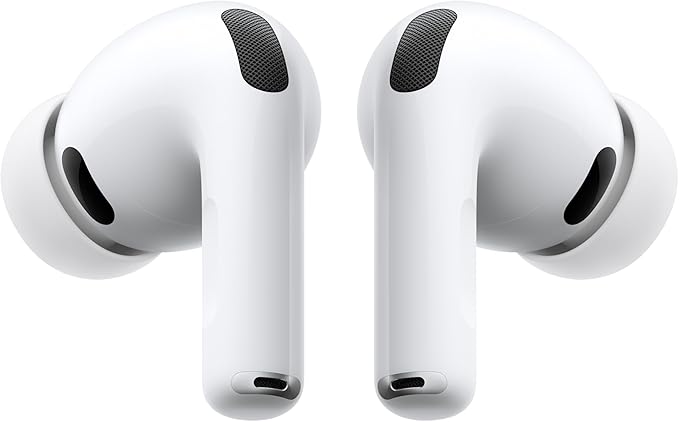
Apple AirPods Pro 3 8.9/10
Why you: you live in the Apple ecosystem and want flagship cancelling in an in-ear fit, with the strongest comfort score of the three examples here.
Trade-off: the value score is the lowest of the three examples, and Android listeners miss features and get no LDAC.
H2 chip · Adaptive ANC · Wireless charging case
And this is how much of the package the budget tier keeps:

QCY H6 Ultra 8.6/10
Why you: you want over-ear cancelling on a budget: the battery score leads this whole page and the value score is the highest of the three examples.
Trade-off: sound and call quality sit a step below the flagships, and the codec list is basic.
Up to 100 h playback (ANC off) · Over-ear ANC · Budget tier
Step 8: Wired or wireless
One short section, because the answer is usually settled by Step 1. Wired means zero latency, no battery to manage and no codec ceiling, which is why studio and competitive gaming picks still plug in. Wireless wins everywhere convenience matters: commuting, calls, moving around a desk. Some models do both, and a wired fallback is worth having for flights and flat batteries.
Step 9: Build a shortlist of two
End the process with two finalists, not a ranking of ten. Fix the form factor from Step 2 and the tier from Step 7, and let those two filters leave you a pair of candidates. Then read the dedicated review of each finalist and check the trade-off lines against your Step 1 use case. If both still fit, choose on comfort: it is the factor you will feel every day, long after the spec differences fade.
Frequently asked questions
What matters most when choosing headphones?
The main use case. It decides the form factor, whether noise cancelling is worth paying for and which features matter. Every later step is a filter on top of that first decision.
Should I buy in-ear or over-ear headphones?
In-ears for travel, exercise and small bags. Over-ears for long sessions, bigger sound and easier comfort over hours. On-ears split the difference and suit shorter listening sessions.
Do I need LDAC or aptX?
Only if your phone supports them and you listen to high-quality files in quiet places. iPhones use AAC with every headphone. On Android, check the phone’s codec list before paying for a headphone because of one.
Is noise cancelling worth it?
For flights, trains and open offices, yes: it removes steady low noise better than anything else. For quiet homes and voice-heavy environments, a good seal gets you most of the benefit at no cost.
How many models should I shortlist?
Two. Fix the form factor and the budget tier first; those filters should leave a pair of finalists. Comparing two trade-off lists is a decision. Comparing ten is a hobby.

I am the founder of Sound Mavericks, where I provide the polite truth about audio equipment. I started this site because consumer electronics reviews are often too technical. Instead of using a silent lab, I test headphones, earbuds, and Bluetooth speakers in the real world – like on a noisy subway or in a busy coffee shop.
To stay independent, I buy my own review units (mostly from the United States) rather than accepting free gifts from brands. Once I finish testing a product, I sell it locally to our community. My goal is to help you understand sound quality, active noise cancellation (ANC), and battery life without the marketing hype.