The best earbuds for PC gaming are the SteelSeries Arctis GameBuds, and the reason is a number rather than a feature list: latency. Plain Bluetooth adds roughly 150 to 250 milliseconds of delay depending on codec, which puts gunshots and footsteps audibly behind the action in a fast game. Every pick in this roundup avoids that problem with a dedicated 2.4 GHz USB dongle that brings delay down to gaming levels, Sony quoting under 30 ms for the INZONE Buds. If a model only offers Bluetooth and a gaming mode, it is not in this list, because on a PC that is a compromise rather than a fix.
The ranking is research-based, from manufacturer specifications, Amazon listing data and published review consensus. Latency figures are makers’ claims, stated as such, not our measurements.

SteelSeries Arctis GameBuds 8.3/10
Why you: you play on PC and want dongle latency for games plus Bluetooth for your phone, with per-game EQ presets in the SteelSeries software.
Trade-off: buy the right version, because Xbox support needs the Xbox edition of the dongle while the PlayStation edition covers PC and PS5.
2.4 GHz USB-C dongle · Bluetooth 5.3 · ANC · IP55 · 10 h buds, 40 h with case
Why plain Bluetooth is too slow for PC gaming
Bluetooth audio was designed for music, where a quarter-second of buffering is invisible. In a game it is not. A standard SBC Bluetooth connection typically runs 200 ms or more end to end, AAC on PC is in a similar range, and even aptX Low Latency, which few PCs support natively, only gets to about 40 ms. At 200 ms, a footstep sounds after the enemy has rounded the corner, and dialogue visibly misses the lips. A 2.4 GHz dongle bypasses the Bluetooth audio stack entirely: the earbuds talk to a dedicated USB receiver on a link the maker controls, and quoted figures land under 30 to 40 ms, close enough to wired that most players stop noticing delay at all.
Gaming modes on ordinary Bluetooth earbuds sit in between. They shorten buffers and can bring delay down, but published measurements of well-known models still land in the 150 to 250 ms range in game mode, which is why this roundup treats Bluetooth-only models as casual-play options rather than PC gaming picks. If your games are turn-based or single-player and story-driven, that delay may not bother you. For competitive shooters, rhythm games and fighting games, the dongle is the purchase.
The picks at a glance
| Product | Low-latency link | Battery (buds / total) | Check Price |
|---|---|---|---|
| SteelSeries Arctis GameBuds | 2.4 GHz USB-C dongle + Bluetooth 5.3 | 10 h / 40 h | Check Price |
 Sony INZONE Buds | 2.4 GHz USB-C dongle, under 30 ms claimed | 12 h / 24 h | Check Price |
 ASUS ROG Cetra True Wireless SpeedNova | 2.4 GHz SpeedNova dongle + Bluetooth 5.3 | Up to 46 h total in Bluetooth mode | Check Price |
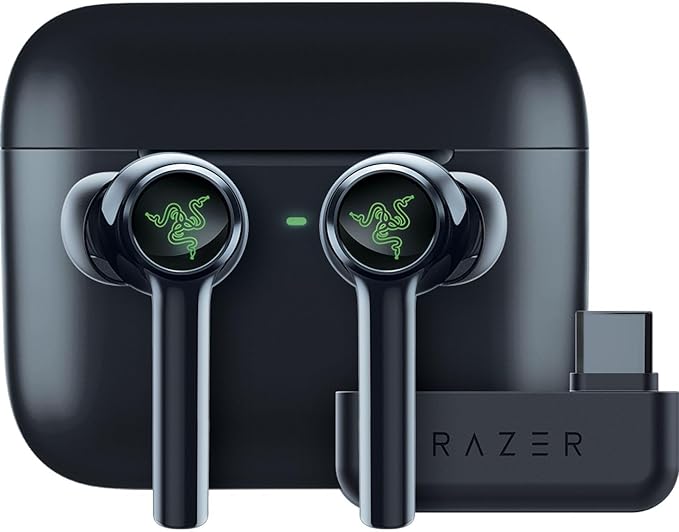 Razer Hammerhead Pro HyperSpeed | HyperSpeed 2.4 GHz dongle + Bluetooth 5.3 | Up to 30 h total | Check Price |
 JBL Quantum TWS | 2.4 GHz USB-C dongle + Bluetooth | 8 h / 24 h | Check Price |
Best overall: SteelSeries Arctis GameBuds
The GameBuds lead because they treat the PC as the main platform instead of an afterthought. The L-shaped USB-C dongle stores in the case, plugs into a PC, PS5, Switch or handheld, and carries the low-latency 2.4 GHz link; a triple press on the earbud quick-switches to Bluetooth 5.3 for a phone. On the PC side, SteelSeries GG and Sonar give you a large library of per-game EQ presets, which in practice means footstep-focused profiles for shooters without hand-tuning an equaliser. Four-mic hybrid ANC, an IP55 rating and a Qi wireless charging case round out a package with no obvious hole in it.
Battery is rated at up to 10 hours per charge and 40 hours with the case, the strongest total figure in this list, and the fit borrows from Jabra-style earbud shapes that sit securely without a wing or a hook. The one buying decision to get right is the version: the PlayStation edition linked here covers PC, PS5, Switch and mobile, while Xbox players need the Xbox edition with its different dongle. On a PC both editions behave the same, so buy for the console you own, not the desk.
Best for long sessions: Sony INZONE Buds
Sony INZONE Buds 8.4/10
Why you: you play long PC or PS5 sessions and want the longest single-charge battery here plus Sony’s quoted sub-30 ms dongle link.
Trade-off: there is no Bluetooth Classic at all; away from the dongle, the buds speak LE Audio only, which most phones still handle poorly and iPhones not at all.
2.4 GHz USB-C dongle · Under 30 ms claimed · LE Audio (LC3) · ANC · 12 h buds, 24 h with case
Sony built the INZONE Buds with Fnatic’s input and around one job: competitive play at a PC or PS5. The USB-C transceiver has a PC/PS5 switch on it, Sony quotes latency under 30 ms on that link, and the 8.4 mm driver is the same Dynamic Driver X unit family used in the WF-1000XM5, so game audio and music both hold up. Battery is the headline after latency: up to 12 hours on the dongle connection per charge, the longest single-charge figure in this roundup, with 24 hours including the case. The INZONE Hub software on PC handles EQ, spatial sound profiles and mic settings, including AI noise reduction for voice chat.
The caveat in the card is structural, not a detail. Sony states plainly in the listing that the INZONE Buds support the 2.4 GHz dongle and Bluetooth LE Audio with the LC3 codec only; SBC, AAC and LDAC are not supported, and LE Audio does not work with iPhone or iPad. As a desk-bound gaming bud that lives next to its dongle, that is a fair trade. As your only earbuds for phone and PC, it is the wrong buy, and the GameBuds above exist for exactly that reader.
Best sound quality: ASUS ROG Cetra True Wireless SpeedNova
ASUS ROG Cetra True Wireless SpeedNova 8.2/10
Why you: you care how games and music actually sound, and want hi-res 24-bit/96 kHz audio over the dongle plus Dirac tuning.
Trade-off: the 46-hour battery figure is for Bluetooth mode; dongle play drains the buds faster, and the fit runs large for smaller ears.
2.4 GHz SpeedNova + Bluetooth 5.3 · Adaptive ANC · Bone-conduction AI mic · IPX4 · 46 h total (Bluetooth mode)
ASUS gave the Cetra SpeedNova the audio budget the others spent elsewhere. ROG SpeedNova is its 2.4 GHz link, and over it the buds carry 24-bit/96 kHz audio, with Dirac Opteo tuning on top, which makes this the best-sounding pick in the list for both games and music. Adaptive ANC adjusts to your surroundings, and the microphone system pairs a bone-conduction sensor with AI noise reduction, a combination aimed at keeping your voice intelligible when a room gets loud. Bluetooth 5.3 covers phone duty, and ASUS rates total battery at up to 46 hours in Bluetooth mode.
Read that battery figure the way the card flags it: dongle mode is the power-hungry one, so treat 46 hours as the Bluetooth ceiling and expect notably less per charge while gaming on the receiver. The buds are also on the larger side. Neither point dents the recommendation for a PC-first player who values sound, and ROG Ally and handheld PC owners get a dongle that fits their machines without an adapter.
Best for multi-platform players: Razer Hammerhead Pro HyperSpeed
Razer Hammerhead Pro HyperSpeed 8.0/10
Why you: you split time between a PC, a console and a phone, and want one pair that follows you across all three with adjustable ANC.
Trade-off: the dongle has no storage slot in the case, which is an odd miss on a product built around its dongle, and battery life is mid-pack.
HyperSpeed 2.4 GHz dongle · Bluetooth 5.3 · Adjustable ANC · THX Spatial Audio · 30 h total · Wireless charging case
Razer’s Pro HyperSpeed is the generalist of the group. The HyperSpeed USB-C dongle handles PC, PlayStation and Switch at gaming latency, Bluetooth 5.3 covers the phone, and Razer lets the two links coexist, with a do-not-disturb setting that keeps phone alerts out of a match. ANC is adjustable rather than fixed, which suits players who move between a quiet room and a shared house, and THX Spatial Audio is available for supported content. The case charges wirelessly and total battery is rated up to 30 hours.
Two practical notes. The Chroma RGB lighting is cosmetic and costs battery if you leave it on. And as the card says, the dongle does not store in the case, so travelling players need a plan for a small, losable USB-C stick. Razer’s own app support on PC is also thinner for this model than SteelSeries’ GG is for the GameBuds. None of that stops it being the most flexible single purchase here for a three-device household.
Best value dongle pick: JBL Quantum TWS
JBL Quantum TWS 7.7/10
Why you: you want a proper 2.4 GHz dongle connection for PC gaming at the lowest cost in this roundup, with a dongle that stores inside the case.
Trade-off: it is an older model, so battery life and ANC trail the newer picks, and QuantumSURROUND needs JBL’s PC software to work.
2.4 GHz USB-C dongle · Bluetooth · Dual Source · Adaptive ANC · 8 h buds, 24 h with case
The Quantum TWS is the oldest design here and usually the cheapest way into dongle gaming. The USB-C receiver stores inside the charging case, which the Razer above should learn from, and JBL Dual Source lets you answer a phone call over Bluetooth without leaving the dongle connection behind, then drop back into the game. On PC, QuantumENGINE software adds QuantumSURROUND processing and EQ. Adaptive ANC and six beamforming mics cover calls and chat. Battery, at up to 8 hours per charge and 24 hours total, is the clearest sign of its age, and players with long sessions should look at the INZONE Buds instead. For a first dongle setup or a second machine, the value case is strong.
Where these picks do not fit
Three neighbouring questions come up often enough to answer directly. If your PC use is mainly work calls and general listening rather than games, our guide to the best Bluetooth earbuds for PC covers that ground without the gaming premium. If the budget is capped, our best gaming earbuds in the under-$100 tier roundup works that band, where some picks rely on gaming modes rather than dongles, with the latency trade stated per model. And if your problem is voice chat specifically, our best Bluetooth earbuds for Discord picks look at mic quality and Discord’s own audio settings, which cause more trouble than any earbud on this page.
FAQ
Can I use normal Bluetooth earbuds for PC gaming?
You can, and for slow or story-driven games many players do. The cost is latency: standard Bluetooth connections typically add 150 to 250 ms of delay, which is obvious in shooters, rhythm games and fighting games. For competitive play, a 2.4 GHz USB dongle or a wired connection is the fix.
How much latency does a 2.4 GHz dongle have?
Far less than Bluetooth. Makers quote figures such as under 30 ms for Sony’s INZONE Buds dongle link, and dongle connections generally land in the under-40 ms range. Those are manufacturer claims rather than independent measurements, but the gap to Bluetooth is large enough that the ranking does not depend on the exact number.
Do gaming earbud dongles work on any PC?
The dongles in this list are USB-C and plug-and-play on Windows PCs, with software from SteelSeries, Sony, ASUS, Razer or JBL adding EQ and settings. A desktop with only USB-A ports needs a USB-C to USB-A adapter, and some models include one. Check the version before buying for consoles: Xbox needs specifically licensed dongles.
Can I use the microphone over the dongle connection?
Yes. Unlike Bluetooth’s hands-free profile, which drops audio quality when the mic opens, a 2.4 GHz dongle carries game audio and your voice at full quality at the same time. That is a second, quieter reason dongle earbuds beat Bluetooth earbuds for PC gaming with voice chat.
Are gaming earbuds good for music?
The better ones are. The ROG Cetra SpeedNova carries 24-bit/96 kHz audio over its dongle, and the INZONE Buds use a driver from Sony’s flagship music line. Expect a game-tuned sound signature with strong bass out of the box; EQ in each maker’s app can flatten it for music.
Verdict
Buy the dongle, not the gaming label. The SteelSeries Arctis GameBuds are the default recommendation for PC players because the whole package, latency, software, battery and fit, has no weak point. The Sony INZONE Buds are the long-session and low-latency specialist pick, as long as the LE Audio-only limitation does not touch your setup. The ROG Cetra SpeedNova sounds best, the Razer Hammerhead Pro HyperSpeed travels between platforms most easily, and the JBL Quantum TWS proves the entry price for proper low-latency PC audio is lower than the flagship marketing suggests.

I am the founder of Sound Mavericks, where I provide the polite truth about audio equipment. I started this site because consumer electronics reviews are often too technical. Instead of using a silent lab, I test headphones, earbuds, and Bluetooth speakers in the real world – like on a noisy subway or in a busy coffee shop.
To stay independent, I buy my own review units (mostly from the United States) rather than accepting free gifts from brands. Once I finish testing a product, I sell it locally to our community. My goal is to help you understand sound quality, active noise cancellation (ANC), and battery life without the marketing hype.