Most earbud roundups rank sound quality first and treat the laptop as an afterthought. A PC asks different things of a pair of earbuds. Your voice has to survive Windows call handling, the connection has to stay put through an eight-hour workday, and a delay that is invisible in a song becomes obvious when a character’s lips move out of sync in a video. The five picks below were chosen for computer use first: call quality in meetings, multipoint between a laptop and a phone, latency, and in two cases a USB dongle that sidesteps your laptop’s Bluetooth radio entirely.
This is a research-based roundup. The picks come from manufacturer specifications, platform certifications and published review measurements, not from hands-on testing in our office. Where a number is a manufacturer’s claim, the copy says so.
Built for the laptop first. A pre-paired USB dongle, Microsoft Teams certification and the strongest call mics in this group make it the safest buy for anyone whose workday runs through meetings.
The Short List
| Product | Best for | PC connection | Buy |
|---|---|---|---|
| Jabra Evolve2 Buds | Meetings and calls | USB dongle + Bluetooth multipoint | Check Price |
| Logitech Zone True Wireless | Plug-and-play work setups | USB-A receiver + Bluetooth multipoint | Check Price |
| Sony WF-1000XM5 | Sound and noise cancelling | Bluetooth multipoint, no dongle | Check Price |
| ASUS ROG Cetra True Wireless SpeedNova | PC gaming, low latency | 2.4 GHz USB-C dongle + Bluetooth | Check Price |
| EarFun Air Pro 4 | A tight budget | Bluetooth multipoint, no dongle | Check Price |
What Actually Matters on a PC
The microphone problem is a Windows problem
Plain Bluetooth splits audio into two profiles. One carries stereo music to the buds. The other, used the moment a microphone opens in Zoom, Teams or Discord, squeezes both directions into a low-bandwidth channel that was designed for phone calls. That is why earbuds that sound rich in Spotify turn thin and distant as soon as a meeting starts, and why your voice arrives muffled at the other end. No codec setting fixes it, because the limit sits in the profile itself. The workarounds in this list are hardware: a USB dongle with its own radio link (Jabra, Logitech, ASUS), or microphone arrays and processing strong enough to stay clear inside the narrow channel (Sony, EarFun).
A dongle does more than pair faster
A bundled receiver arrives pre-paired, shows up in Windows as a plain USB audio device, and keeps working on machines where Bluetooth is disabled by policy, broken by a driver update, or simply weak. Certified dongles also carry the meeting controls with them: answer, mute and volume from the bud, registered properly in Teams or Zoom. If your laptop is a work machine you do not administer, a dongle is often the difference between earbuds that work and earbuds you fight. If you are pairing consumer buds to a personal machine, our guide on how to pair earbuds to a PC covers the Windows and macOS steps.
Latency: fine for films, rough for games
Standard Bluetooth audio delay sits around 150 to 250 milliseconds depending on codec and device. Video apps compensate by delaying the picture, so films and YouTube look fine. Games cannot compensate, and neither can a video call. For competitive play on a PC, a 2.4 GHz dongle connection such as the ROG Cetra’s is the only wireless route in this list that feels close to wired. LE Audio with the LC3 codec lowers Bluetooth latency on paper, and Windows 11 has begun supporting it, but both the laptop’s Bluetooth radio and the earbuds need to support it, and most combinations people own today do not.
Multipoint is the feature you will use daily
Every pick here connects to two devices at once. Park the buds on your laptop for the workday and they still catch a call from the phone in your pocket, then return to the laptop when the call ends. Four of the five do this over Bluetooth. The ROG Cetra does a hybrid version: dongle in the PC, Bluetooth to the phone, both live at the same time.
1. Jabra Evolve2 Buds: Best for Meetings and Calls
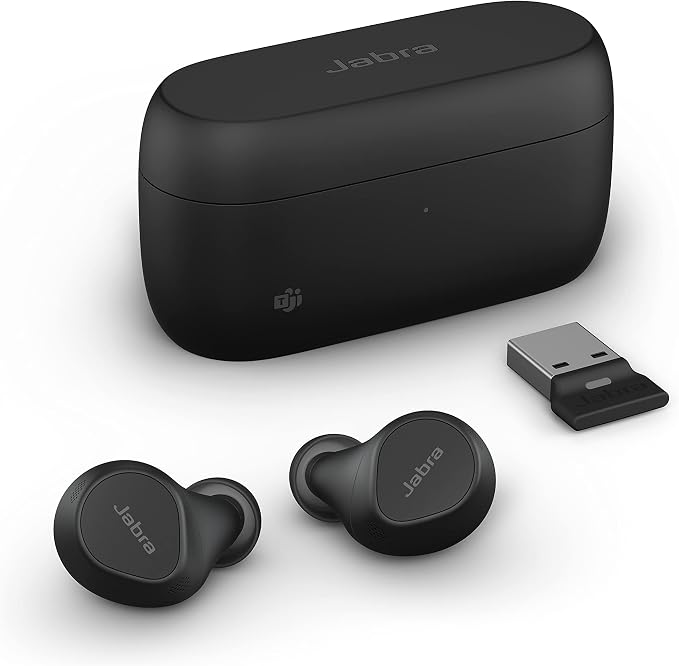
The Jabra Evolve2 Buds start from the opposite end to most earbuds. Jabra built them for laptop calls and treated music as the second job. The case carries a USB dongle that is already paired to the buds, so a new work laptop is a ten-second setup: plug in the dongle, open the case, join the meeting. This listing is the Microsoft Teams certified version, and the certification is practical, not decorative. Call controls on the buds talk to Teams directly, including mute state, so the app and the buds always agree on your mute status.
Call quality is the reason to pay Jabra money. MultiSensor Voice combines four microphones with a bone-conduction sensor that picks up the vibration of your jaw, which gives the processing a clean reference for your voice in a noisy room. Published call tests consistently put the Evolve2 Buds at or near the top of the earbud class for voice pickup in wind and office noise. Adjustable ANC handles the listening side, and multipoint covers the laptop plus one phone across two connections in total, the dongle counting as one of them.
The trade-offs are real. Sound tuning favors voice clarity over bass weight, and music listeners who want a warm, full low end will find the Sony below more enjoyable. Battery is rated at 8 hours per charge with ANC on and 33 hours with the case, which is enough for a week of meetings but unremarkable for music. The buds are IP57 rated, so rain and a dusty desk drawer are non-issues.
- Connection: Bluetooth 5.2 multipoint plus pre-paired USB dongle
- Certified for Microsoft Teams; works with Zoom and other meeting apps
- Battery: 8 hours per charge (ANC on), 33 hours total with case
- Wireless charging case, IP57 buds
2. Logitech Zone True Wireless: Best Plug-and-Play Receiver Pick

The Logitech Zone True Wireless takes the same dongle logic as the Jabra and wraps it in Logitech’s meeting software. The box includes a USB-A receiver and a USB-C adapter, and the buds hold connections to the receiver and a phone at the same time. Certification covers Microsoft Teams, Zoom and Google Meet, and the Logi Tune app adds EQ, mic sidetone and headset settings that IT departments can also manage at scale. This listing is the Rose finish; the hardware is identical across colors.
Hybrid ANC and a three-microphone array per bud keep calls clear, and reviewers have generally rated its noise cancelling a step behind the Evolve2 Buds while rating its fit and finish highly. Talk time is the honest weakness. Logitech rates around 6 hours of talk time with ANC on, and listening time at up to 9 hours with ANC off, so a day of back-to-back calls will need a case top-up at lunch. The case charges over USB-C or Qi wireless.
Buy it if your priority is a receiver-based setup that behaves like office equipment and stays out of your way. Skip it if your day is mostly music with the occasional call; the Sony below serves that pattern better. Readers comparing over-ear options for the same job should also see our guide to the best headphones for online meetings, where boom mics still hold an edge for all-day calling.
- Connection: USB-A receiver (USB-C adapter included) plus Bluetooth multipoint
- Certified for Teams, Zoom and Google Meet; Logi Tune app support
- Battery: about 6 hours talk time (ANC on), up to 9 hours listening (ANC off)
- Qi wireless charging case
3. Sony WF-1000XM5: Best Sound and Noise Cancelling

The Sony WF-1000XM5 is the pick for people who work at a PC but listen like music is the main event. Its noise cancelling remains the benchmark in this group, which matters at a desk near a road, a fan or a family. LDAC support pays off on laptops and phones that can send it, multipoint keeps two devices connected, and Windows Swift Pair makes the first connection painless. Battery is rated at 8 hours per charge with ANC on and 24 hours with the case.
On calls, Sony leans on six microphones and AI noise reduction trained to separate voice from background. In quiet and moderately noisy rooms it works well. In genuinely loud environments it trails the two dongle picks above, partly because of the Windows microphone profile problem described earlier and partly because Jabra’s bone-conduction reference is hard to beat. There is no dongle in the box and no low-latency gaming mode worth the name, so video is fine but fast games will feel the delay.
One practical note for laptop use: the XM5’s multipoint is reliable, but the Sony app lives on your phone, so EQ and ANC settings are adjusted there and carried over to the PC connection. Treat the phone as the control panel and the laptop as a playback device and the arrangement works smoothly.
- Connection: Bluetooth 5.3 multipoint, LDAC and AAC, no dongle
- ANC: strongest in this roundup
- Battery: 8 hours per charge (ANC on), 24 hours total with case
- IPX4 buds; wireless charging case
4. ASUS ROG Cetra True Wireless SpeedNova: Best for PC Gaming

The ASUS ROG Cetra True Wireless SpeedNova solves the gaming problem with radio hardware instead of codec promises. Plug the USB-C dongle into a PC and the buds run on ASUS’s 2.4 GHz SpeedNova link with latency low enough for shooters, while Bluetooth stays connected to your phone at the same time. ASUS calls this hybrid multipoint, and it means a phone call can land mid-session without a re-pairing dance. In 2.4 GHz mode the buds also carry 24-bit/96 kHz audio, a step above anything plain Bluetooth offers here.
Voice chat holds up its end. A bone-conduction microphone reads your jaw vibration and helps the noise reduction isolate your voice from keyboard clatter and room noise, the same basic trick Jabra uses for meetings, tuned here for Discord instead of Teams. Adaptive ANC, Dirac Opteo tuning and per-bud battery of about 5.8 hours in 2.4 GHz mode with ANC on round out the spec sheet. ASUS rates total battery at up to 46 hours with the case in Bluetooth mode, less in 2.4 GHz mode.
The compromises are size and taste. The case is bigger than the others here, the RGB lighting will not suit every office, and call quality in a work meeting is good rather than class-leading. For a desk that splits time between spreadsheets and games, this is still the most capable single pair in the list.
- Connection: 2.4 GHz USB-C dongle plus Bluetooth, both active together
- 24-bit/96 kHz audio in 2.4 GHz mode; Dirac Opteo tuning
- Battery: about 5.8 hours per charge in 2.4 GHz mode (ANC on), up to 46 hours total in Bluetooth mode
- Bone-conduction AI microphone; adaptive ANC; IPX4
5. EarFun Air Pro 4: Best Budget Pick

The EarFun Air Pro 4 covers the core PC checklist at the lowest cost in this group: multipoint for laptop and phone, a game mode EarFun rates under 50 milliseconds, and codec support that embarrasses pricier buds, with LDAC and aptX Lossless both on board. Six microphones with cVc noise reduction keep calls presentable in a typical home office. EarFun rates total playtime at 52 hours with the case, and independent testers have found roughly 7.5 hours per charge with ANC on, which is honest company for the Sony above.
What the lower cost gives up is polish. There is no dongle, so the Windows microphone profile limit applies in full, and call quality in loud rooms drops a clear step below the Jabra and Logitech. The ANC is strong for the price and EarFun rates it up to 50 dB, a figure to treat as a claim rather than a measurement; in practice it handles fans, keyboards and steady office hum well and struggles with voices nearby, like every adaptive system at this price.
For a personal laptop, coursework, or a home desk where meetings are occasional, this is where the sensible money goes. Spend more only when callers hearing you clearly is part of your job.
- Connection: Bluetooth 5.4 multipoint, LDAC and aptX Lossless, no dongle
- Game mode rated under 50 ms by EarFun
- Battery: 52 hours total with case (manufacturer rating)
- 6-mic cVc calls; IP55 buds; wireless charging case
All Five, Side by Side
| Product | Connection | Battery per charge | Microphone setup | Buy |
|---|---|---|---|---|
| Jabra Evolve2 Buds | USB dongle + Bluetooth 5.2 | 8 h (ANC on) | 4 mics + bone-conduction sensor | Check Price |
| Logitech Zone True Wireless | USB-A receiver + Bluetooth | About 6 h talk (ANC on) | 3 mics per bud, noise cancelling | Check Price |
| Sony WF-1000XM5 | Bluetooth 5.3, LDAC | 8 h (ANC on) | 6 mics with AI noise reduction | Check Price |
| ASUS ROG Cetra SpeedNova | 2.4 GHz dongle + Bluetooth 5.3 | About 5.8 h in 2.4 GHz mode (ANC on) | Bone-conduction AI mic | Check Price |
| EarFun Air Pro 4 | Bluetooth 5.4, LDAC + aptX Lossless | About 7.5 h (ANC on, tested) | 6 mics with cVc 8.0 | Check Price |
Two Popular Picks We Left Off, and Why
AirPods work with a Windows PC as plain Bluetooth earbuds, but the features that justify their cost on an iPhone stay behind: no multipoint switching to a Windows laptop, settings locked to Apple devices, and call handling that hits the same microphone profile wall as every other consumer bud. Samsung’s Galaxy Buds have a similar catch in reverse: their automatic device switching works inside the Samsung ecosystem, so a Windows laptop plus a non-Samsung phone gets plain Bluetooth and little else. Both are fine earbuds. Neither is built for a PC-first desk. If your work calls for a headset with a boom instead, our roundup of the best office headsets covers that side of the desk.
FAQ
Are the best Bluetooth earbuds for a laptop the same as for a desktop PC?
Yes. Laptops and desktops use the same Bluetooth audio profiles and the same meeting apps, so every pick here works for both. The one desktop-specific catch is range and interference: a tower under a desk can weaken the signal, and a dongle on a short USB extension cable often fixes dropouts that a laptop never shows.
Why do my earbuds sound bad as soon as I join a call on Windows?
Windows switches the buds from the stereo music profile to the hands-free call profile when a microphone opens. That profile carries far less audio bandwidth in both directions, so music collapses to mono and voices thin out. Earbuds with a USB dongle, like the Jabra and Logitech above, avoid the worst of it because the dongle manages the call link itself.
Do I really need a USB dongle for earbuds on a computer?
Only if calls are a big part of your day, your laptop’s Bluetooth is unreliable, or the machine is locked down by a work IT policy. For music, video and occasional calls, plain Bluetooth multipoint buds such as the Sony WF-1000XM5 or EarFun Air Pro 4 are enough, and they are cheaper and smaller to carry.
Can earbuds stay connected to a laptop and a phone at the same time?
Yes, that is multipoint, and all five picks support it. The buds keep both connections live, move to the phone when a call comes in, and return to the laptop afterwards. On the Jabra Evolve2 Buds the dongle counts as one of the two connections; on the ROG Cetra the dongle and the phone connection run side by side.
Are Bluetooth earbuds good enough for gaming on PC?
For story games and casual play, yes, though you will notice delay in rhythm games and shooters. Bluetooth latency usually sits between 150 and 250 milliseconds. A 2.4 GHz dongle connection, like the ROG Cetra SpeedNova’s, cuts that to a level most players cannot feel, which is why it is the gaming pick here.
What is LE Audio, and should it change what I buy?
LE Audio is the newer Bluetooth audio standard. Its LC3 codec promises better sound at lower bitrates and lower latency, and Windows 11 has started adding support. The catch is that the laptop’s Bluetooth radio, its driver and the earbuds all need to support it, and that combination is still uncommon. Buy for the connection you can use today, and treat LE Audio support as a bonus.

I am the founder of Sound Mavericks, where I provide the polite truth about audio equipment. I started this site because consumer electronics reviews are often too technical. Instead of using a silent lab, I test headphones, earbuds, and Bluetooth speakers in the real world – like on a noisy subway or in a busy coffee shop.
To stay independent, I buy my own review units (mostly from the United States) rather than accepting free gifts from brands. Once I finish testing a product, I sell it locally to our community. My goal is to help you understand sound quality, active noise cancellation (ANC), and battery life without the marketing hype.