Most earbuds sound fine on Discord until you unmute. Music plays at full quality, then your first word drops the connection into call mode and your voice comes out thin and compressed, a step behind the game. That is a Bluetooth limitation, not a Discord bug, and it decides this whole list. The earbuds that hold up in voice channels either skip Bluetooth for the call itself, using a 2.4GHz USB dongle, or handle Bluetooth call mode better than average with strong mics and multipoint. These picks are research-based: we compared published specs, recorded mic tests and owner reports instead of testing the units ourselves. Six earbuds made the cut. Four carry dongles. Two work over Bluetooth alone and earn their place anyway.
Sony INZONE Buds: the dongle connection keeps your voice and the game audio at full quality at the same time, Sony rates the buds at 12 hours per charge, and the noise-rejecting mic is the strongest in this group. If you play on PC or PS5 and talk most nights, start here.
The Picks at a Glance
| Pick | Best for | Connection | Price |
|---|---|---|---|
| Sony INZONE Buds | Best overall | 2.4GHz dongle + Bluetooth LE Audio | Check Price |
| SteelSeries Arctis GameBuds | PC and console switching | 2.4GHz dongle + Bluetooth 5.3 | Check Price |
| Razer Hammerhead HyperSpeed | ANC with a dongle | 2.4GHz dongle + Bluetooth 5.2 | Check Price |
| ASUS ROG Cetra SpeedNova | Loud rooms, windy calls | 2.4GHz dongle + Bluetooth | Check Price |
| Jabra Elite 10 Gen 2 | Bluetooth-only, work and Discord | Bluetooth multipoint | Check Price |
| EarFun Air Pro 4i | Budget pick | Bluetooth multipoint | Check Price |
Why Discord Makes Ordinary Earbuds Sound Bad
Bluetooth was built with two separate jobs. A2DP carries music one way, from your PC or phone to the earbuds, at decent quality. The moment a microphone opens, the connection switches to the hands-free profile, HFP, which has to squeeze voice in both directions over a narrow channel. On many Windows PCs that channel runs at telephone quality. Your voice loses its top end, the game audio drops to a flat mono feed, and there is nothing Discord can do about it. The audio was never sent in the first place.
Discord’s own noise suppression, including the Krisp processing built into the app, cleans up fan noise and keyboard clicks. It cannot restore bandwidth that HFP threw away. This is also why the same earbuds sound acceptable on a phone call and poor on Discord desktop: phones usually negotiate a wider voice band than a Windows Bluetooth stack does.
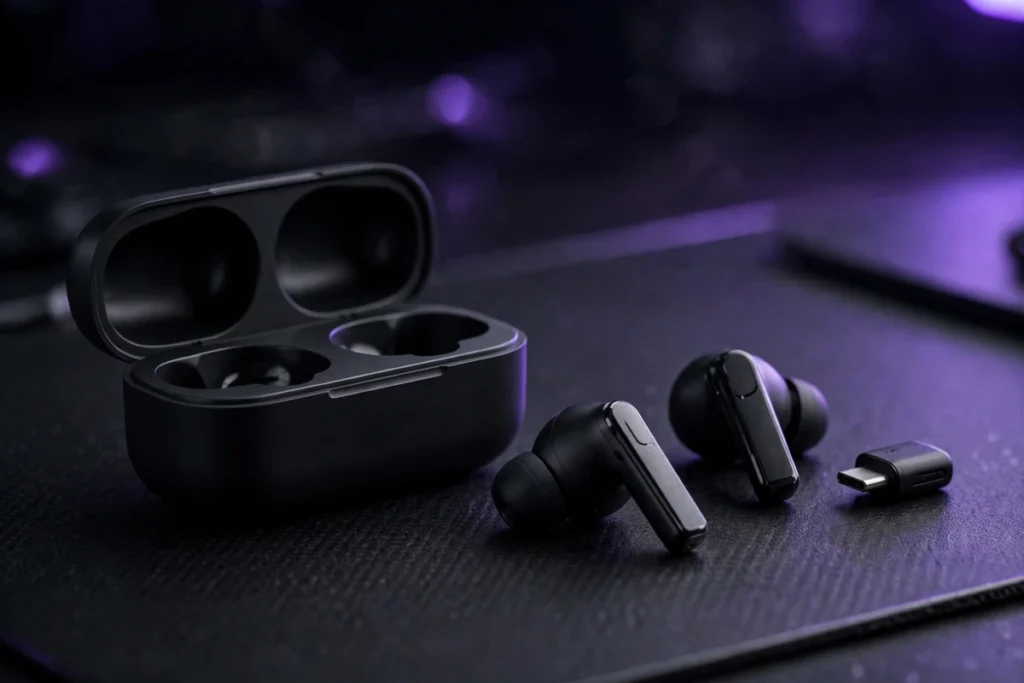
A 2.4GHz dongle sidesteps the whole problem. To your PC or console the earbuds look like a USB audio device, so voice and game sound travel at full quality in both directions, with latency low enough that lip sync in video and callouts in a match stop being an issue. Four of the six picks below work this way. If you would rather have a boom mic and an over-ear fit, our best PC gaming headset guide covers that side of the market.
What We Looked For
- Connection first. A dongle that bypasses HFP, or multipoint Bluetooth that at least handles call mode gracefully.
- Microphone quality in call mode, judged from recorded mic tests and reviews, with background-noise rejection weighted heavily. A great music mic test tells you little about Discord.
- Battery for long sessions. Anything under six hours per charge gets awkward on a raid night.
- Switching between PC and phone. Most people take Discord calls on both. Multipoint or a one-button switch matters.
- Fit for hours. Small, light buds with more than one tip size.
1. Sony INZONE Buds: Best Overall for Discord

Sony built the INZONE Buds for exactly this job, with input from the Fnatic esports organisation, and it shows in the details that matter for voice chat. The USB-C dongle gives a 2.4GHz connection Sony rates at under 30 milliseconds of latency. Your mic stays full-band, the game stays in stereo, and nobody in the channel hears the underwater effect you get from Bluetooth call mode. Battery life is the other headline: 12 hours per charge over the dongle, doubled by the case. Most gaming earbuds manage half that.
The microphone uses AI noise reduction trained to separate your voice from background sound, and in recorded tests it holds up well against a keyboard and a desk fan. Active noise cancelling is on board for loud households. Two compromises to know about. There is no classic multipoint: the buds talk to the dongle or to a Bluetooth device, and you switch between them rather than staying connected to both. And the fit runs large, so small ears should test the smaller tips first.
- Connection: 2.4GHz USB-C dongle, Bluetooth 5.3 with LE Audio
- Battery: 12 hours per charge (dongle), 24 hours total with case
- Mic: AI noise reduction, touch controls for mute
- Extras: ANC, IPX4 splash resistance, works on PC, PS5 and Switch
2. SteelSeries Arctis GameBuds: Best for PC and Console Switching

The Arctis GameBuds solve the switching problem better than anything else here. A button on the case jumps the buds between the 2.4GHz dongle in your PC or console and Bluetooth on your phone, no re-pairing, no settings menu. For someone who plays on the TV, talks on the PC and takes Discord calls on the phone in the same evening, that one button is the reason to buy these.
Voice performance is solid rather than class-leading. The mics carry noise reduction that keeps a voice clear in a normal room, and the dongle keeps game audio at full quality during calls. Battery runs 10 hours per charge and 40 hours with the case, and the IP55 rating shrugs off sweat and rain. One buying warning: SteelSeries sells separate PlayStation and Xbox editions, and they are not interchangeable. The listing linked here is the PlayStation version in white, which also covers PC. Xbox players need the Xbox edition.
- Connection: 2.4GHz USB-C dongle, Bluetooth 5.3, one-button quick switch
- Battery: 10 hours per charge, 40 hours total with case
- Mic: Built-in mics with noise reduction
- Extras: ANC with transparency mode, IP55, Qi wireless charging, 100+ game audio presets in the app
3. Razer Hammerhead HyperSpeed: ANC With a Dongle

Razer’s pitch is simple: the Hammerhead HyperSpeed pairs a low-latency dongle with active noise cancelling, a combination the INZONE Buds match but the GameBuds only partly do, at a street price that usually sits below both. In a Discord call the dongle does the same trick as the Sony: full-quality voice out, full-quality game audio in. The mics have environmental noise cancelling, and in a typical bedroom or study they keep speech upfront.
Be clear about which model this is. This listing is the Hammerhead HyperSpeed, Razer’s dongle earbud built around Bluetooth 5.2, not the newer and pricier Pro HyperSpeed. What you give up against the Sony is battery life per charge and mic polish. What you get back is ANC, Chroma RGB lighting (turn it off and the battery thanks you), and up to 30 hours in total with the case. Like the GameBuds, it comes in platform editions; this is the PlayStation version, which also works on PC and mobile.
- Connection: 2.4GHz USB-C dongle, Bluetooth 5.2
- Battery: Up to 30 hours total with case
- Mic: Dual mics with environmental noise cancelling
- Extras: ANC, Chroma RGB, works on PC, PS5 and mobile
4. ASUS ROG Cetra True Wireless SpeedNova: Best Mic for Loud Rooms

The ROG Cetra SpeedNova takes a different route to a clear voice: a bone-conduction sensor picks up the vibration of your speech directly, so the mic relies less on what the room sounds like. In ASUS’s own demos and in reviewer tests, speech stays intelligible with music playing in the room and a fan running, conditions that smear most earbud mics. If your Discord time happens in a shared flat or a family living room, that is a real advantage, not a spec-sheet trick.
The rest of the package is complete: SpeedNova 2.4GHz over a USB-C dongle for PC, PS5 and Switch, Bluetooth for your phone, adaptive ANC, and battery life ASUS rates at up to 46 hours in total in Bluetooth mode (expect less over the dongle). The Dirac Opteo tuning leans bright, which flatters footsteps and callouts more than bass-heavy music. The case is chunky, and the Armoury Crate software is heavier than it needs to be. Neither matters once you are in a call.
- Connection: 2.4GHz SpeedNova dongle, Bluetooth dual mode
- Battery: Up to 46 hours total with case (Bluetooth mode)
- Mic: Bone-conduction AI microphone
- Extras: Adaptive ANC, Dirac Opteo tuning, PC, PS5, Switch and mobile support
5. Jabra Elite 10 Gen 2: Best Bluetooth-Only Pick
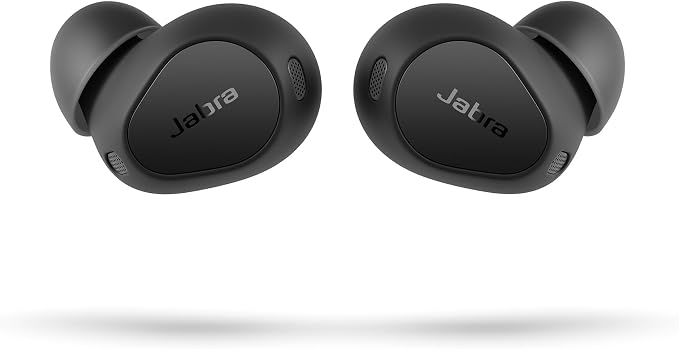
Not everyone wants a gaming earbud, and the Jabra Elite 10 Gen 2 is the pick for people whose day runs from work calls into Discord at night. Jabra’s six-microphone system is the best call setup here that works over plain Bluetooth: voices stay natural, wind noise is handled well in outdoor tests, and multipoint keeps the buds connected to a laptop and a phone at once. Discord on the phone, a work call on the laptop, no re-pairing in between.
The smart case does something unusual. Plug it into a wired source, a plane screen or a handheld console, and it streams that audio to the buds over LE Audio. Handy, though it does not change the Discord-on-PC picture: over Bluetooth the buds still drop into call mode, so game audio narrows while you talk. Jabra rates battery at up to 27 hours in total with ANC on, and the oval shape sits easier in small ears than most of this list. Buy these for call quality across your whole day, with Discord as one stop among several.
- Connection: Bluetooth 5.3 multipoint (two devices), LE Audio smart case
- Battery: Up to 27 hours total with case (ANC on)
- Mic: 6-microphone call system
- Extras: Dolby Atmos spatial sound, wireless charging, IP57 buds
6. EarFun Air Pro 4i: Best Budget Pick

The EarFun Air Pro 4i is here for Discord on a phone, or casual PC voice chat where a dongle feels like overkill. Its six microphones with cVc noise reduction punch above the price in published call tests, multipoint connects a PC and phone at the same time, and battery life (6.5 hours with ANC on, 40 hours with the case) covers long sessions. The wider budget field sits in our best gaming earbuds under $100 guide.
Two settings matter. First, LDAC and multipoint cannot run together on this model, so leave LDAC off and let the buds use AAC or SBC: Discord gains nothing from a hi-res codec in call mode. Second, accept the ceiling. On PC these still use Bluetooth call mode, so your voice will not match the dongle picks, and the under-50ms game mode helps video sync without fixing call quality. As a cheap second pair or a phone-first pick, the value is hard to argue with.
- Connection: Bluetooth 5.4 multipoint (LDAC off)
- Battery: 6.5 hours per charge (ANC on), 40 hours total with case
- Mic: 6 microphones with cVc 8.0 noise reduction
- Extras: ANC, IP55, game mode under 50ms, wireless charging
Settings That Help, Whatever You Buy
Pick the right devices inside Discord. In Voice and Video settings, set input and output explicitly instead of leaving them on Default. On Windows with Bluetooth earbuds, output options often include a hands-free entry and a stereo entry: the hands-free one is the low-quality path. With a dongle, choose the dongle device for both and the problem disappears. Our guide to pairing earbuds with a PC walks through the Windows side.
Use Discord’s noise suppression. The Standard setting removes steady background noise; the Krisp option is stronger and eats some voice character in exchange. Try Standard first. Then set input sensitivity manually, a little above your keyboard and breathing, so the mic is not open all evening. In a loud room, push-to-talk beats every algorithm on this page.
Split the jobs if you already own a good mic. A desktop USB mic plus earbuds used for audio only keeps the earbuds out of call mode entirely. Your voice gets the real microphone, your ears keep full-quality game sound, and the earbuds never switch profiles. It is the cheapest upgrade on this page if the mic is already on your desk.
On mobile, expectations reset. Discord on a phone uses the phone’s call handling, which usually negotiates a wider voice band than Windows Bluetooth. The Bluetooth-only picks sound noticeably better there than on a PC, which is why the Jabra and EarFun make sense for phone-first users.
Best Bluetooth Earbuds for Discord: FAQ
What are the best earbuds for Discord?
The Sony INZONE Buds. Their 2.4GHz dongle keeps your microphone at full quality while the game audio stays in stereo, which no Bluetooth connection on a Windows PC can do. The SteelSeries Arctis GameBuds are the better choice if you switch between console, PC and phone all evening, and the Jabra Elite 10 Gen 2 leads the Bluetooth-only options.
Are there Discord certified earbuds?
No. Discord runs a certification program for headsets, and every certified model is an over-ear or on-ear headset from brands like Razer, SteelSeries, HyperX and Logitech. No true wireless earbuds carry Discord certification. Certification is not a requirement for good voice quality: what decides how you sound is the microphone and whether the connection avoids Bluetooth call mode.
Why do my earbuds sound bad on Discord?
Because of Bluetooth call mode. Listening uses the high-quality A2DP profile, but the moment your microphone opens, the connection switches to the hands-free profile, which squeezes voice and audio into a narrow channel. Your voice turns thin and the game or video drops to mono. A 2.4GHz dongle avoids the switch entirely, which is why four of the six picks in this guide include one.
Can I use the same earbuds for Discord on my PC and my phone?
Yes. The Jabra Elite 10 Gen 2 and EarFun Air Pro 4i use multipoint Bluetooth and stay connected to both devices at once. The SteelSeries Arctis GameBuds switch between their dongle and a phone with a button on the case. The Sony INZONE Buds move between the dongle and one Bluetooth device, but not both at the same time.
Do these earbuds work with Discord on PS5 and Xbox?
On PS5, yes: the INZONE Buds, Arctis GameBuds (PlayStation edition) and Hammerhead HyperSpeed (PlayStation edition) all connect through their USB dongles, and Discord is built into the console. Xbox is stricter: it blocks most USB audio dongles and has no standard Bluetooth audio, so you need the dedicated Xbox edition of the GameBuds or a licensed Xbox model.
The Bottom Line
If Discord voice is the priority, buy a dongle. The INZONE Buds are the most complete package here: the clearest voice path, 12 hours per charge and real noise cancelling. The GameBuds run them close and switch devices better. The two Bluetooth-only picks are not failed versions of the same idea; they suit people whose Discord time sits on a phone or inside a workday. What none of the Bluetooth-only options can do is beat the physics of call mode on a Windows PC, and any guide that ignores that is selling you the wrong earbuds.

I am the founder of Sound Mavericks, where I provide the polite truth about audio equipment. I started this site because consumer electronics reviews are often too technical. Instead of using a silent lab, I test headphones, earbuds, and Bluetooth speakers in the real world – like on a noisy subway or in a busy coffee shop.
To stay independent, I buy my own review units (mostly from the United States) rather than accepting free gifts from brands. Once I finish testing a product, I sell it locally to our community. My goal is to help you understand sound quality, active noise cancellation (ANC), and battery life without the marketing hype.