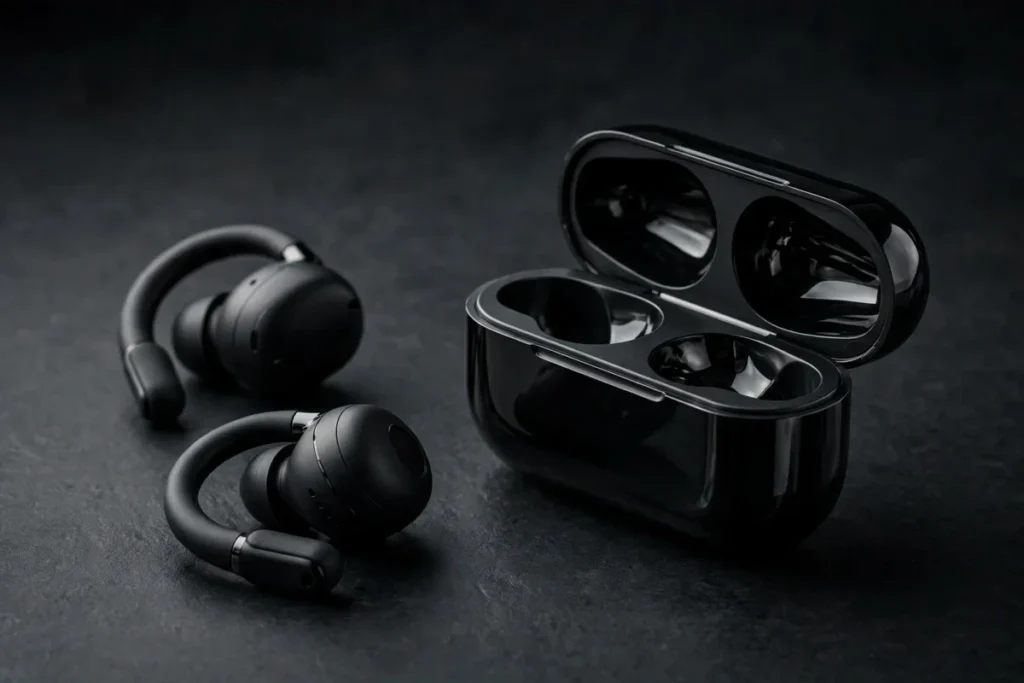
Open-ear earbuds have spent years trading sound quality for awareness, and the SoundPEATS CC3 Pro is SoundPEATS’ attempt to close that gap. Launched on October 28, 2026 as the successor to the PearlClip Pro, it is a second-generation clip-on design with an unusual weapon: two drivers per earbud — a 12mm dynamic driver for the lows and a 9mm ceramic piezoelectric driver for the highs — plus LDAC hi-res support, Bluetooth 6.0, physical button controls and a battery claim that nearly doubles its predecessor’s. The catch is what enabling LDAC does to the rest of the feature list.
Our Early Verdict
On paper — and in the first wave of independent testing — the CC3 Pro is the most complete open-ear clip bud SoundPEATS has made: genuinely full sound for the form factor, an expansive stage, battery life that jumps from roughly 6 hours to 10 per charge, wireless charging, and proper physical buttons instead of fussy touch panels. The compromises are specific and knowable: turn LDAC on and playback roughly halves while multipoint, spatial audio and game mode switch off. If you listen over AAC or SBC and want all-day open-ear comfort, this is an easy recommendation. If LDAC is the reason you’re buying, read the trade-off section first.
| Sound Quality (on paper) | 8.7 |
| Comfort & Design | 8.8 |
| Battery Life | 8.9 |
| Call Quality | 7.9 |
| Features & App | 8.4 |
| Value | 8.8 |

How we are reviewing this one: the CC3 Pro launched days ago, so this is a research-based launch review built from SoundPEATS’ published specifications, the verified Amazon US listing, and the hands-on reviews and long-term tests already published by independent testers. We have not listened to it ourselves, and the score is provisional for exactly that reason — it reflects the hardware, the documented step up from the PearlClip Pro, and the early review consensus, and we will revisit it as more measurements land.
SoundPEATS CC3 Pro Specifications
| Product | SoundPEATS CC3 Pro |
| Drivers | Hybrid dual drivers per bud: 12mm dual-magnet dynamic driver (lows) + 9mm ceramic piezoelectric driver (highs) |
| Frequency response | 20 Hz – 40 kHz; Hi-Res Audio certified |
| Bluetooth codecs | LDAC, AAC, SBC |
| Bluetooth | 6.0, with multipoint (two-device) connection |
| Battery life | Up to 10 hours per charge; 44 hours total with the case (LDAC use reduces this substantially — see below) |
| Charging | USB-C and wireless charging; 10-minute fast charge adds roughly 3 hours of playback |
| Controls | Physical button controls on each bud |
| Water resistance | IPX6 (strong water jets — workouts, sweat and heavy rain) |
| Design | Clip-on open-ear fit; memory-steel core with liquid-silicone contact surfaces |
| Weight | 5.5g per earbud |
| App | SoundPEATS app: Spatial Audio, Dynamic EQ, Game mode, firmware updates |
| Buy | Check Price on Amazon |
What’s New vs the PearlClip Pro
The PearlClip Pro established SoundPEATS’ clip-on formula — light buds, a memory-steel clip, LDAC on a single 12mm driver — and the CC3 Pro keeps that shape while upgrading almost every line of the spec sheet. The headline change is the second driver: a 9mm ceramic piezoelectric unit dedicated to the treble, paired with a 12mm dual-magnet dynamic driver handling bass and lows. Splitting the work is how in-ear monitors get their clarity, and it is still rare in open-ear buds, where a single driver usually has to shout across an air gap. The frequency response claim widens accordingly, out to 40 kHz, with Hi-Res Audio certification behind it.
The generational jump is just as clear away from the drivers. Battery life leaps from roughly 6 hours per charge and 24 hours total to 10 and 44 — the difference between a bud you ration and a bud you forget to charge. The case gains wireless charging alongside USB-C. Water resistance steps up from IPX5 to IPX6. And the controls change philosophy entirely: where the PearlClip generation relied on touch surfaces, the CC3 Pro goes back to physical buttons, a change early reviewers single out as a genuine quality-of-life win — a click you can feel, with gloves on, mid-run, without the accidental pauses touch panels invite.
| SoundPEATS CC3 Pro | SoundPEATS PearlClip Pro | |
|---|---|---|
| Drivers | Dual: 12mm dynamic + 9mm ceramic piezoelectric | Single 12mm dual-magnet dynamic |
| Codecs | LDAC, AAC, SBC | LDAC, AAC, SBC |
| Battery (buds) | Up to 10 hours | Roughly 6 hours |
| Battery (total) | 44 hours | 24 hours |
| Case charging | USB-C + wireless | USB-C |
| Controls | Physical buttons | Touch |
| Water resistance | IPX6 | IPX5 |
| Buy | Check Price on Amazon | Check Price on Amazon |
Read together, this is a true second generation rather than a refresh: same clip-on idea, better sound hardware, far better endurance, and controls that fix the first model’s most common annoyance. PearlClip Pro owners get a real upgrade path; the one thing that has not changed is the codec list, and that is where the story gets complicated.
Sound Quality: Two Drivers, One Open Ear
The dual-driver layout is the CC3 Pro’s reason to exist, and the early consensus is that it works. Mighty Gadget scored the earbuds 80% in its launch review, praising bass weight and clarity that are unusual for an open-ear design — the 12mm dynamic driver has a short, direct path to the ear, and it shows. AudioReviews and NerdyHiFi hearings point the same way: an expansive soundstage with precise placement for the form factor, and volume headroom to spare, which matters on open-ear buds that compete with traffic and gym noise rather than sealing it out. This is the recurring theme of the first reviews — the CC3 Pro sounds less like a compromise product and more like a small speaker that happens to clip to your ear.
The reservation is at the top end. The ceramic piezoelectric driver delivers detail, but more than one tester found the treble bright enough to fatigue over long sessions — the piezo unit does its job enthusiastically, and if you are treble-sensitive you will likely reach for the app’s Dynamic EQ to soften it. That the EQ exists, and works even with LDAC engaged, softens the criticism considerably: this is a tuning preference you can adjust, not a flaw you are stuck with. Bass, meanwhile, is the surprise strength. Open-ear designs normally leak their low end into the room; reviewers consistently describe the CC3 Pro’s low frequencies as full and controlled by open-ear standards, while staying honest that no clip-on will match a sealed in-ear for sub-bass depth.
The LDAC Trade-Off: Read This Before You Buy for Hi-Res
Here is the section that decides who should buy these. The CC3 Pro supports LDAC and carries Hi-Res Audio certification — but independent testing, including a month-long launch review and Notebookcheck’s coverage, documents what enabling LDAC actually costs. Playback drops from the headline 10 hours to roughly 5.5. Multipoint switches off, so the two-device connection goes away. Spatial audio and game mode are disabled too. And toggling LDAC requires a re-pair to take effect, so it is not a setting you flip casually between tracks.
Our read: this is a firmware-and-bandwidth reality, not deceptive marketing — LDAC’s high bitrate is genuinely expensive for a small bud to sustain, and SoundPEATS is hardly the first maker to fence features off when it is on. But it changes the buying logic. If your plan was all-day wear with hi-res streaming, the real battery figure for your use case is 5.5 hours, not 10, and the feature set shrinks to match. If, like most open-ear buyers, you mostly listen over AAC or SBC while running, cycling, working or commuting — where ambient awareness is the point and codec differences are subtle at the best of times — you keep the full 10 hours, multipoint, spatial audio and game mode, and the LDAC badge becomes an occasional bonus for a focused evening listen rather than the main event. Buy it on the second basis and it is excellent value; buy it purely as an LDAC device and you will feel short-changed.
Battery Life and Charging
With LDAC off, the numbers are a genuine generational leap: up to 10 hours per charge and 44 hours in total with the case, against the PearlClip Pro’s roughly 6 and 24. That is most of a working week of listening between case charges, and it removes the range anxiety that dogged the first model. The charging story is complete for the class — USB-C, wireless charging for pad users, and a fast charge that returns roughly 3 hours of playback from 10 minutes plugged in. The only asterisk is the one covered above: treat 5.5 hours as your working figure if you plan to live in LDAC mode, and note that the case’s extra charges become correspondingly more important.
Fit, Controls, App and Calls
The clip design carries over the PearlClip formula — a memory-steel core that flexes to your ear and holds its shape, with liquid-silicone contact surfaces where the bud meets skin — at 5.5g per bud, light enough to forget. Reviewers rate the fit secure for running and training, helped by the IPX6 rating shrugging off sweat and hard rain. One sizing note recurs in early coverage: the buds may run large for smaller ears, so if clip-ons have historically felt bulky on you, that is the fit risk to weigh. The physical buttons deserve their praise — playback, volume and calls handled with a positive click, no wet-finger touch failures, and none of the accidental triggers that plague touch panels during workouts.
Software runs through the SoundPEATS app — note, the current SoundPEATS app, not the older PeatsAudio one long-time owners may still have installed. It brings Spatial Audio, a Dynamic EQ that stays available even in LDAC mode, a low-latency Game mode, and firmware updates; Mighty Gadget noted some friction in the app experience, so expect functional rather than polished. Call quality lands where most open-ear buds land: pickup is decent and perfectly usable in quiet settings, but a little inconsistent once background noise picks up, since the microphones sit outside the ear canal with no seal to help them. For desk calls and quiet streets, fine; for a windy platform, manage expectations.
Who It’s For — and the Clip-On Competition
Buy the CC3 Pro if you want open-ear awareness without the usual thin sound: runners, cyclists, dog walkers, open-plan workers and parents who need one ear on the room. The dual drivers, 10-hour battery, wireless charging and real buttons make it the most complete package SoundPEATS has put in this shape, and PearlClip Pro owners get meaningful upgrades in sound, endurance and controls.
Look at the wider field if your priorities differ. The Soundcore AeroClip 2 is the mainstream clip-on rival to audition, Bose’s take in our Bose Ultra Open Earbuds 2nd Gen review is the premium end of this design, and the UGREEN ClipBuds Pro 2 covers the value end. And if your listening is mostly hi-res at a desk, be honest with yourself: a sealed in-ear with LDAC will serve that habit better than any open-ear bud, this one included.
PearlClip Pro owners: a worthwhile upgrade, not an essential one. You gain the second driver, close to double the battery, wireless charging, IPX6 and buttons — a long list. What you do not gain is a better LDAC experience; the trade-offs in the section above apply to your upgrade exactly as they do to a new buyer.
SoundPEATS CC3 Pro FAQ
Is the SoundPEATS CC3 Pro better than the PearlClip Pro?
Yes, on most of the spec sheet. The CC3 Pro adds a second, ceramic piezoelectric treble driver alongside the 12mm dynamic driver, stretches battery life from roughly 6 hours per charge (24 total) to 10 hours (44 total), adds wireless charging and IPX6 water resistance, and swaps touch controls for physical buttons. The PearlClip Pro remains a lighter-touch, simpler option, but as a second-generation model the CC3 Pro is the clear step forward.
What does turning on LDAC do on the SoundPEATS CC3 Pro?
More than most buyers expect. Independent testing found that enabling LDAC cuts playback from up to 10 hours to roughly 5.5 hours, and disables multipoint, spatial audio and game mode while it is active; the change also needs a re-pair to take effect. LDAC is best treated as a focused-listening mode. For everyday listening over AAC or SBC, you keep the full battery life and the complete feature set.
How long does the SoundPEATS CC3 Pro battery last?
Up to 10 hours per charge and 44 hours in total with the charging case, using AAC or SBC. In LDAC mode, expect roughly 5.5 hours per charge based on independent testing. The case charges over USB-C or wirelessly, and a 10-minute fast charge adds roughly 3 hours of playback — enough to cover a run or a commute from an almost-empty case.
Are the SoundPEATS CC3 Pro good for running and workouts?
They are built for it. The clip-on design uses a memory-steel core with liquid-silicone contact surfaces at just 5.5g per bud, the physical buttons work with sweaty or gloved hands where touch controls fail, and the IPX6 rating handles sweat and heavy rain. One caution from early reviews: the buds may feel large on smaller ears, so fit is the one thing to check if you have had trouble with clip-ons before.
Which app does the SoundPEATS CC3 Pro use?
The current SoundPEATS app — not the older PeatsAudio app. It provides Spatial Audio, a Dynamic EQ (which works even with LDAC switched on), a low-latency Game mode, control settings and firmware updates. Reviewers describe the app as functional with some friction rather than best-in-class, but everything the earbuds advertise is in there.
The Bottom Line
The SoundPEATS CC3 Pro is what a second generation should be: the same likeable clip-on idea, rebuilt with dual drivers that give open-ear sound real body and detail, battery life that nearly doubles, wireless charging, a tougher water rating, and buttons that simply work. Its one structural weakness is honestly documented — LDAC on this platform costs you half the battery and several features — and our provisional 8.5/10 prices that in. Judge it as an everyday open-ear bud with an occasional hi-res mode, and it is one of the strongest clip-on releases of the year. Judge it as a dedicated LDAC device, and the caveats above should steer your decision.

I am the founder of Sound Mavericks, where I provide the polite truth about audio equipment. I started this site because consumer electronics reviews are often too technical. Instead of using a silent lab, I test headphones, earbuds, and Bluetooth speakers in the real world – like on a noisy subway or in a busy coffee shop.
To stay independent, I buy my own review units (mostly from the United States) rather than accepting free gifts from brands. Once I finish testing a product, I sell it locally to our community. My goal is to help you understand sound quality, active noise cancellation (ANC), and battery life without the marketing hype.