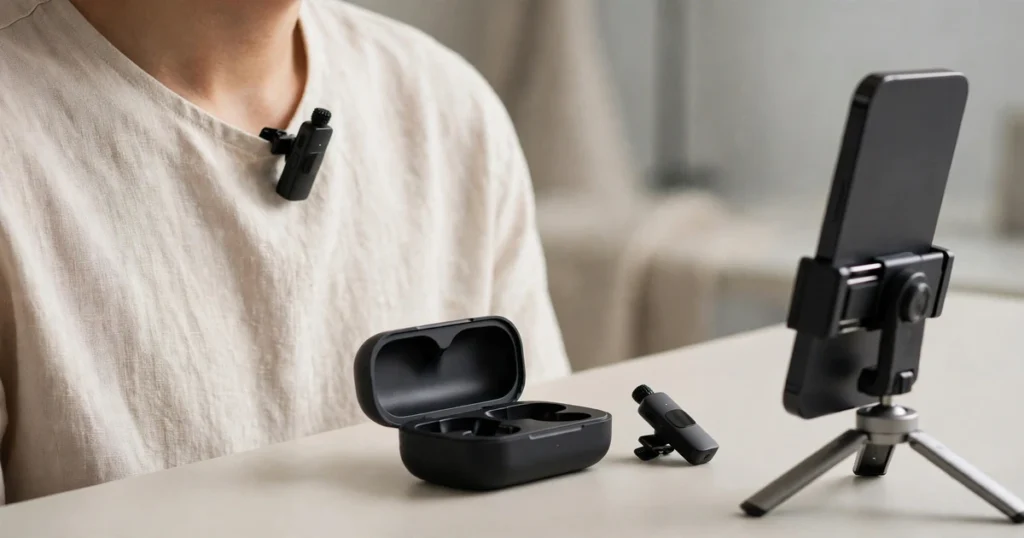
Your iPhone shoots video that rivals cameras costing ten times more — but its built-in microphone is still the weakest link in every vlog, interview, and TikTok you record. A dedicated wireless lavalier mic fixes that instantly: clip on a transmitter, plug a tiny receiver into your phone, and you get broadcast-clean voice from across the room.
After digging through manufacturer specs, creator feedback, and iPhone compatibility details for every major system on the market, SoundMavericks names the DJI Mic Mini the best wireless microphone for iPhone overall. It pairs a 400 m wireless range with a 48-hour total battery life and dead-simple iPhone connectivity — and every system below earned its spot for a specific kind of iPhone creator.
Quick Comparison: The Best Wireless Mics for iPhone at a Glance
| Microphone | Best For | iPhone Connector | Range | Battery (total) | Channels |
|---|---|---|---|---|---|
| DJI Mic Mini | Best Overall | USB-C receiver (iPhone 15/16/17) | 400 m | ~48 hours | 2 |
| DJI Mic 2 | Best Premium | USB-C + Lightning adapters in box | 250 m | ~18 hours | 2 |
| RØDE Wireless GO II | Serious Creators | USB-C (Lightning cable sold separately) | 200 m | 7 hours | 2 |
| RØDE Wireless ME | Easiest to Use | USB-C + Lightning cable in box | 100 m+ | 7 hours | 1 (+ receiver mic) |
| Hollyland Lark M2 | Best Value | USB-C receiver (MFi Lightning version available) | 300 m | ~40 hours | 2 |
| Shure MoveMic One | No Receiver Needed | None — connects over Bluetooth | ~30 m | ~24 hours | 1 |
1. DJI Mic Mini — Best Overall Wireless Mic for iPhone
SoundMavericks’ verdict: The Mic Mini is the system we’d recommend to nearly every iPhone creator. DJI’s spec sheet rates the wireless link at 400 m — the longest here — and the transmitter and receiver run 11.5 and 10.5 hours respectively, with the charging case pushing total runtime to roughly 48 hours. At about 10 g per transmitter, it disappears on a collar, and the two noise-cancellation levels plus automatic limiting keep outdoor audio clean without any fiddling. For iPhone 15/16/17 owners, the included USB-C receiver plugs straight in and you’re recording in seconds.

| Sound Quality | 9.2 |
| iPhone Ease of Use | 9.5 |
| Wireless Range | 9.0 |
| Battery Life | 9.5 |
| Features | 8.5 |
| Value | 9.0 |
What stands out:
- 400 m wireless range (line of sight) — best in this roundup, per DJI’s published specs
- Roughly 48 hours total battery with the charging case; transmitters run ~11.5 hours each
- Two noise-cancellation levels and automatic limiting to prevent clipping
- 10 g transmitters with clip and magnetic mounting
- Direct Bluetooth connection option to select DJI devices
Watch out for: The standard kit’s phone receiver is USB-C, so iPhone 14 and older (Lightning) need DJI’s separate Lightning mobile adapter. There’s no onboard recording or receiver display — this is a deliberately simple system.
2. DJI Mic 2 — Best Premium Wireless Mic for iPhone
SoundMavericks’ verdict: The Mic 2 is DJI’s flagship, and it’s the pick for creators who want pro features without a pro learning curve. The headline upgrade over the Mic Mini is 32-bit float internal recording on each transmitter — a safety net that makes clipped audio virtually impossible to ruin. The receiver adds a touchscreen for gain and settings, and DJI rates the wireless range at 250 m with 6-hour runtime per unit (about 18 hours with the case). Best of all for iPhone users, this kit ships with both USB-C and Lightning phone adapters in the box, so it works with every iPhone generation out of the gate.

| Sound Quality | 9.3 |
| iPhone Ease of Use | 9.0 |
| Wireless Range | 8.5 |
| Battery Life | 8.5 |
| Features | 9.2 |
| Value | 8.0 |
What stands out:
- 32-bit float internal recording — backup audio that survives sudden loud peaks
- Both Lightning and USB-C phone adapters included, covering all iPhone generations
- Touchscreen receiver with real-time gain control
- Intelligent noise cancelling with adjustable strength
- 250 m wireless range per DJI’s specs
Watch out for: Bulkier and heavier than the Mic Mini (28 g transmitters), and the 6-hour per-unit battery is shorter — you lean on the charging case for long days. It’s also the priciest kit here.
3. RØDE Wireless GO II — Best for Serious iPhone Creators
SoundMavericks’ verdict: The Wireless GO II is the system that defined this category, and it remains the choice for creators who want maximum control. RØDE rates the Series IV 2.4 GHz link at 200 m, battery life at 7 hours, and — the feature that separates it from everything else here — each transmitter can record over 40 hours of backup audio internally. Add the safety channel (a -20 dB backup track), a built-in display, and fine gain control, and this is the kit for interviews and client work where you cannot afford to lose a take. On iPhone, the receiver’s USB-C digital output plugs directly into iPhone 15/16/17; Lightning iPhones need RØDE’s SC15 USB-C-to-Lightning cable, sold separately. The free RØDE Central app unlocks the advanced settings, including the RØDE Capture video app for iOS.

| Sound Quality | 9.2 |
| iPhone Ease of Use | 8.0 |
| Wireless Range | 8.8 |
| Battery Life | 8.0 |
| Features | 9.3 |
| Value | 8.2 |
What stands out:
- Over 40 hours of onboard recording per transmitter — unmatched backup safety
- Safety channel records a second, quieter track to rescue clipped audio
- 200 m range with RØDE’s stable Series IV 2.4 GHz transmission
- Deep control via the RØDE Central and RØDE Capture apps
- Doubles as a USB mic for your computer
Watch out for: More complex than the plug-and-play picks, and Lightning iPhones need an extra cable purchase. The 7-hour battery is the shortest here with no charging case included.
4. RØDE Wireless ME — Easiest Wireless Mic to Use with iPhone
SoundMavericks’ verdict: If the GO II is the pro tool, the Wireless ME is the point-and-shoot. RØDE built it for creators who want great audio with zero learning curve: it auto-pairs out of the box, and the intelligent GainAssist technology automatically rides your levels so nothing clips. The clever twist is the microphone built into the receiver itself — the person holding the iPhone gets recorded too, which is perfect for two-way interviews and voiceovers. RØDE rates the range at over 100 m and battery life at up to 7 hours. iPhone compatibility is excellent: the receiver connects via USB, and the box includes RØDE’s SC21 USB-C-to-Lightning cable, so both new and old iPhones are covered with no extra purchases.

| Sound Quality | 8.8 |
| iPhone Ease of Use | 9.5 |
| Wireless Range | 8.0 |
| Battery Life | 8.2 |
| Features | 8.5 |
| Value | 8.8 |
What stands out:
- Receiver has its own built-in mic — record both sides of an interview with one kit
- GainAssist auto-levels your audio; no menus or gain staging to learn
- USB-C-to-Lightning cable included — works with every iPhone generation in the box
- Auto-pairs instantly; works with the RØDE Capture iOS video app
- Can add a second transmitter later for three-mic recording
Watch out for: Single transmitter in the standard kit (the ME Dual adds a second). No onboard recording or charging case, and the 100 m range is the shortest here.
5. Hollyland Lark M2 — Best Value Wireless Mic for iPhone
SoundMavericks’ verdict: The Lark M2 is our value pick, and it doesn’t feel like a compromise. Each transmitter weighs just 9 g — the lightest here — yet Hollyland rates the wireless range at 300 m line of sight and total battery at around 40 hours with the charging case. Audio is captured at 48 kHz/24-bit with environmental noise cancellation, and the button-size transmitters clip or magnet-mount to clothing. For iPhone users, the key detail is the receiver: this combo ships with a USB-C plug receiver that works natively with iPhone 15/16/17, while Hollyland also sells an MFi-certified Lightning receiver for older iPhones. A neat bonus is instant phone-speaker playback without unplugging the receiver.

| Sound Quality | 8.6 |
| iPhone Ease of Use | 9.0 |
| Wireless Range | 9.0 |
| Battery Life | 9.0 |
| Features | 8.3 |
| Value | 9.2 |
What stands out:
- 9 g transmitters — the smallest and lightest system in this guide
- 300 m wireless range and ~40 hours total battery with the charging case
- 48 kHz/24-bit audio with environmental noise cancellation
- USB-C receiver for iPhone 15/16/17; MFi-certified Lightning receiver also available
- Double-press the transmitter to start/stop phone video recording remotely
Watch out for: The Lightning receiver is a separate variant, so pick your version carefully at checkout. No onboard recording, and the feature set is leaner than DJI or RØDE’s offerings.
6. Shure MoveMic One — Best Receiver-Free Mic for iPhone
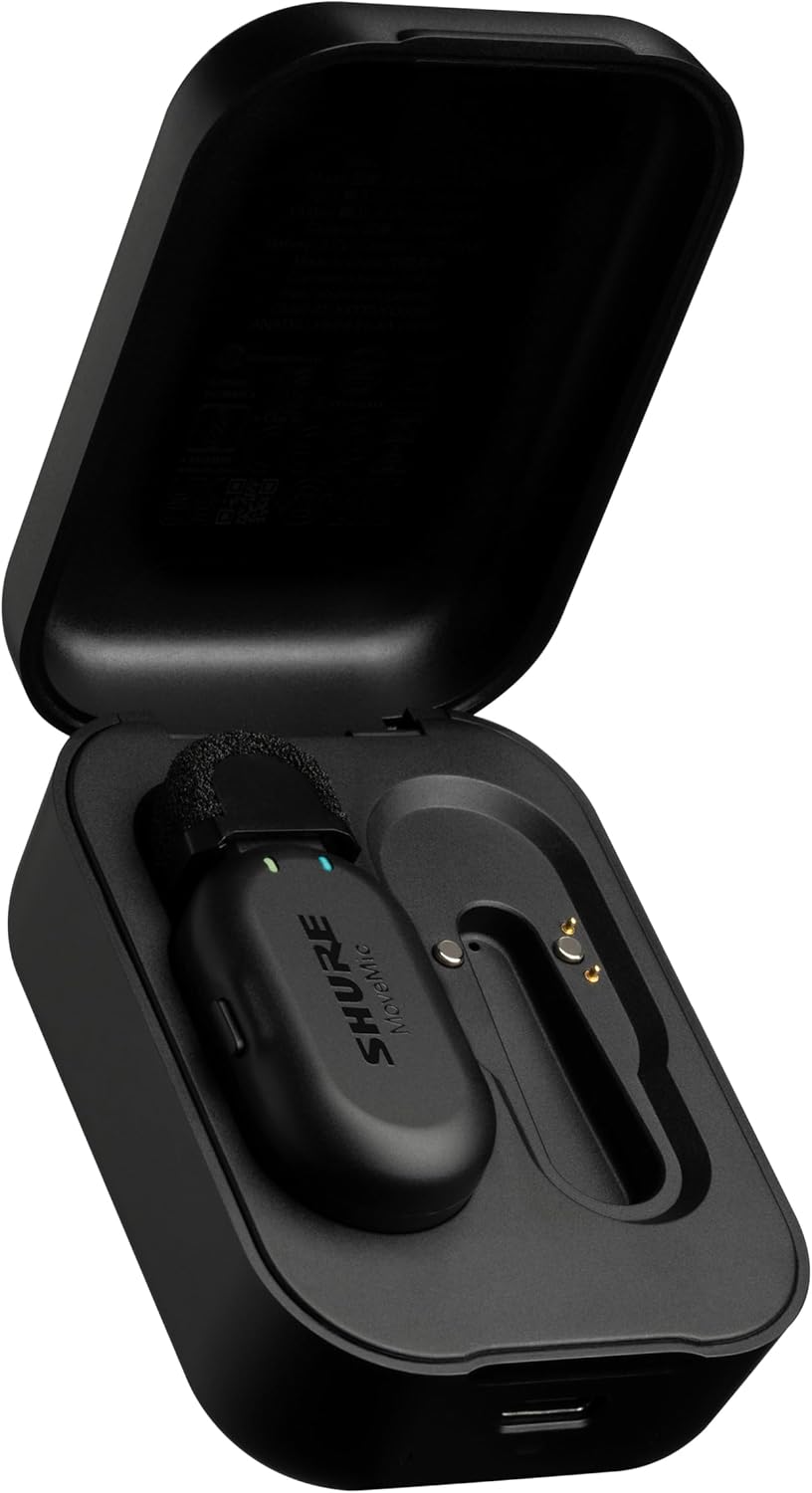
SoundMavericks’ verdict: The MoveMic One takes a completely different approach: there’s no receiver dongle at all. The lavalier pairs directly with your iPhone over a wireless link and records through Shure’s free MOTIV Video and Audio apps, where you control gain, EQ, compression, and noise reduction. That makes it the most pocketable, minimalist setup here — one mic, one charging case, no dongle to lose. Shure’s Amazon listing rates the mic at 8 hours per charge with the case extending total runtime to a full day, and the IPX4 rating means rain and splashes won’t end your shoot. The tradeoff is range and flexibility: it’s a single-channel system with a shorter wireless reach than the 2.4 GHz kits, and recording into third-party apps like TikTok directly requires the optional MoveMic receiver.
| Sound Quality | 8.8 |
| iPhone Ease of Use | 9.2 |
| Wireless Range | 7.5 |
| Battery Life | 8.0 |
| Features | 8.0 |
| Value | 7.8 |
What stands out:
- No receiver dongle — pairs straight to your iPhone, nothing to plug in or lose
- Shure’s MOTIV apps give you pro controls: gain, EQ, compression, noise reduction
- 8 hours per charge with a charging case for a full day of shooting
- IPX4 water resistance for outdoor shoots
- Legendary Shure broadcast sound in a tiny clip-on form factor
Watch out for: Single-channel only — for two-person interviews, step up to the MoveMic Two. Direct recording into third-party social apps needs the optional MV-R receiver, and the wireless range is shorter than dedicated 2.4 GHz systems. Bluetooth audio always involves compression tradeoffs — our Bluetooth audio codecs guide explains what that means for quality.
How to Choose a Wireless Microphone for iPhone
1. Get the connector right: Lightning vs USB-C
This is the single most important iPhone-specific decision. iPhone 15, 16, and 17 use USB-C, so any USB-C receiver plugs straight in. iPhone 14 and older use Lightning — and Apple requires the receiver to be MFi-certified, otherwise iOS may refuse to recognize it. The DJI Mic 2 and RØDE Wireless ME cover both generations out of the box; for the others, check which receiver version you’re buying before you check out.
2. Decide how many voices you need
Solo vloggers and talking-head creators only need one transmitter. Interviewers need two — a dual-channel kit records both voices at once. Note that some single-TX kits cheat cleverly: the RØDE Wireless ME’s receiver has its own microphone, so the person behind the iPhone gets captured too.
3. Understand the wireless link
Five of the six picks above use a dedicated 2.4 GHz digital wireless link — the same kind of low-latency wireless tech you’ll find in the wireless guitar systems we’ve reviewed. It delivers a stable, full-quality signal with ranges from 100 m to 400 m (line of sight). The Shure MoveMic instead connects directly to your phone wirelessly with no receiver — simpler, but with a shorter range.
4. Battery life and charging cases
For a full day of shooting, prioritize a charging case: the DJI Mic Mini stretches to roughly 48 hours total and the Hollyland Lark M2 to about 40, while the RØDE kits without cases top out around 7 hours per charge.
5. Noise cancellation and safety features
If you record outdoors, adjustable noise cancellation (DJI Mic 2, Hollyland Lark M2) or noise reduction (DJI Mic Mini) matters more than raw range. And if you can never re-shoot — weddings, interviews, client work — onboard or 32-bit float internal recording (DJI Mic 2, RØDE Wireless GO II) is worth paying for. If your main need is clean voice on everyday calls rather than recorded video, our roundup of the best noise cancelling earbuds for phone calls covers the call-quality side of the mic equation.
Frequently Asked Questions
Do wireless microphones work with iPhone?
Yes. Most modern wireless mic systems connect to iPhone through a small receiver that plugs into the phone’s port — USB-C on iPhone 15 and newer, Lightning (with an MFi-certified receiver) on older models. Systems like the Shure MoveMic skip the receiver entirely and pair directly with the phone.
Which connector do I need for my iPhone — Lightning or USB-C?
iPhone 15, 16, and 17 use USB-C, so a USB-C receiver works natively. iPhone 14 and earlier need a Lightning receiver, ideally MFi-certified so iOS recognizes it reliably. Kits like the DJI Mic 2 and RØDE Wireless ME include adapters or cables for both, covering every iPhone generation in the box.
Do I need an app to use a wireless mic with my iPhone?
No — the plug-and-play systems in this guide record straight into the iPhone’s Camera app and any video app. Companion apps are optional but useful: RØDE Capture adds direct mic control and dual-camera recording on iOS, DJI and Hollyland offer settings apps, and the Shure MOTIV apps are required for the receiver-free MoveMic.
Can I record two people at once on an iPhone?
Yes, with a dual-channel kit — the DJI Mic Mini, DJI Mic 2, Hollyland Lark M2, and RØDE Wireless GO II each ship with two transmitters that record simultaneously. The RØDE Wireless ME offers a clever alternative: its receiver has a built-in microphone, so the interviewer behind the iPhone is captured without a second transmitter.
What’s the difference between a 2.4 GHz wireless mic and a Bluetooth mic?
2.4 GHz systems use a dedicated digital link between the transmitter and a receiver plugged into your iPhone, giving longer range (100–400 m) and a stable, full-quality signal. Bluetooth-direct mics like the Shure MoveMic pair straight to the phone with no dongle — more convenient and pocketable, but with shorter range. For interviews and meetings rather than content creation, see our guide to the best noise cancelling headphones with a microphone for clear calls.
Is the DJI Mic Mini good for iPhone?
It’s our top overall pick for iPhone creators: a 400 m wireless range, roughly 48 hours of total battery with the charging case, 10 g transmitters, and a USB-C receiver that plugs directly into iPhone 15/16/17. iPhone 14 and older need DJI’s separate Lightning adapter.
The SoundMavericks Verdict
For most iPhone creators, the DJI Mic Mini is the right buy — the longest range, the longest battery life, and the simplest iPhone setup in this roundup. Step up to the DJI Mic 2 if you want 32-bit float internal recording and adapters for both Lightning and USB-C iPhones. The RØDE Wireless GO II is the pro’s safety net with its 40+ hours of onboard recording, while the Wireless ME is the easiest system here to hand to a beginner. The Hollyland Lark M2 delivers remarkable value in the smallest package, and the Shure MoveMic One is unmatched for minimalists who refuse to carry a receiver dongle.

I am the founder of Sound Mavericks, where I provide the polite truth about audio equipment. I started this site because consumer electronics reviews are often too technical. Instead of using a silent lab, I test headphones, earbuds, and Bluetooth speakers in the real world – like on a noisy subway or in a busy coffee shop.
To stay independent, I buy my own review units (mostly from the United States) rather than accepting free gifts from brands. Once I finish testing a product, I sell it locally to our community. My goal is to help you understand sound quality, active noise cancellation (ANC), and battery life without the marketing hype.