Here is the fact most buying guides for Apple users bury: your iPhone and iPad cannot use the Bluetooth codecs printed in big letters on most headphone boxes. Every iPhone and iPad sends Bluetooth audio using AAC or SBC only. There is no LDAC, no aptX, no aptX Lossless, and no way to unlock them with an app or a setting. A headphone that costs more because it supports LDAC will quietly fall back to AAC the moment it connects to your iPhone — and sound exactly like it would on that codec, because that is the codec it is using.
That single fact reshapes how you should shop. For Apple devices, codec badges are worth nothing. What actually decides your experience is AAC tuning, noise cancelling, call quality, battery life, and how well a headphone plays with the Apple ecosystem. AirPods add things no third party can fully copy — personalised spatial audio, automatic switching, Find My tracking — while Sony, Bose and Beats answer with sound customisation, real multipoint pairing, and in some cases stronger noise cancelling. This guide covers both earbuds and over-ear headphones, and scores every pick on what genuinely matters on iOS and iPadOS.
Our verdict — the short version
Best earbuds for most iPhone users: Apple AirPods Pro 3. The deepest Apple integration and excellent noise cancelling — no rival matches it inside the Apple ecosystem.
Best over-ear headphones: Sony WH-1000XM6. Superb noise cancelling, long battery life, proper multipoint, and sound you can shape with a real equaliser — as long as you accept its LDAC support goes unused on Apple hardware.
Best Apple over-ear experience: Apple AirPods Max (USB-C). Unmatched spatial audio and build for films and Apple Music, at the cost of weight.
Why Bluetooth codecs do not matter on iPhone and iPad
Bluetooth audio is a negotiation: the phone offers the codecs it supports, the headphone picks the best one they share, and on Apple hardware that shared best is always AAC. AAC is a good codec, and Apple implements it well — a well-tuned AAC headphone can sound excellent, which is why AirPods sound as good as they do. SBC is the universal fallback. Everything beyond those two — Sony’s LDAC, Qualcomm’s aptX family, LHDC and the rest — is simply not on the menu in iOS or iPadOS, on any model, at any price.
Two consequences follow. First, never pay a premium for codec support when buying for an iPhone or iPad — it has value on many Android phones and none here. Second, judge headphones on AAC performance: tuning, drivers, noise cancelling and app support. Sony and Bose both tune carefully for AAC and sound genuinely strong on Apple devices. Our guide to Bluetooth codecs explained: AAC vs LDAC vs aptX covers the full picture.
There is one escape hatch, and it is wired. Apple Music offers lossless audio, and you can hear it by connecting a suitable headphone over USB-C, bypassing Bluetooth entirely. Two picks below — the Beats Studio Pro and the current USB-C AirPods Max — support wired USB-C audio. Wireless listening is AAC all the way down, and every ranking here reflects that.
Best headphones for iPhone and iPad at a glance
| Product | Type | Best for | Battery (ANC on) | Check |
|---|---|---|---|---|
| Apple AirPods Pro 3 | Earbuds | Most iPhone users | Up to 8 hours | Check Price |
| Apple AirPods 4 with ANC | Earbuds | Open fit without ear tips | Up to 4 hours | Check Price |
| Sony WF-1000XM6 | Earbuds | Sound quality and EQ control | Up to 8 hours | Check Price |
| Sony WH-1000XM6 | Over-ear | Best overall over-ear | Up to 30 hours | Check Price |
| Bose QuietComfort Ultra Headphones (2nd Gen) | Over-ear | Maximum noise cancelling and comfort | Up to 23 hours | Check Price |
| Beats Studio Pro | Over-ear | Apple features plus USB-C lossless | Up to 24 hours | Check Price |
| Apple AirPods Max (USB-C) | Over-ear | Films, spatial audio and build | Up to 20 hours | Check Price |
Best earbuds for iPhone and iPad
Apple AirPods Pro 3 — best earbuds for most iPhone users
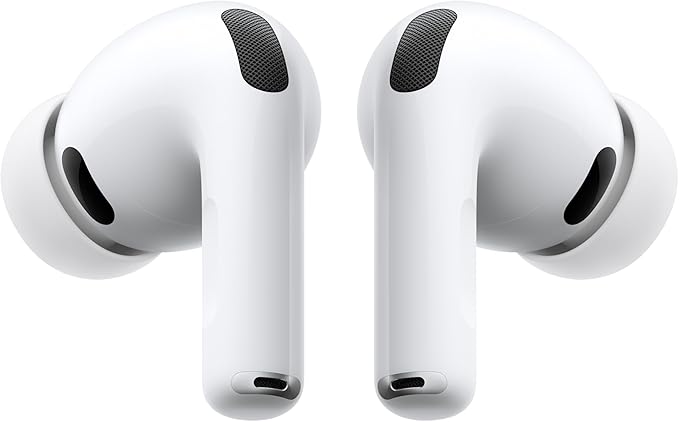
If you own an iPhone and an iPad and want earbuds that simply behave like part of them, this is it. The AirPods Pro 3 pair instantly, switch automatically between your Apple devices, work with Find My down to the case speaker, and support Audio Sharing so two listeners can watch one iPad together. Personalised spatial audio with head tracking makes iPad films feel bigger than the screen, and the hearing-health and Live Translation features are things no third-party earbud on iOS can replicate, because Apple keeps those doors closed.
On the fundamentals, Apple rates battery life at up to eight hours with noise cancelling on, with further charges from the USB-C MagSafe case. Five sizes of silicone tips, from XXS to L, make a good seal easier to find, and a proper seal is what lets the noise cancelling do its best work on planes, trains and open-plan offices. The buds and case carry an IP57 rating, so workouts and rain are no worry. Sound is clean and balanced, tuned exactly for the AAC stream your iPhone sends, with clear vocals that flatter podcasts and calls as much as music.
The honest trade-offs: no manual equaliser in iOS, so the tuning is the tuning; no true multipoint with non-Apple devices; and the feature advantage evaporates if you move to Android. Inside an Apple household, though, nothing else is this effortless — which is why the Pro 3 tops this list.
Apple AirPods 4 with Active Noise Cancellation — best if you hate ear tips

Some ears simply reject silicone tips, and for those listeners the AirPods 4 with ANC is the cleverest option Apple makes. The open design rests in the ear without sealing it, yet still delivers real active noise cancelling, Adaptive Audio, and Conversation Awareness that lowers your music when you start talking. You keep the Apple essentials too: automatic switching, spatial audio, Find My, and a compact USB-C case with wireless charging and a locating speaker.
Set expectations correctly. An open fit cannot match the sealed Pro 3’s isolation, so on a loud flight you will hear more of the cabin. Battery life is shorter — up to four hours with cancelling on, up to twenty hours total with the case — and the rating is IP54. In return you get all-day comfort with nothing jammed in your ear canal. Choose the Pro 3 for travel and focus; choose these for comfort-first everyday wear.
Sony WF-1000XM6 — best non-Apple earbuds for sound control

The WF-1000XM6 is the earbud for iPhone owners who want to shape their sound rather than accept a fixed tuning. Sony’s Sound Connect app works fully on iOS, with a proper equaliser, adjustable cancelling and ambient levels, and remappable controls. The sound is rich and detailed over AAC, battery life runs up to eight hours with cancelling on and up to twenty-four with the case, and multipoint keeps the buds connected to your iPad and a laptop at once — something AirPods cannot do outside Apple’s own switching system.
Now the codec honesty, again: Sony markets these buds on LDAC high-resolution audio, and on an iPhone that feature never switches on. Buy them for the tuning, EQ, fit and noise cancelling, all real on iOS, not for the badge. You also give up the Apple-only extras: no automatic switching and no head-tracked spatial audio in Apple apps. As the successor to the well-proven WF-1000XM5, it is arguably the smartest pick here for mixed iPhone-and-laptop households.
Best over-ear headphones for iPhone and iPad
Sony WH-1000XM6 — best over-ear headphones overall
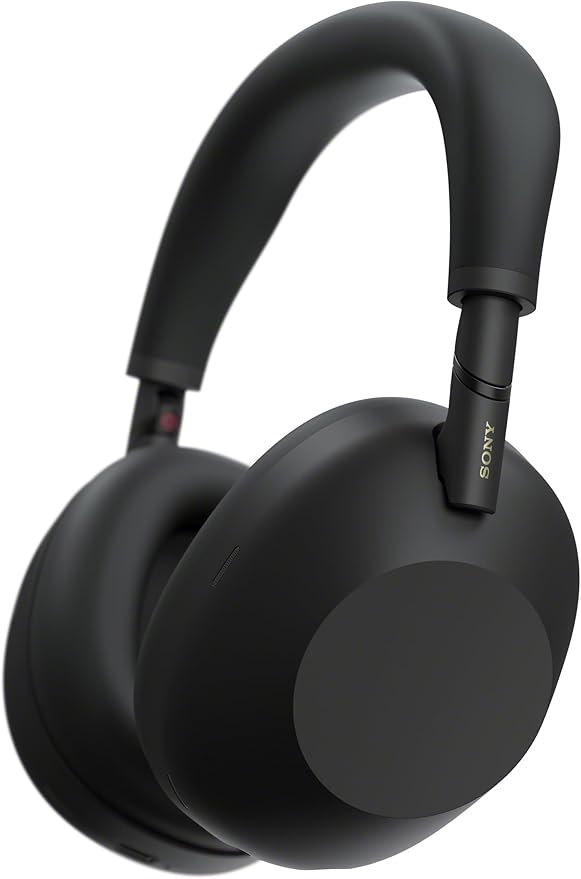
The WH-1000XM6 is the over-ear we recommend first to iPhone and iPad owners not committed to AirPods Max. Its noise cancelling is among the strongest you can buy, the sound is full and confident over AAC with a proper equaliser in Sony’s iOS app, and battery life is rated at up to thirty hours with cancelling on. The folding design travels well, and multipoint connects two devices at once — your iPad and a work laptop, for example. Our guide to Bluetooth multipoint explains why that matters more than most spec-sheet features.
The caveats are the usual Sony-on-Apple ones. LDAC is onboard and completely unused by your iPhone. There is no Find My integration and no automatic Apple switching, so moving between devices means the Bluetooth menu or multipoint. Call quality is strong, helped by Sony’s multi-microphone system. None of that stops the XM6 being the best all-round over-ear here: it wins on the fundamentals, and the fundamentals are what you hear every day.
Bose QuietComfort Ultra Headphones (2nd Gen) — best for noise cancelling and comfort

Bose built its reputation on silence, and the QuietComfort Ultra Headphones (2nd Gen) defend it. The noise cancelling is the benchmark rivals are measured against, the fit is light and balanced for long sessions, and Bose’s Immersive Audio creates a convincing out-of-head soundstage from ordinary stereo tracks — useful, because it works with any app, not only Apple’s own content. Battery life is rated at up to twenty-three hours, or up to eighteen with Immersive Audio on, and the Bose iOS app covers EQ and modes properly.
Trade-offs, honestly stated: this generation’s headline codec support targets Snapdragon Sound Android phones, so on an iPhone you listen over AAC like everyone else. No wired USB-C audio mode, battery life trails the Sony, and no automatic Apple switching or Find My. Pick the Bose when quiet and comfort outrank everything.
Beats Studio Pro — the Apple-friendly middle ground
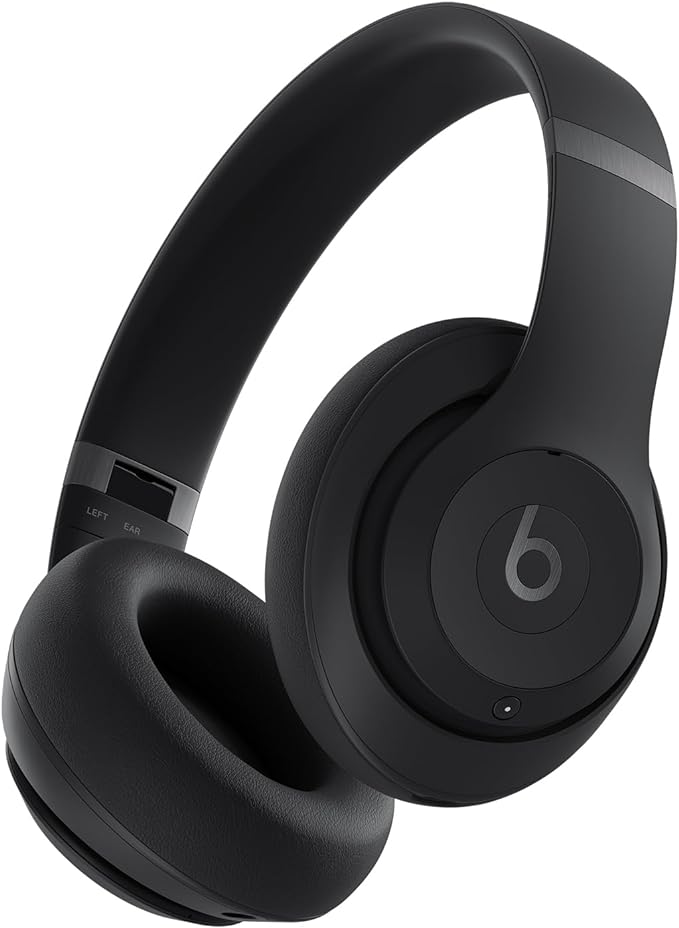
Beats is Apple’s own brand, and the Studio Pro is the pick for listeners who want most of the Apple treatment for less than AirPods Max, plus one trick the Max historically lacked: wired USB-C audio, so you can listen to lossless Apple Music from an iPhone or iPad by cable and bypass Bluetooth completely. Wirelessly you get personalised spatial audio with head tracking, one-touch pairing, Find My and automatic switching support, alongside a fully featured Android experience if your household is mixed.
Battery life is rated at up to forty hours with noise cancelling off and up to twenty-four hours with it on, the sound is energetic with strong low end, and the folding design is more bag-friendly than the AirPods Max. Versus the Max you give up the metal build, the Digital Crown, and a step of refinement in noise cancelling; versus Sony, equaliser depth and multipoint flexibility. As a bridge between the Apple garden and the wider world, nothing else sits quite where the Studio Pro sits.
Apple AirPods Max (USB-C) — best for films and Apple spatial audio
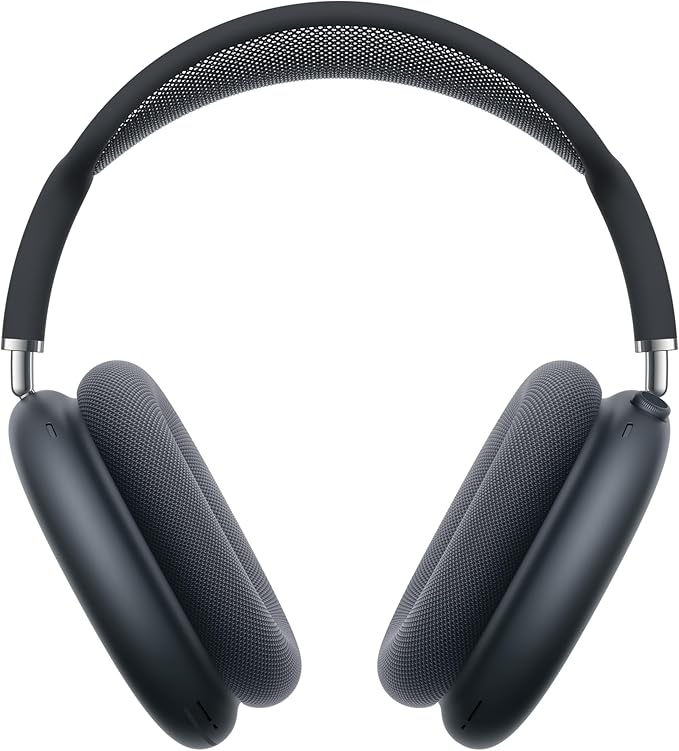
The AirPods Max is a very specific product done very well. The aluminium-and-mesh build feels like no other headphone here, the Digital Crown is the best volume control on any wireless headphone, and personalised spatial audio with head tracking turns an iPad film night into something close to a small cinema. Noise cancelling and transparency are both excellent, battery life is rated at up to twenty hours, and the current version charges over USB-C, finally matching your iPhone and iPad cables. Wired USB-C audio is also supported, the other honest route to lossless on Apple devices.
Then the compromises. The Max is heavy, and some listeners feel it on long sessions where the Bose disappears. The Smart Case protects little, and there is no equaliser. Buy it for Apple-first film and music listening and that build, knowing what it refuses to be: light, adjustable, or platform-neutral.
AirPods vs non-Apple headphones: the honest trade-offs
Strip away the marketing and the choice is ecosystem features versus audio flexibility. AirPods and, to a lesser degree, Beats give you instant pairing, automatic switching between iPhone, iPad and Mac, spatial audio in Apple apps, Find My, Audio Sharing, and settings built into iOS itself. Sony and Bose give you equalisers, adjustable ambient levels, equal or stronger over-ear noise cancelling, and real multipoint with any two devices.
Multipoint deserves a warning on iOS. AirPods do not offer standard multipoint; their automatic switching only works between Apple devices on the same account, and occasionally switches when you did not want it to. Sony and Bose multipoint works between any two Bluetooth sources, including an employer-issued Windows laptop. Neither system is strictly better — they solve different households. And current iPhones and iPads have no headphone jack at all; our explainer on the USB-C vs Lightning headphone adapter situation covers what still works, and our roundup of the best wired earbuds for iPhone covers the cable-first route.
USB-C or Lightning: charging on current models
Apple’s line has moved. The AirPods Pro 3, AirPods 4, current AirPods Max and every Beats, Sony and Bose pick in this guide charge over USB-C, the same connector as current iPhones and iPads, so one cable covers your whole kit bag. Older Lightning AirPods Max units still circulate in sales and refurbished channels; they sound the same wirelessly, but need a Lightning cable and lack the wired USB-C audio mode. Buying a Max today, choose the USB-C version and check the listing title carefully. The Pro 3 and AirPods 4 ANC cases also keep wireless charging, including Apple Watch charger compatibility.
How to choose the best headphones for your iPhone or iPad
Do you want earbuds or over-ear headphones for iPad viewing?
For films on an iPad, over-ears give you bigger sound, longer battery and better isolation, and AirPods Max or Beats Studio Pro add head-tracked spatial audio anchored to the screen. For everything portable — commuting, workouts, calls, pockets — earbuds win on size alone. Many Apple households end up with one of each; AirPods Pro 3 plus a Sony or Bose over-ear covers every scenario in this guide.
Which headphones are best for iPhone calls?
AirPods Pro 3, because iOS call handling, voice isolation and the microphone system were designed together. The Sony WF-1000XM6 and WH-1000XM6 are the strongest non-Apple alternatives, with multi-microphone noise reduction that holds up outdoors.
Are expensive headphones worth it for iPhone?
Only when the money buys something iOS can use: better noise cancelling, tuning, fit, battery, or ecosystem features. Money spent on codec badges buys literally nothing on an iPhone or iPad. Spend on the experience, not the spec sheet.
Frequently asked questions
Do LDAC or aptX headphones sound better on an iPhone?
No. iPhones and iPads only transmit Bluetooth audio over AAC and SBC, so an LDAC or aptX headphone automatically falls back to AAC. It can still sound excellent, because tuning matters more than the codec badge, but you gain nothing from the extra codec support on Apple devices.
Will Sony and Bose headphones work with an iPhone and iPad?
Yes, fully for everyday listening. They pair over Bluetooth, their iOS apps provide EQ and noise cancelling controls, and models with multipoint can connect to an iPhone and iPad or laptop at the same time. What you do not get is Apple’s own layer: automatic switching, personalised spatial audio in Apple apps, Audio Sharing and Find My integration.
Can two people listen to one iPad at the same time?
Yes, with Audio Sharing. Two sets of AirPods, or supported Beats models, can connect to one iPhone or iPad so two listeners hear the same film or music with separate volume control. Third-party headphones from Sony and Bose cannot use Audio Sharing; that feature is reserved for Apple’s H-series chips.
How do I get lossless audio from Apple Music on an iPhone?
Not over Bluetooth — every wireless connection is limited to AAC. Connect a compatible headphone by USB-C cable instead. The Beats Studio Pro and the current USB-C AirPods Max both support wired USB-C audio, which carries the lossless stream from Apple Music without Bluetooth compression.
Should I buy the USB-C or Lightning AirPods Max?
Buy the USB-C version. It charges with the same cable as current iPhones and iPads, it is the model Apple currently sells, and it supports wired USB-C audio for lossless listening. Lightning models sound the same over Bluetooth but need a different cable and miss the wired lossless mode.
Do AirPods work with an iPad as well as an iPhone?
Yes. AirPods pair to your Apple account rather than a single device, so they appear on your iPad, iPhone and Mac automatically and can switch between them. Every feature that works on iPhone, including spatial audio, Find My and Audio Sharing, works on iPad as well.

I am the founder of Sound Mavericks, where I provide the polite truth about audio equipment. I started this site because consumer electronics reviews are often too technical. Instead of using a silent lab, I test headphones, earbuds, and Bluetooth speakers in the real world – like on a noisy subway or in a busy coffee shop.
To stay independent, I buy my own review units (mostly from the United States) rather than accepting free gifts from brands. Once I finish testing a product, I sell it locally to our community. My goal is to help you understand sound quality, active noise cancellation (ANC), and battery life without the marketing hype.