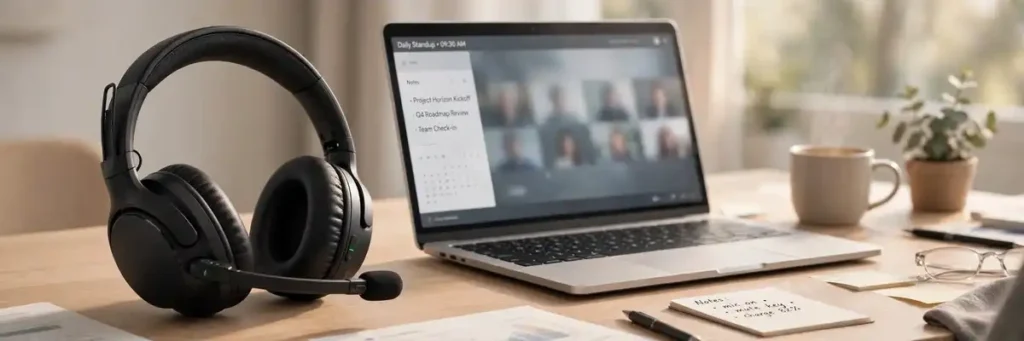
The best work from home headset is a very different product from the best work headphones. Music-first headphones like the Sony XM6 sound great on calls, but a purpose-built headset — one with a boom microphone, certified Teams/Zoom compatibility, and a stable USB or DECT connection — makes you sound clearer on every meeting and keeps you connected through a full day of back-to-back calls. After comparing call-centric headsets across professional reviews, manufacturer documentation, and owner feedback, SoundMavericks’ verdict is clear: the Jabra Evolve2 75 is the best work from home headset overall, pairing an 8-microphone system with up to 36 hours of battery life and a reliable USB adapter that just works with your laptop.
If your workday runs on Zoom and Teams calls, a boom mic positioned near your mouth beats an integrated headphone mic every time — especially with kids, dogs, or a dishwasher running in the background. Below are the seven headsets that score highest for home-office use, followed by a buying guide built from the questions real shoppers ask: which headset has the best mic for work calls, whether wired or wireless wins for home use, and what Teams certification actually buys you.
Quick Comparison: Best Work From Home Headset
| Headset | Best for | Mic / key strengths | Battery |
|---|---|---|---|
| Jabra Evolve2 75 | Best overall | 8-mic system, ANC, Teams-certified USB connection | Up to 36 hours |
| Poly Voyager 4320 UC | Best battery and range | Noise-cancelling boom mic, Teams button | Up to 24 hours |
| Logitech Zone Wireless | Best all-day comfort | Dual MEMS mic array on boom, ANC | Up to 15 hours talk |
| JLab Go Work Gen 2 | Best budget pick | Noise-cancelling boom mic, USB dongle included | Up to 55 hours |
| Plantronics Voyager 5200 UC | Best single-ear | 4-mic noise-cancelling, WindSmart | Up to 7 hours |
| Yealink WH62 Dual Teams | Best for deskphones + PC | DECT connection, 525 ft range | Up to 14 hours talk |
| Microsoft Modern USB-C Headset | Best wired | Noise-cancelling mic, zero charging | N/A (wired) |
1. Jabra Evolve2 75 — Best Overall

SoundMavericks’ pick for the best work from home headset, and the consensus pick among the big review outlets too — TechRadar rates the Evolve2 75 as the best headset for working from home overall. The reason is the microphone system: eight microphones (including a hideaway boom arm) that are tuned to pick out your voice and reject everything else, which is exactly the difference you hear when a household with people and pets is your “office.”
- Mic: 8-microphone technology with hideaway boom arm
- Battery: Up to 36 hours
- Connection: Bluetooth 5.2 + USB-C Link 380 adapter, certified for Teams and UC platforms
- Design: On-ear, 197 g, active noise cancelling with HearThrough awareness
2. Poly Voyager 4320 UC — Best Battery Life and Range

If your home-office day involves wandering away from the desk — putting on laundry between calls, answering the door mid-meeting — the Voyager 4320 UC is the range king. Poly rates its Bluetooth range at up to 50 metres, and independent testing puts its talk time at up to 24 hours, enough to get through several days of meetings between charges. It is Microsoft Teams certified with a dedicated Teams button, and the noise-cancelling boom mic keeps your voice front and centre.
- Mic: Noise-cancelling boom mic, certified for Microsoft Teams
- Battery: Up to 24 hours talk time
- Connection: Bluetooth 5.2, USB-C adapter, up to 50 m range
- Extras: Charge stand and travel pouch included
3. Logitech Zone Wireless — Best for All-Day Comfort

The Zone Wireless is the lightest on-ear pick here at around 181 grams, with a silicone-padded headband and leatherette ear cushions that stay comfortable through a full calendar of meetings. Its dual MEMS microphone array sits on a boom you can flip up to mute, it carries Teams certification, and it supports Qi wireless charging — a genuinely nice touch on a work desk where you can drop it on a charging pad between calls. Talk time runs up to 15 hours with noise cancelling off.
- Mic: Dual MEMS mic array on flip-to-mute boom, noise-cancelling
- Battery: Up to 15 hours talk time, 2-hour recharge, Qi wireless charging
- Connection: Bluetooth + USB-A receiver (USB-C adapter included), multipoint for computer and phone
- Design: On-ear, ~181 g, active noise cancelling, Teams certified
4. JLab Go Work Gen 2 — Best Budget Work From Home Headset
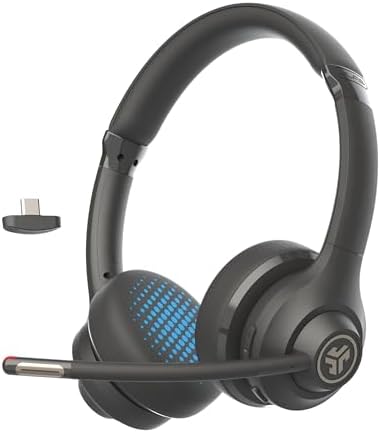
Working from home does not require a corporate budget. The Go Work Gen 2 is the best budget work from home headset we can recommend without caveats: a genuine noise-cancelling boom mic, a USB-C dongle for a rock-solid PC connection, multipoint Bluetooth so your phone stays connected too, and up to 55 hours of battery life. JLab backs it with a two-year warranty, which is rare at this tier. The trade-off is basic materials and no active noise cancelling, but for calls and comfort at a desk, it punches well above its class.
- Mic: Noise-cancelling boom mic
- Battery: Up to 55 hours
- Connection: Bluetooth 5 + USB-C dongle, multipoint pairing
- Design: On-ear, 40 mm drivers, 2-year warranty
5. Plantronics Voyager 5200 UC — Best Single-Ear Headset

Some remote workers hate sealing off both ears — you want to hear the doorbell, the kids, or your own voice naturally. The Voyager 5200 UC is the classic single-ear solution: a tiny over-ear hook weighing about an ounce, with a 4-microphone noise-cancelling system and Poly’s WindSmart technology. Voice controls let you answer calls hands-free, and the UC version ships with a BT700 Bluetooth adapter and a charging case for desk-to-room mobility. Seven hours of talk time is modest, so it suits lighter call schedules rather than back-to-back marathon days.
- Mic: 4-microphone noise-cancelling system with WindSmart
- Battery: Up to 7 hours talk time
- Connection: Bluetooth via BT700 USB adapter, up to ~98 ft range
- Extras: Voice controls, charging case, works with Teams and Zoom
6. Yealink WH62 Dual Teams — Best for Deskphone and PC Users
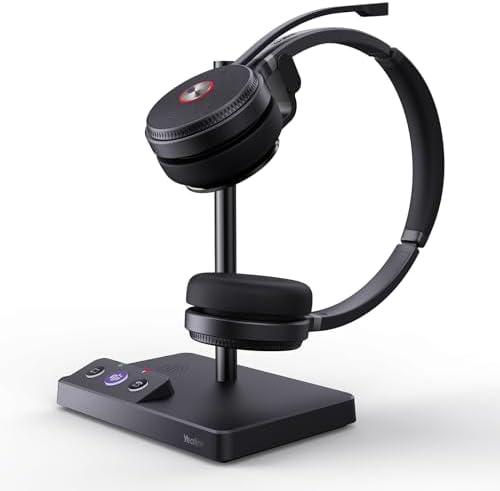
If your home office still has a deskphone — or your workflow spans a VoIP phone and a computer — a DECT headset is the answer. The Yealink WH62 Dual Teams connects to both via its base station, offers a staggering 525-foot range (fine, go take that call from the garden), and carries Teams certification. DECT is more stable and interference-free than Bluetooth in crowded wireless environments. Up to 14 hours of talk time covers even the heaviest call days.
- Mic: Noise-cancelling mic, Teams certified
- Battery: Up to 14 hours talk time
- Connection: DECT 6.0 via base station, up to 525 ft range
- Design: Dual-ear, connects to deskphone and PC simultaneously
7. Microsoft Modern USB-C Headset — Best Wired Pick

Sometimes the smartest work-from-home headset is the simplest one. A wired USB headset has no battery to charge, no Bluetooth pairing to fight, and a connection that never drops mid-sentence. The Microsoft Modern USB-C Headset is Teams certified with a noise-cancelling microphone and inline controls — including a visible mute indicator so you are never “talking on mute.” It is on-ear and lightweight enough for all-day wear, and it is the pick for anyone who works at one desk and wants call audio that just works.
- Mic: Noise-cancelling microphone with inline mute button
- Battery: None — wired USB-C
- Connection: Wired USB-C, certified for Microsoft Teams
- Design: On-ear, lightweight, inline call controls with mute status light
Headset vs Headphones: Why “Headset” Means Mic-First for Work From Home
This is the distinction that decides whether you buy the right product. In audio retail, a headset is a mic-first, call-centric product — think Jabra Evolve2, Poly Voyager, Yealink, and Logitech’s business lines. A headphone is music-first, with a mic as a secondary feature. If your priority is being heard clearly on calls, the boom mic on a true headset sits centimetres from your mouth and is acoustically tuned for voice. An integrated headphone mic sits on your ear, several inches further away, picking up more room noise and less voice.
That is why this guide looks different from our wireless headphones for work coverage (currently in draft) and our office headsets roundup: those lean toward premium listening or business-grade devices, while every pick here is a call-centric work-from-home headset built around the microphone. If you mainly need noise blocking for focus rather than call clarity, see our noise-cancelling headphones for work guide instead.
Why Microphone Quality Matters More Than ANC on Work Calls
ANC is a listener-side feature: it makes your world quieter. But on a call, your colleagues do not care how quiet your world is — they care how clear you sound. A boom mic with noise rejection (like the Jabra Evolve2 75’s 8-mic system or the Poly Voyager 4320 UC’s noise-cancelling boom) is what actually removes your background noise for them. Independent testing consistently ranks dedicated headset mics ahead of integrated headphone mics for call clarity. Treat ANC as a comfort bonus for focus time, not the headline spec.
Teams and Zoom Certification: What It Actually Means
When a headset is “Certified for Microsoft Teams,” it has passed Microsoft’s testing for reliable call control — answer, hang up, and mute from the headset itself — plus firmware compatibility with Teams. The Teams variant usually adds a dedicated Teams button. Zoom certification works similarly. Certification does not change sound quality, but it removes the small daily frictions (a mute button that does nothing, a headset Teams cannot see) that wear on remote workers. Every pick on this list is certified for, or fully compatible with, Teams and Zoom.
Wired vs Wireless Headset for Working From Home: Which Should You Choose?
Go wireless if you move around during the day — coffee runs, school pickups, walking while you talk. Prioritize battery life and range: the Poly Voyager 4320 UC’s 24-hour talk time and 50-metre range exist for exactly this. Go wired if you work at one desk and want zero maintenance — no charging, no pairing, no dropouts. The Microsoft Modern USB-C Headset is the archetype. Wireless headsets ship with a USB adapter (dongle) that connects to your computer; always use the dongle rather than the laptop’s built-in Bluetooth, because the dongle gives a more stable connection and better call audio.
Comfort for All-Day Wear: On-Ear, Over-Ear, or Single-Ear?
Comfort is personal, but the wearing style sets the baseline. Over-ear cups seal around your ears for the best isolation and long-session comfort — at the cost of heat. On-ear designs like the Jabra Evolve2 75 and Logitech Zone Wireless press on your ears instead, running cooler and lighter; the best ones stay comfortable for hours. Single-ear designs like the Voyager 5200 UC leave one ear open so you can hear your surroundings — ideal if you need to stay aware of the household. If you wear glasses, pay attention to clamping force; on-ear and single-ear designs tend to be friendlier than tight over-ear seals.
The Bottom Line
For most remote workers, the Jabra Evolve2 75 is the best work from home headset: top-tier mic quality, real ANC for focus time, and battery life that ignores your calendar. Stretch your legs between calls? The Poly Voyager 4320 UC buys range and endurance. On a budget? The JLab Go Work Gen 2 covers the essentials without compromise where it counts. And if you want the simplest possible setup, a wired Microsoft Modern USB-C Headset will never let you down mid-sentence.
Frequently Asked Questions
What is the best work from home headset for Zoom calls?
The Jabra Evolve2 75 is our top pick for Zoom calls: an 8-microphone system with a boom arm, up to 36 hours of battery, and a USB adapter that gives a stable connection to your computer. It is also Zoom compatible and Teams certified, so call controls work natively in both apps.
Do I need a boom mic for working from home?
Not strictly, but it is the single biggest upgrade for call clarity. A boom mic sits close to your mouth and is tuned for voice, so callers hear less of your room and more of you. In quiet rooms an integrated mic is fine; with household noise, a boom mic is noticeably better.
Is a wired or wireless headset better for working from home?
Wireless wins if you move around the house during calls — look for long battery life and range, like the Poly Voyager 4320 UC. Wired wins if you sit at one desk: nothing to charge, pair, or drop. Either way, use the included USB dongle rather than your laptop’s built-in Bluetooth for the most reliable calls.
Are work-from-home headsets different from call center headsets?
They overlap, but home headsets tend to be friendlier for mixed use: better music quality, nicer designs, and multipoint connections for laptop plus phone. Call center headsets (see our noise-cancelling work headphones guide) are usually cheaper, bulkier, and optimized purely for talk.
Can I use a work from home headset for music too?
Yes — all the picks here play music, and models like the Jabra Evolve2 75 and Logitech Zone Wireless have 40 mm-class drivers and ANC that make music genuinely enjoyable. They will not match dedicated music headphones for pure sound quality, but for a workday soundtrack they are more than good enough.

I am the founder of Sound Mavericks, where I provide the polite truth about audio equipment. I started this site because consumer electronics reviews are often too technical. Instead of using a silent lab, I test headphones, earbuds, and Bluetooth speakers in the real world – like on a noisy subway or in a busy coffee shop.
To stay independent, I buy my own review units (mostly from the United States) rather than accepting free gifts from brands. Once I finish testing a product, I sell it locally to our community. My goal is to help you understand sound quality, active noise cancellation (ANC), and battery life without the marketing hype.