The best wireless headphones for work are not the same as the best wireless headphones, period. A great-sounding pair can still be a terrible work tool if its microphones make you sound like you are calling from inside a wind tunnel, or if it cannot stay connected to your laptop and phone at the same time. After cross-referencing professional reviews, call-quality test data, and owner feedback across retailers, SoundMavericks’ verdict is clear: the Sony WH-1000XM6 is the best wireless headphone for work overall, combining class-leading noise cancelling with multipoint connectivity, a genuinely good call mic, and comfort that survives a full workday.
Work headphones live or die on a different scorecard than music headphones. Microphone clarity on Zoom and Teams calls, multipoint Bluetooth that hops between your laptop and phone, all-day comfort, and noise cancelling that erases open-office chatter matter far more than soundstage or bass extension. Below are the seven over-ear wireless headphones that score highest on the work-specific criteria — followed by a buying guide built from the questions real shoppers ask, including what makes the best wireless headphones for work calls, meetings, and working from home.
Quick Comparison: Best Wireless Headphones for Work
| Headphones | Best for | Work strengths | Battery |
|---|---|---|---|
| Sony WH-1000XM6 | Best overall | 12-mic ANC, multipoint, excellent call quality | 30 hours |
| Bose QuietComfort Ultra Headphones (2nd Gen) | Blocking office noise | Top-tier ANC, featherweight comfort | 30 hours |
| Sony WH-1000XM5 | Best value flagship | 4-mic calls, multipoint, proven comfort | 30 hours |
| Jabra Evolve2 85 | Work calls & meetings | UC/Teams certified, 10-mic array, busy light | 37 hours |
| Apple AirPods Max (USB-C) | Apple users | Seamless Apple switching, strong transparency | 20 hours |
| Sennheiser Momentum 4 Wireless | Battery life | 60-hour battery, clear calls, aptX Adaptive | 60 hours |
| Soundcore Space Q45 | Under $100 | Adaptive ANC, multipoint, LDAC | 50 hours |
1. Sony WH-1000XM6 — Best Overall Wireless Headphones for Work
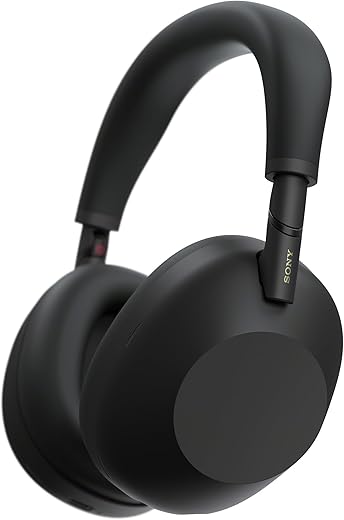
The SoundMavericks verdict: the WH-1000XM6 is the most complete work headphone you can buy. Sony’s latest flagship pairs a 12-microphone noise cancelling system — driven by the new QN3 processor — with a redesigned, more comfortable fit and call quality that professional reviewers consistently rate among the best on any consumer headphone. Multipoint connects to your laptop and phone simultaneously, and the 30-hour battery with ANC on easily covers a full work week of calls.
What sets it apart for work specifically is how the pieces combine. The ANC erases the exact mid-frequency noise — human voices, keyboard clatter, HVAC hum — that ruins focus in open offices. The mic system isolates your voice from background noise on calls well enough that colleagues stop asking you to repeat yourself. And Speak-to-Chat automatically pauses when you start talking to a coworker, which sounds like a gimmick until you use it at your desk. If you only buy one pair for work, this is the one. For the full model-by-model breakdown, see our Sony WH-1000XM4C vs XM5 vs XM6 comparison.
- Why it works for work: best-in-class ANC for offices, 12 mics for clear calls, multipoint, 30-hour battery, all-day comfort redesign.
- Watch out for: it is a flagship with a flagship price; there is no official water resistance rating.
2. Bose QuietComfort Ultra Headphones (2nd Gen) — Best for Blocking Office Noise

The SoundMavericks verdict: if your work problem is noise — the open-plan office, the chatty coworker, the espresso machine — Bose remains the answer. The second-generation QuietComfort Ultra refines Bose’s legendary noise cancelling with spatial audio, and the lightweight clamp is the easiest fit in this roundup for wearing from your first standup to your last email. Call quality is strong for a consumer headphone, with a mic system tuned to reject steady background noise.
Choose the Bose over the Sony if comfort is your number-one criterion or if you find Sony’s ANC pressure fatiguing. The tradeoff: the Bose mic is not quite as composed as the Sony’s in loud, chaotic environments, and power users may miss Sony’s deeper app customization. But for pure “shut out the office and get to work” performance, nothing here beats it.
- Why it works for work: elite noise cancelling, the most comfortable long-wear fit here, spatial audio for immersive focus sessions.
- Watch out for: call mic slightly behind the Sony in noisy rooms; fewer app tweaks than the competition.
3. Sony WH-1000XM5 — Best Value Flagship for Work

The SoundMavericks verdict: the previous-generation Sony flagship is the smart-money pick for work. The WH-1000XM5 keeps nearly everything that matters for the office — excellent ANC, a four-microphone call system that was the best in its class at launch, multipoint, and a 30-hour battery — and it now routinely sells well under its original flagship tier. You give up the XM6’s redesigned comfort and 12-mic array, but for desk work and video calls the difference is smaller than the spec sheet suggests.
This is the pick for anyone who wants flagship work performance without paying launch-day money. Pair it with our buying advice below on mic technique — speaking slightly off-axis from the mic, keeping firmware updated — and colleagues will never know you bought the “old” model. Note that Sony’s naming is confusing: the XM4C is a newer 2026 refresh, and our XM4C vs XM5 vs XM6 comparison untangles the whole lineup.
- Why it works for work: flagship-level ANC and call quality, multipoint, 30-hour battery — now at a mid-tier street price.
- Watch out for: it does not fold flat; the XM6 is noticeably more comfortable for very long days.
4. Jabra Evolve2 85 — Best Wireless Headphones for Work Calls & Meetings

The SoundMavericks verdict: the Evolve2 85 is the only pick here designed for calls first and music second — and it shows. This is a business-grade UC headset certified for Microsoft Teams (with a dedicated Teams button on the MS variant), with a 10-microphone array engineered to make your voice cut through, a physical busy light that tells coworkers you are on a call, and a boom-less design that still manages excellent voice pickup. If your workday is back-to-back meetings rather than back-to-back playlists, this is your pick.
The tradeoffs are honest ones. Music sounds perfectly fine but not flagship-fun — the tuning is tuned for voice clarity, not bass. And the design is office-professional rather than lifestyle-sleek. But Jabra rates battery life at up to 37 hours, it connects to your laptop via an included USB adapter for rock-solid call stability (a genuinely underrated feature), and the busy light alone has saved more meetings than any ANC spec ever will. If your job is mostly calls, skip the consumer flagships and buy the tool built for the job. For dedicated office gear, also see our best office headsets roundup.
- Why it works for work: Teams/UC certification, 10-mic call system, busy light, USB adapter for stable laptop calls, 37-hour battery.
- Watch out for: music tuning is workmanlike, not exciting; bulkier than consumer flagships.
5. Apple AirPods Max (USB-C) — Best Wireless Headphones for Work for Apple Users

The SoundMavericks verdict: if your work life runs on a Mac, iPhone, and iPad, nothing integrates like the AirPods Max. Automatic switching between Apple devices is genuinely seamless — take a call on your iPhone mid-Zoom and it just works — and the transparency mode remains the most natural-sounding in the business, so you can hear a coworker without removing the headphones. Computational audio keeps call quality consistently good, and the current USB-C model fixes the old Lightning charging annoyance.
The honest caveats: 20 hours of battery is the shortest here (still two full workdays), the weight is noticeable on very long days, and the price sits at the top of this list. Android and Windows users should look elsewhere — the magic is in the Apple ecosystem. But for the Apple-first professional, the frictionless device hopping saves more daily friction than any spec on this page.
- Why it works for work: best-in-class Apple device switching, superb transparency mode, strong ANC, USB-C charging.
- Watch out for: heaviest pick here; shortest battery life; the premium only makes sense inside the Apple ecosystem.
6. Sennheiser Momentum 4 Wireless — Best Battery Life for Work
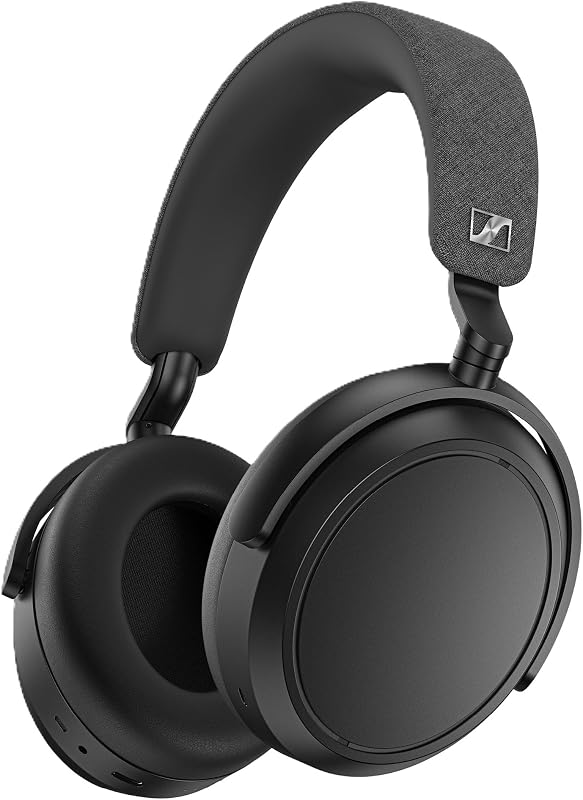
The SoundMavericks verdict: the Momentum 4’s headline number — 60 hours of battery with ANC on — is roughly double every other flagship here, and for work that is not a party trick. It means charging roughly once every two weeks instead of twice a week, and never thinking about battery before a travel day. Call quality is clear, the ANC is strong (a notch below Sony and Bose but well above average), and aptX Adaptive support gives Android users excellent wireless sound quality on breaks.
The design is understated and the fold-flat earcups travel well. Comfort is good for long sessions, though the clamp is firmer than the Bose. If your nightmare scenario is headphones dying mid-meeting, or you simply hate managing another charging cable, the Momentum 4 ends the conversation. It is the endurance athlete of work headphones.
- Why it works for work: 60-hour battery (double the flagships), clear call mics, strong ANC, folds flat for the commute.
- Watch out for: firmer clamp than Bose; touch controls take a day to learn.
7. Soundcore Space Q45 — Best Wireless Headphones for Work Under $100
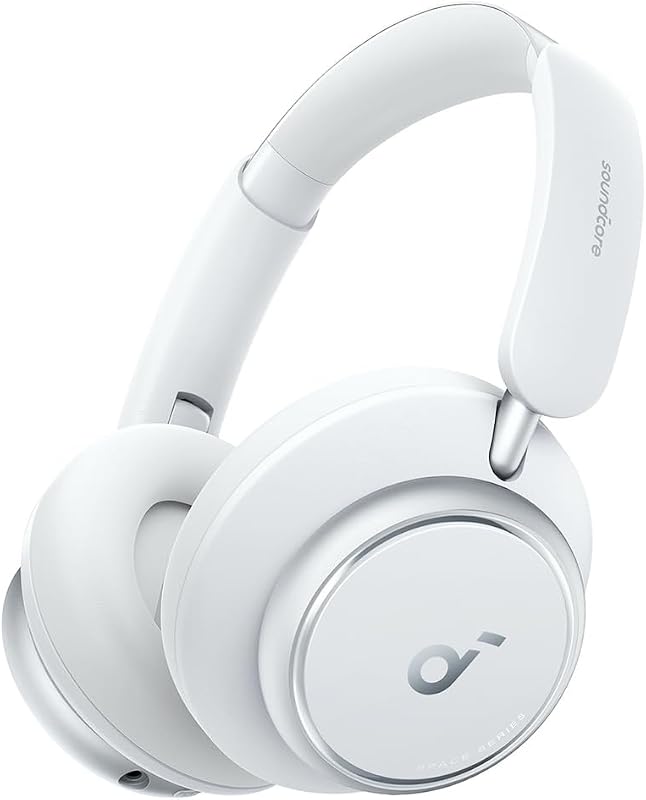
The SoundMavericks verdict: the Space Q45 is proof that work-ready headphones no longer require a flagship budget. Adaptive ANC that adjusts to your environment, multipoint for laptop-plus-phone, LDAC for high-quality wireless audio, and a 50-hour battery — that feature set was flagship-only a few years ago. Call quality is solidly good rather than great, which is the honest line at this tier, but for quiet home offices it is more than enough.
This is the pick for students, new hires kitting out a home office, or anyone who wants 80% of the flagship work experience for a fraction of the cost. The companion app is genuinely useful, with a hearing-test-based custom EQ and adjustable ANC levels. You give up the last 10% of noise cancelling and mic refinement — but at this tier, that is the right trade to make.
- Why it works for work: adaptive ANC, multipoint, 50-hour battery, LDAC — flagship features at a budget-tier price.
- Watch out for: call mic is good, not great; ANC a step behind Sony/Bose in loud offices.
Best Wireless Headphones for Work Calls: What Actually Matters
When shoppers search for the best wireless headphones for work calls, they are really asking one question: will the people on the other end hear me clearly? Everything else is secondary. Here is how to judge, in order of importance:
Microphone quality beats everything
Your colleagues’ experience of you is 100% microphone. Look for multi-microphone arrays with beamforming and AI noise rejection — the Sony WH-1000XM6’s 12-mic system and the Jabra Evolve2 85’s 10-mic array are the standouts here. Published call tests from RTINGS and SoundGuys consistently show that flagship multi-mic systems keep your voice intelligible in noisy rooms where single-mic designs fall apart. If your calls happen in a quiet home office, any pick on this list is fine; if you call from open offices or cafes, prioritize the mic.
Multipoint is non-negotiable
Multipoint Bluetooth keeps your headphones connected to two devices at once — typically your laptop and your phone — and switches automatically. A call comes in on your phone while you are in a Zoom meeting; with multipoint, you just answer. Without it, you are re-pairing mid-meeting. Every pick in this roundup supports multipoint (or Apple automatic switching) except in the most basic sense — confirm it before buying any headphone not on this list.
ANC that targets voices
For focus, you want noise cancelling tuned for mid-frequency sound — human voices, keyboard clatter — not just airplane drone. Sony’s and Bose’s current systems are the benchmarks precisely because they attack that frequency range. This is also why over-ears beat earbuds for office focus: the physical seal adds passive isolation on top.
All-day comfort
Clamping force, earcup depth, and weight decide whether headphones survive an 8-hour day. This is the one spec no review fully captures for you — head shapes vary — but consistently light models with deep earcups (Bose QC Ultra, Sony XM6) are the safest bets. If you wear glasses, prioritize models reviewers specifically call out as glasses-friendly.
Best Wireless Headphones for Work From Home
Working from home changes the equation. The enemy is not office chatter — it is the doorbell, the dog, the dishwasher, and the neighbor’s leaf blower. The best wireless headphones for work from home need strong ANC for unpredictable noise, a mic that rejects household chaos, and comfort for days when the headphones never leave your head.
Our top WFH pick is the Sony WH-1000XM6: its ANC adapts to your environment and its mic system is the best here at keeping your voice clear while suppressing what is happening around you. The Bose QuietComfort Ultra (2nd Gen) is the comfort-first alternative for marathon wear. And if your home office doubles as your music-listening room, the Sennheiser Momentum 4‘s 60-hour battery means one less thing to charge.
One WFH-specific tip: enable sidetone (sometimes called “hear your own voice”) in your headphone app if available. Hearing yourself naturally at low volume stops you from shouting on calls — your household will thank you. And if your work is call-center style — high call volume, need for a mute button and all-day mic reliability — our noise cancelling headphones for work and call centers guide covers purpose-built headsets instead.
Best Wireless Headphones for Work Meetings
Meetings are the stress test. The best wireless headphones for work meetings need three things: a mic that keeps you intelligible when the meeting runs long and the room gets loud, platform compatibility with Zoom and Microsoft Teams, and multipoint so a phone call does not derail the meeting.
For meeting-heavy roles, the Jabra Evolve2 85 is the purpose-built answer — UC/Teams certification, a busy light, and a USB adapter that keeps the laptop connection rock-solid when Bluetooth gets flaky in crowded offices. For everyone else, the Sony WH-1000XM6 and WH-1000XM5 handle Teams and Zoom calls excellently over standard Bluetooth, and their multipoint means your phone stays connected too.
A practical note: most Bluetooth instability on work calls comes from the laptop’s Bluetooth stack, not the headphones. If your calls drop or stutter, a USB Bluetooth adapter (Jabra includes one; others are inexpensive) or the included 3.5mm cable as a wired fallback solves it instantly. Every pick here except the AirPods Max includes a wired cable for exactly this reason.
Over-Ear Headphones vs Earbuds for Work
Over-ears win for work in most cases: better passive isolation, bigger batteries, and more room for microphone arrays. But earbuds have their place — they are lighter, more discreet on camera, and better for people who overheat in over-ears. If you lean earbud, our best noise cancelling earbuds for phone calls and work calls guide covers the top options, and our best earbuds for talking on the phone roundup goes deeper on call-specific picks. Many professionals end up with both: over-ears at the desk, earbuds in the bag.
Frequently Asked Questions
Are wireless headphones good for work calls?
Yes — the current generation of flagship wireless headphones handles work calls very well. Multi-microphone arrays with AI noise rejection keep your voice clear on Zoom and Teams, and models like the Sony WH-1000XM6 and Jabra Evolve2 85 are specifically engineered for it. For mission-critical call volume, a UC-certified headset like the Evolve2 85 is the safest choice.
What is multipoint, and why does it matter for work?
Multipoint Bluetooth keeps your headphones connected to two devices simultaneously — usually your laptop and your phone — and switches between them automatically. It matters because work means interruptions: a phone call during a Zoom meeting, a video on your phone during a break. Without multipoint, every switch means manual re-pairing.
Can I use these headphones with Zoom and Microsoft Teams?
Yes. All the headphones in this roundup work with Zoom, Teams, Google Meet, and Webex over standard Bluetooth. The Jabra Evolve2 85 goes further with official UC/Teams certification and a dedicated Teams button on the MS variant, which guarantees compatibility and unlocks platform-specific features.
How long should the battery last for a workday?
Anything over 20 hours covers a full work week of calls without mid-week charging anxiety. The Sennheiser Momentum 4’s 60 hours is the standout — roughly two weeks of workdays per charge. As a rule of thumb, prioritize 30+ hours if you travel or hate charging cables.
Do I need a boom mic for work calls?
Not anymore. Modern multi-mic arrays on flagship headphones deliver clear call quality without a boom — which is why over-ear consumer headphones now dominate home offices. A boom mic still wins in genuinely loud environments (call floors, airports), which is exactly what our call-center headset guide is for.
Are noise cancelling headphones better for open offices?
Yes — measurably. ANC tuned for mid-frequency noise reduces the voices and clatter that break concentration, and published testing shows the Sony and Bose flagships lead here. Pair ANC with focus music or brown noise and an open office becomes manageable.
The Final Verdict
The best wireless headphones for work in 2026 is the Sony WH-1000XM6 — it is the only pick here that is best-in-class at all three work disciplines: blocking noise, carrying calls, and disappearing on your head for eight hours. Buy the Bose QuietComfort Ultra (2nd Gen) if comfort is king, the Sony WH-1000XM5 if you want flagship performance for less, the Jabra Evolve2 85 if your calendar is wall-to-wall meetings, the AirPods Max if you live in Apple’s ecosystem, the Sennheiser Momentum 4 if you never want to think about charging, or the Soundcore Space Q45 if your budget stays under $100.
Whichever you choose, prioritize the mic, multipoint, and comfort over sound specs — those are what your workday actually runs on. And if your work skews toward dedicated office gear rather than do-everything headphones, our best office headsets guide covers the business-built alternatives.

I am the founder of Sound Mavericks, where I provide the polite truth about audio equipment. I started this site because consumer electronics reviews are often too technical. Instead of using a silent lab, I test headphones, earbuds, and Bluetooth speakers in the real world – like on a noisy subway or in a busy coffee shop.
To stay independent, I buy my own review units (mostly from the United States) rather than accepting free gifts from brands. Once I finish testing a product, I sell it locally to our community. My goal is to help you understand sound quality, active noise cancellation (ANC), and battery life without the marketing hype.