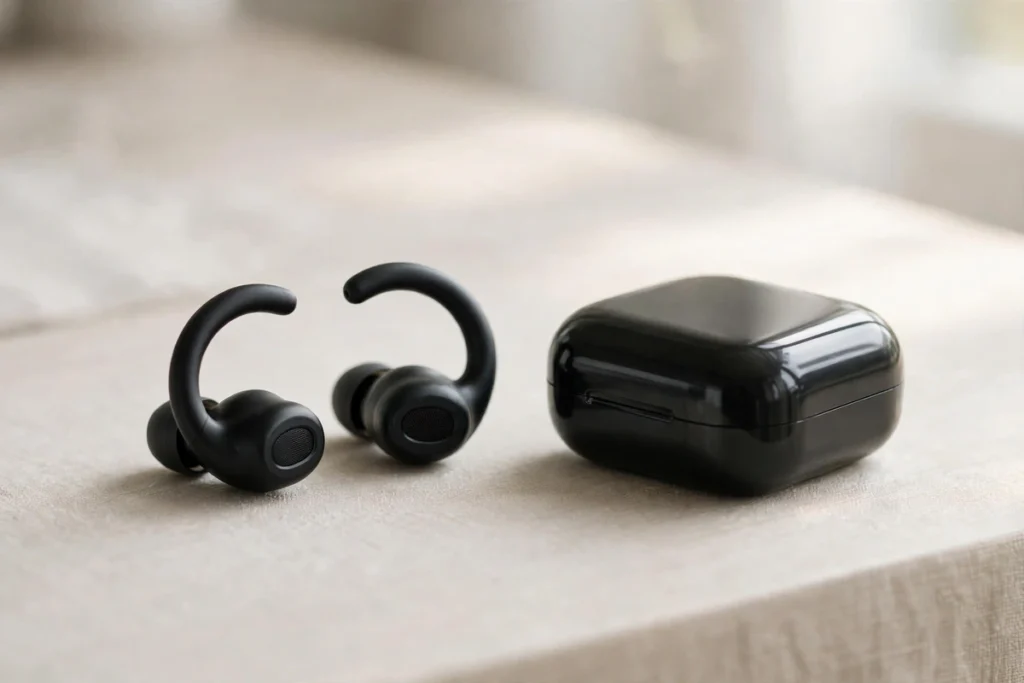
The Sony LinkBuds Clip (WF-LC900) is Sony’s first clip-on earbud. Instead of a tip pushed into your ear canal, a small node rests at the canal entrance and a stiff bridge loops over the ear, so nothing seals and nothing blocks the world out. Sony sells it in Black, Green, Greige and Lavender, and the Clip is now listed on Amazon US.
This is a research review. We have not tested the LinkBuds Clip hands-on, so the verdict below is built from Sony’s published specifications, the verified Amazon US listing, and hands-on reviews. Where a figure is Sony’s rating rather than a measurement, we say so, and the score is provisional until our own testing lands.

Sony LinkBuds Clip 7.2/10 provisional
Why you: you want music, podcasts and calls running all day without sealing your ears, so traffic, colleagues and doorbells stay audible while you listen.
Trade-off: there is no noise cancelling and no seal, so bass stays light and loud places win. The case also charges by cable only.
10 mm driver · 9 h buds / 37 h with case · Bluetooth 5.3 multipoint · IPX4 · 6.4 g per bud
Design and fit: a clip, not a plug
Each bud splits into two parts joined by a bridge. The glossy front node sits at the opening of your ear canal, the driver housing rests just outside it, and the bridge between them is deliberately stiff. Sony wants the clip to grip the same way every time rather than flex into a slightly different position, and early testers say the fit takes a day or two to learn. Once the motion clicks, the buds stay put and feel airy in a way sealed tips never do: no canal pressure, no plugged-ear echo of your own voice, and at 6.4 g per bud very little weight to notice. Sony includes a set of Fitting Cushions in the box for smaller ears that need extra grip.
The case is a rounded square with a glossy lid and a rubberised base, a USB-C port and reset button on the back, and an LED up front. It is a touch larger than the slimmest rival cases, so tight pockets notice it, though at about 42 g it never feels heavy. Sony launched the Clip in India earlier in 2026 at the premium end of the open-ear segment, and the design language matches that position: tidier and more jewellery-like than most clip-ons, closer in spirit to the Bose than to the budget end of the category. The buds carry an IPX4 rating, enough for sweat and light rain. Four colours (Black, Green, Greige, Lavender) run the same hardware; the Amazon US listing verified for this review is the Black version.
Sony LinkBuds Clip specifications
| Product | Sony LinkBuds Clip (WF-LC900) |
| Design | Open-ear clip-on, stiff bridge, Fitting Cushions included |
| Driver | 10 mm dynamic, 20 Hz to 20 kHz |
| Bluetooth | 5.3, multipoint (two devices), about 10 m range |
| Codecs | SBC, AAC, plus DSEE upscaling and 360 Reality Audio in the app |
| Battery | Up to 9 hours per charge, up to 37 hours with the case, up to 4 hours talk time |
| Charging | USB-C case, about 1.5 hours; 3-minute quick charge for about 1 hour of playback; no wireless charging |
| Water resistance | IPX4 (buds) |
| Weight | 6.4 g per bud; case about 42 g |
| App | Sony Sound Connect, 10-band EQ, three listening modes |
| Check Price | Check Price on Amazon |
Sound quality: clear voices, light bass
A single 10 mm driver per bud does the work, with Sony’s DSEE processing restoring some of the high-frequency detail that compressed streams throw away. Hands-on reviews land in the same place: the tuning is balanced and clean, vocals sit front and centre, and separation stays tidy on busy tracks. Podcast and audiobook voices come through especially well, and the Voice Boost listening mode pushes speech further forward when you are somewhere noisy.
The limits are physics, not tuning. An open driver sitting outside the canal cannot move air the way a sealed bud does, so sub-bass has presence without punch. Bass-heavy electronic tracks sound energetic but thin at the bottom, and every tester who tried them said the same. With spatial content in the Sound Connect app, 360 Reality Audio widens the presentation in a way that suits the open fit, since none of the effect depends on a seal. If your listening is mostly pop, rock, acoustic and spoken word, the Clip covers it well. If deep low end is the reason you listen, no clip-on at any price fixes that, and a sealed bud will suit you better.
Noise cancelling: none, and that is the point
The Clip has no active noise cancelling and no passive seal. Our noise cancelling score of 2.0 says exactly that, and it is not a mark against the design: blocking noise is the one job these buds refuse to do. You hear traffic before you cross the road, a colleague saying your name, a child in the next room. That awareness is the entire reason the product exists, and it is why open-ear buds keep growing while sealed buds fight over decibels.
What Sony adds instead is control over how open the sound feels. A double tap on a bud cycles three listening modes. Standard is the everyday setting. Voice Boost lifts speech so calls, podcasts and lyrics stay clear at lower volume. Sound Leakage Reduction trims the high frequencies that escape sideways, so the person next to you on a train hears less of your music. None of this quiets the world for you. In genuinely loud places (a packed platform, a busy road) the honest answer from reviewers is that music loses and volume is your only tool, which is the trade every open-ear buyer signs up for.
Call quality: a bone conduction sensor does the heavy lifting
Calls are where Sony spent real engineering money. Each bud carries dual microphones plus a bone conduction sensor that picks up the vibration of your voice directly, and Sony’s Precise Voice Pickup processing uses AI trained on voice and noise samples to separate your speech from the street around you. The open design helps in one quiet way too: you hear your own voice naturally, so you stop shouting into calls the way sealed buds make people do.
Tester reports are consistent. In quiet rooms and offices, callers sound natural and clear. Outdoors with moderate background noise, speech stays usable and intelligible. In very loud surroundings the processing starts to lose, which matches every rival in this class. For a bud with no boom and no seal, that is a strong result, and it is a big part of why the Clip scores well despite the missing ANC.
Battery and charging: 9 hours, and the case earns its size
Sony rates the buds at up to 9 hours of music per charge and up to 37 hours in total with the case, with talk time rated at up to 4 hours. Hands-on testing landed close to 8 hours of playback, a fair result for buds this small. A 3-minute charge returns about an hour of listening, and the case refills over USB-C in about 1.5 hours. The case holds roughly three full recharges in reserve, which is the honest reason it is not the slimmest case in this class.
Two omissions stand out at this level. There is no wireless charging, so the case always needs a cable, and there is no wear detection, so taking a bud off does not pause your music. Neither sinks the product, but both are features rivals manage, and they are counted in our Value score rather than hidden.
App, controls and multipoint
The Sony Sound Connect app covers setup, firmware, the three listening modes and a 10-band equaliser with presets (Heavy, Clear, Hard, Soft) plus custom slots. DSEE and 360 Reality Audio live there too. Tap controls sit on both buds, and a double tap switches listening modes without reaching for your phone, which turns out to be the control you use most: Voice Boost at your desk, Leakage Reduction on the train, Standard everywhere else.
Multipoint is the quiet headline feature. The Clip holds two Bluetooth connections at once, so it can sit on your laptop for a video call and your phone for everything else, switching without a trip through pairing menus. Testers who lived with it singled this out as the feature they would miss most on cheaper rivals, several of which still make you reconnect by hand.
LinkBuds Clip vs Soundcore AeroClip 2 vs Bose Ultra Open (2nd Gen)
Three clip-ons, three priorities. The Soundcore AeroClip 2, which we scored 8.4, is the feature-stacked option with LDAC and HearID sound personalisation. The Bose Ultra Open (2nd Gen), also 8.4 in our testing, is the premium build with Immersive Audio and a wireless charging case. The Sony is the call-and-comfort pick: the best voice pickup hardware of the three and the longest bud battery, at the cost of hi-res codecs and case charging tricks.
| Product | Battery (buds / with case) | Standout feature | Our score | Check Price |
|---|---|---|---|---|
| Sony LinkBuds Clip | 9 h / 37 h | Bone conduction voice pickup, 3 tap-to-switch modes | 7.2 (provisional) | Check Price |
 Soundcore AeroClip 2 | 8 h / 32 h | LDAC hi-res audio, HearID personalisation | 8.4 | Check Price |
 Bose Ultra Open Earbuds (2nd Gen) | 9 h / 28 h | Immersive Audio, wireless charging case | 8.4 | Check Price |
Read the table honestly: the Sony is not the highest scorer here. What it offers instead is a specific mix (the longest calls-and-comfort game in the class, Sony’s app polish, and a fit that disappears) that the other two do not match head-on.
Who should buy the Sony LinkBuds Clip
Buy the Clip if your listening happens in shared spaces: an office where people talk to you, a home with kids in earshot, walks and runs on real streets. Buy it if you take calls all day and your voice matters more than your bass. Buy it if sealed tips ache after an hour, because the clip fit is the gentlest in the category.
Skip it if you commute in loud noise and expect music to win, because it will not. Skip it if wireless charging and wear detection are habits you rely on. And if the Sony name is not what draws you, the UGREEN ClipBuds Pro 2 covers the same open-ear basics for far less, while our open-ear earbuds roundup ranks the whole field in one place.
Frequently Asked Questions
Does the Sony LinkBuds Clip have noise cancelling?
No. The LinkBuds Clip has no active noise cancelling and no ear tip seal, by design. Your ears stay open to traffic, voices and announcements. Sony’s Sound Leakage Reduction mode works the other way: it reduces how much of your music other people hear.
How long does the Sony LinkBuds Clip battery last?
Sony rates the buds at up to 9 hours of music per charge and up to 37 hours in total with the charging case, with up to 4 hours of talk time. A 3-minute quick charge gives about 1 hour of playback, and the case charges over USB-C only.
Can the Sony LinkBuds Clip connect to two devices at once?
Yes. Bluetooth 5.3 multipoint keeps the Clip connected to two devices at the same time, such as a laptop and a phone, and switches between them without re-pairing.
Are the Sony LinkBuds Clip good for calls?
Yes, calls are a strength. Dual microphones, a bone conduction sensor and Sony’s Precise Voice Pickup processing isolate your voice, and hands-on testers found calls natural in quiet rooms and usable outdoors in moderate noise. Very loud surroundings remain difficult, as with every open-ear bud.
Sony LinkBuds Clip vs Soundcore AeroClip 2: which should you buy?
Choose the LinkBuds Clip for call quality, all-day comfort and the longer 9-hour bud battery. Choose the AeroClip 2, which we scored 8.4, if LDAC hi-res audio and HearID sound personalisation matter more, or if you want the higher-rated all-rounder.
Final verdict
The LinkBuds Clip is Sony doing open-ear properly: a fit you can wear all day, call hardware that punches above the category, multipoint that works the way office life actually runs, and a battery that lasts the day. The compromises are stated up front rather than buried: no noise cancelling, light bass, a cable-only case and no wear detection. Our provisional score is 7.2 out of 10, pulled down mostly by the noise cancelling bar that this design deliberately leaves empty. If awareness is what you are buying, the Clip is one of the most complete ways to buy it.

I am the founder of Sound Mavericks, where I provide the polite truth about audio equipment. I started this site because consumer electronics reviews are often too technical. Instead of using a silent lab, I test headphones, earbuds, and Bluetooth speakers in the real world – like on a noisy subway or in a busy coffee shop.
To stay independent, I buy my own review units (mostly from the United States) rather than accepting free gifts from brands. Once I finish testing a product, I sell it locally to our community. My goal is to help you understand sound quality, active noise cancellation (ANC), and battery life without the marketing hype.