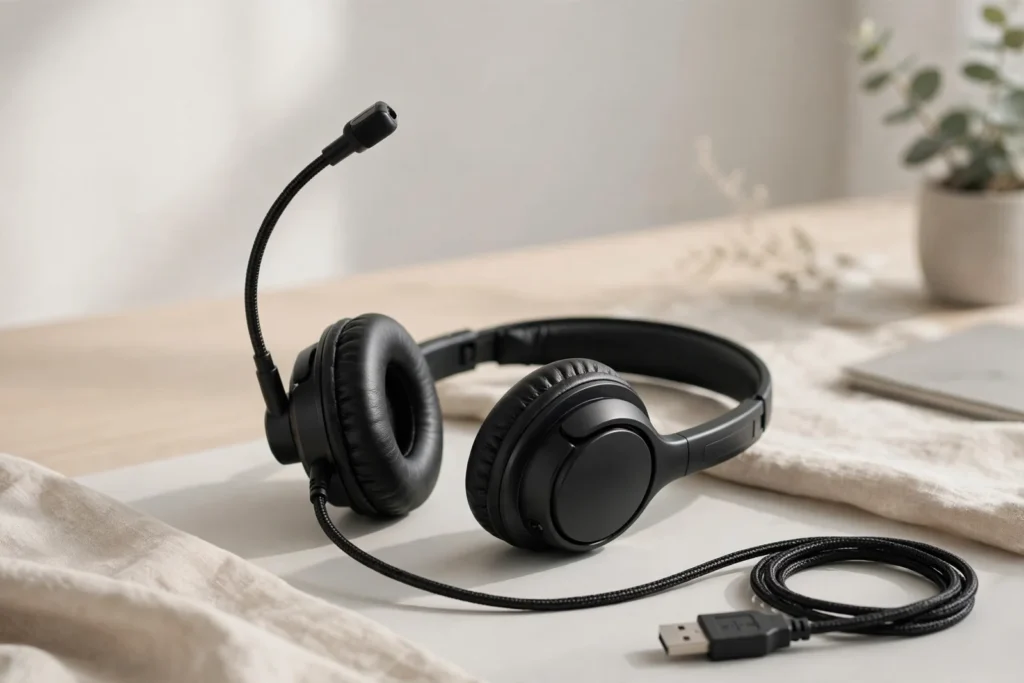
The Logitech H390 ClearChat Comfort USB headset has survived more than a decade of tech turnover for one simple reason: it does a single job — clear calls from a PC — with zero setup. This plug-and-play USB-A stereo headset pairs an adjustable noise-canceling boom microphone with inline volume and mute controls, and it has become a default pick for remote workers, call centers, and online students who need a dependable mic without paying for business-grade wireless gear.
SoundMavericks’ take, built from Logitech’s published specs, professional reviews, and a large body of owner feedback: the H390 is an excellent value for call-centric work, with honest limitations around comfort during marathon wear sessions and long-term cord durability. This guide covers the specs, what the noise-canceling mic actually does on calls, USB-A compatibility notes for modern laptops, and who should buy the H390 — or skip it.

SoundMavericks Verdict
For anyone whose workday is measured in meetings rather than playlists, the H390 is one of the safest budget buys in audio. The microphone is the reason it exists: a boom mic positioned close to your mouth with noise rejection tuned for voice, so callers hear you instead of your keyboard, your kids, or the dishwasher. Plug it into any USB-A port and it just works — no drivers, no software, no pairing. That simplicity is the entire appeal.
The trade-offs are physical, not electronic. The on-ear design presses on your ears rather than sealing around them, so comfort during 6–8 hour marathon days is genuinely mixed. And owner feedback is consistent on one point: the cord and the headband adjustment area are the durability weak points, so this is a budget headset to treat with reasonable care, not a tank. Within those limits, it is hard to beat for the money.
| Sound Quality | 7.6 |
| Comfort & Design | 7.2 |
| Mic/Call Quality | 8.2 |
| Build Quality | 6.8 |
| Value | 8.8 |
Logitech H390 Specs at a Glance
| Spec | Detail |
|---|---|
| Connector | USB-A, wired |
| Design | On-ear stereo headset |
| Microphone | Noise-canceling, adjustable boom (rotates up when not in use) |
| Controls | Inline volume and mute on the cable |
| Setup | Plug-and-play, no software or drivers required |
| Ear cushions | Leatherette |
| Model number | 981-000014 |
| Color | Black |
Design and Comfort: What to Expect for Long Wear
Comfort is where the H390 shows its budget roots, and owner feedback is genuinely mixed. The on-ear design with leatherette cushions works well for many users during 2–4 hour work sessions with breaks between meetings, while others report ear pressure, heat buildup, or soreness after 30 minutes to an hour of continuous wear. The headset is lightweight, which reduces neck strain, but clamping force and cushion depth vary with head and ear shape.
If you have larger ears or are sensitive to on-ear pressure, this design may become uncomfortable during extended sessions. The leatherette material can trap heat compared to breathable fabric alternatives. For a typical workday with gaps between calls, most users find the comfort acceptable. For marathon 6–8 hour wear days without breaks, the H390 is an honest compromise at this price point — a trade-off you accept for the mic quality and price.
Microphone Quality and Call Performance
The microphone is the H390’s reason to exist. The boom arm lets you position the mic close to your mouth for optimal pickup, and you can rotate it up and out of the way when you are just listening to audio. Logitech’s noise-canceling tuning targets voice pickup while rejecting steady background noise — keyboards, fan hum, and room tone — so your voice stays front and center for the people on the call.
Keep expectations honest: this is microphone-side noise rejection, which helps your callers. It is not active noise cancellation for your ears — the H390 has no ANC. That distinction matters if you buy for the wrong reason: see our explainer on active noise cancellation vs passive isolation for what each technology actually does. If clear mic pickup is the priority, also compare our headphones with microphones for clear calls for music-first alternatives. The H390’s boom mic will outperform an integrated headphone mic in noisy rooms, full stop.
Plug-and-Play Setup and USB-A Compatibility
The H390 uses a USB-A connector. Plug it into any USB-A port and it is recognized as an audio device immediately — no drivers, no software, no pairing rituals. That simplicity is why IT departments and call centers buy it by the box.
One compatibility check before buying: USB-A is standard on most desktop PCs and older laptops, but increasingly absent on newer thin-and-light laptops and tablets that only offer USB-C ports. If you only have USB-C, you will need a USB-C to USB-A adapter or hub. And because this is a wired headset with a fixed cable, your movement is tethered to your computer — if you need to walk around during calls, a wireless option would serve you better.
Inline Controls and Everyday Use
The cable carries a small inline pod with volume and mute controls, so you can adjust levels or mute yourself without fumbling through app settings mid-call. It is a small thing that becomes a daily convenience during back-to-back meetings — muting before the doorbell rings takes one press, not a frantic click through a meeting window. The controls work at the system level, so they function across Zoom, Teams, Meet, and any other conferencing app.
Build Quality and Durability: The Honest Weak Points
This is the section where honesty matters most. Long-term owner feedback points to two recurring weak points: the cord (wear where it flexes, particularly around the inline control pod) and the headband adjustment area where the sliders meet the band. Some units run for years; others develop a break at the adjustment point within months of daily use. The plastic construction is lightweight by design, which keeps it comfortable, but it is not built like business-grade hardware.
Practical advice: treat the H390 as budget equipment. Avoid yanking the cable, rotate the boom mic rather than bending it, and don’t hang the headset by its cord. At its price, even a replacement every year or two keeps it far cheaper than premium alternatives — but go in with eyes open about what this price tier buys.
Who Should Buy the H390 — and Who Should Skip It
Buy it if: your workday is calls on a desktop PC or a laptop with USB-A ports; you want the simplest possible setup for Zoom, Teams, or classes; you are equipping a home office or call center on a budget. It is also a strong pick for online students and anyone who wants a dedicated mic that beats laptop and earbud mics in noisy rooms. If call-center-style work is the whole job, also look at our work call-center headphones guide for alternatives.
Skip it if: you only have USB-C devices and don’t want adapter clutter; you need to move around while on calls; you want music-first sound quality or active noise cancellation; or your ears are sensitive to on-ear pressure for long sessions. Wireless headsets with boom mics exist for exactly those trade-offs.
The Bottom Line
The Logitech H390 ClearChat Comfort USB headset is the budget call headset done right: a noise-canceling boom mic, true plug-and-play USB-A, and inline controls, at a price that makes it nearly disposable. SoundMavericks’ verdict is 7.7/10 — outstanding value and mic quality for the money, marked down for mixed long-wear comfort and honest durability limits. For desk-bound callers on USB-A machines, it remains one of the easiest recommendations in audio.
Frequently Asked Questions
Is the Logitech H390 good for Zoom and Teams calls?
Yes. The H390 is a strong budget choice for Zoom and Teams calls: the noise-canceling boom mic sits close to your mouth, the USB-A connection is plug-and-play with no drivers, and the inline mute control works at the system level across conferencing apps.
Does the Logitech H390 need software or drivers?
No. The H390 is fully plug-and-play — plug the USB-A connector into your computer and it is recognized as an audio device immediately, with no software or driver installation required.
Will the H390 work with a laptop that only has USB-C ports?
Not directly. The H390 uses a USB-A connector, so USB-C-only laptops need a USB-C to USB-A adapter or hub. Check your device’s ports before buying; desktops and older laptops with USB-A work out of the box.
Is the Logitech H390 comfortable for all-day wear?
It depends. The lightweight on-ear design suits most users for 2–4 hour sessions with breaks, but owner feedback reports ear pressure and heat buildup during continuous long wear. If you wear a headset for 6–8 unbroken hours daily, comfort is the H390’s honest weak spot.
Does the Logitech H390 have active noise cancellation?
No. The H390 has a noise-canceling microphone, which reduces background noise for your callers — not active noise cancellation for your ears. If you want ANC for your own listening, look at dedicated noise-cancelling headphones instead.
What does “ClearChat” mean in the H390’s name?
ClearChat is Logitech’s legacy branding for this USB headset line — the full original product name is the Logitech H390 ClearChat Comfort USB Headset. Retailers may list it simply as the Logitech H390 USB Headset; it is the same product (model 981-000014).

I am the founder of Sound Mavericks, where I provide the polite truth about audio equipment. I started this site because consumer electronics reviews are often too technical. Instead of using a silent lab, I test headphones, earbuds, and Bluetooth speakers in the real world – like on a noisy subway or in a busy coffee shop.
To stay independent, I buy my own review units (mostly from the United States) rather than accepting free gifts from brands. Once I finish testing a product, I sell it locally to our community. My goal is to help you understand sound quality, active noise cancellation (ANC), and battery life without the marketing hype.