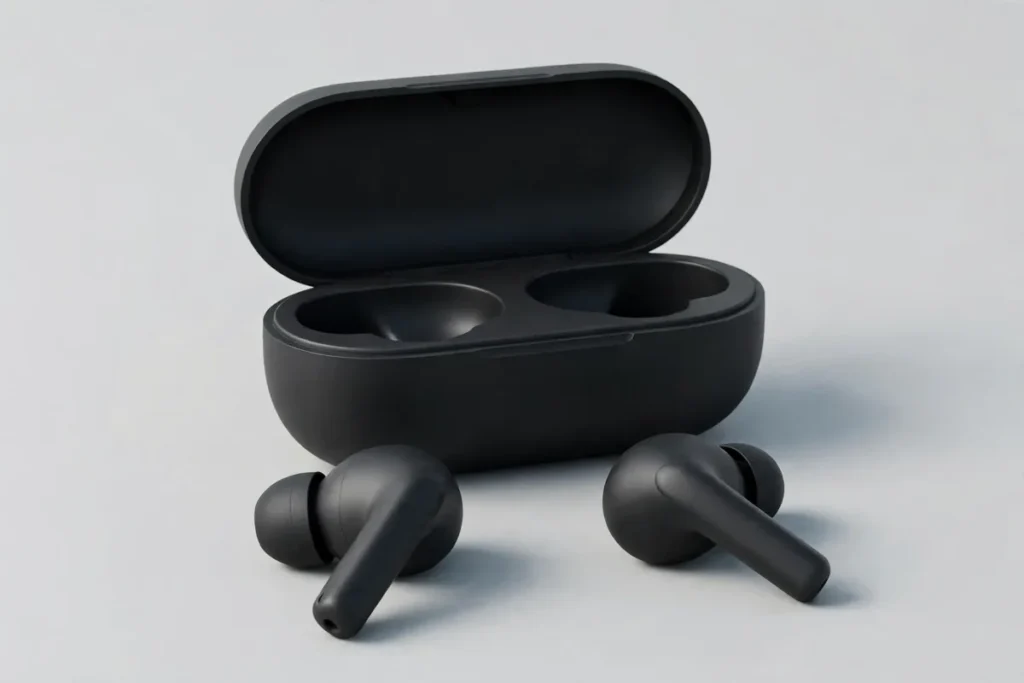
Most true wireless earbuds are built for music first and treat calls as a bonus feature. The Dell Pro Plus Earbuds (EB525) reverse that order. Dell designed them as office equipment: an AI noise-cancelling microphone with its own voice processing unit, Microsoft Teams and Zoom certification, adaptive noise cancelling, and a USB-C wireless receiver that stores inside the charging case.
This is a research review. We have not tested the EB525 hands-on, so the verdict and scores below are provisional. They are built from Dell’s published specifications, the verified Amazon US listing, and hands-on coverage from reviewers who have used the earbuds.

Why you: Calls are the priority here. An AI microphone with a dedicated voice processor keeps your voice clear in a noisy room, Teams and Zoom certification covers the apps you actually use, and a USB-C receiver stored in the case gives your laptop a cleaner connection than plain Bluetooth.
Trade-off: Sound is tuned neutral for voices, so bass stays restrained, and talk time drops to about five hours on call-heavy days.
Overall: 8.1 (provisional, research-based)
Check Price on AmazonDell Pro Plus Earbuds (EB525) specs
| Product | Dell Pro Plus Earbuds (EB525) |
| Driver | 11.6 mm dynamic driver |
| Frequency response | 20 Hz to 20 kHz |
| Bluetooth | 5.3 with LE Audio |
| Noise cancelling | Adaptive ANC, Enhanced Transparency mode |
| Microphone | AI noise-cancelling mic with dedicated voice processing unit |
| Certifications | Microsoft Teams (Open Office) and Zoom certified |
| Wireless receiver | Dell Wireless Audio Receiver HR024 (USB-C), stored in the case |
| Multipoint | 2 active connections, up to 8 paired devices |
| Battery (listening) | Up to 8 hours with ANC on, up to 33 hours with the case |
| Battery (talk) | Up to 5 hours, up to 16.5 hours with the case |
| Charging | USB-C and wireless charging |
| Water resistance | IP54 |
| Weight | 6 g per earbud, 50.4 g case |
| Ear tips | Four sizes: XS, S, M, L |
Calls are the whole point
The microphone system is the reason this product exists. Each bud carries an AI noise-cancelling microphone setup backed by a dedicated voice processing unit. Dell says the AI was trained on hundreds of millions of noise samples so it can separate your voice from the room around you in real time, instead of passing everything through and hoping the meeting app sorts it out.
Hands-on coverage mostly backs that up. Reviewers who tested the EB525 in noisy offices report that keyboard clatter and nearby conversation drop away, and callers hear a clean, focused voice. The certification matters too. These buds are certified for Microsoft Teams under the Open Office program and certified by Zoom, which means call controls and audio behavior were tested against the apps themselves, not just paired and hoped for. That is why the EB525 also sits in our guide to the best earbuds for Zoom calls.
There is one honest limit. The microphone’s frequency response stops at 8 kHz, so your voice sounds clear but narrow, closer to a good phone call than to a podcast recording. One reviewer rated the microphone as merely average for the money. Our read of the coverage: voices land clearly and stay intelligible in bad rooms, and that is what a work bud is for. Do not buy it to record content.
The receiver in the case fixes laptop audio
Anyone who takes calls on a Windows laptop knows the usual problem. Connect earbuds over Bluetooth and the computer often drops the microphone into a low-quality hands-free mode, so you sound distant even when the buds themselves are good. Dell’s answer is the HR024 receiver, a small USB-C dongle that stores inside the charging case and pairs with the buds out of the box. Plug it into your laptop and the EB525 appears as a USB audio device, sidestepping the Bluetooth microphone compromise entirely.
Because the receiver travels in the case, you never have to remember a separate dongle. The connection is also lower latency than standard Bluetooth audio, which keeps lips and voices in sync on video calls. Away from the laptop, the buds run Bluetooth 5.3 with LE Audio and multipoint, holding two active connections at once and remembering up to eight paired devices. Phone in your pocket, laptop on the desk, both connected: that is the working setup these buds were designed around.
Software, apps and the IT angle
Two apps run the EB525. On your phone, the Dell Audio app handles EQ profiles, ANC and transparency levels, and firmware updates. On a Windows PC, the buds appear inside Dell Display and Peripheral Manager, the same console Dell uses for its docks and monitors. For an individual buyer that mostly means settings live in one familiar place. For an IT team it means more: the earbuds can be configured and updated centrally alongside the rest of a Dell fleet, which is a large part of why a product like this exists. Consumer earbuds simply do not offer that, and for companies rolling out hundreds of pairs it can be the deciding feature.
ANC that adapts, sound that stays neutral
The adaptive ANC adjusts its strength to your surroundings rather than running at one fixed level. Coverage describes it as dependable on the noises that fill a workday: air conditioning, traffic rumble, the low wash of an open-plan office. It is not the strongest cancelling in its class. Reviewers who compared it with flagship music buds put it a step below the leaders, and Dell’s tuning priorities explain why. This is a tool for concentration during calls and focus work, not a pair of earmuffs for a long-haul flight.
The Enhanced Transparency mode matters more here than on music buds. It lets announcements, a doorbell or a colleague’s question reach you without pulling a bud out, and because these are work earbuds, you will use it constantly between calls. Switching between ANC and transparency is handled from the buds and the app.
Sound follows the same priorities. The 11.6 mm drivers produce a neutral profile with clearly defined mids, which puts voices, podcasts and call audio right where you want them. Bass is present and controlled but restrained. Play a bass-heavy playlist next to a music-first rival and the Dell sounds leaner and less dynamic. The Dell Audio app offers EQ profiles if you want to nudge things, and for spoken content the stock tuning is already right. Music listeners are served; they are just not the customer Dell built this for.
Comfort, build and battery life
At 6 grams per bud, the EB525 is light enough to wear through a full day of meetings. Dell includes four ear tip sizes, XS through L, and the extra-small option is rarer than it should be. The finish is plain matte black, the case is a pocketable oval at 50.4 grams, and both buds and case carry an IP54 rating, so sweat and a damp commute are fine. IP54 is splash protection, not swim or shower protection. A couple of reviewers noted the touch controls take some getting used to, which is a fair trade for buds at this size.
Battery life is split by job. Listening with ANC on runs up to 8 hours, and the case stretches that to 33 hours, so music and focus time easily cover a workday plus the commute. Talk time is the pinch point: up to 5 hours per charge, 16.5 hours with the case in between. Back-to-back calls all day means a short case break at lunch, which tops the buds up while you eat. The case charges over USB-C and supports wireless charging.
Who should buy the Dell Pro Plus Earbuds
Buy the EB525 if your working day is a string of Teams and Zoom calls on a laptop, especially a Windows machine where Bluetooth call quality usually disappoints. The stored receiver, the certifications and the voice-isolating microphone solve real problems for that job, and the adaptive ANC and 8-hour listening battery handle the hours between calls. If you are comparing work-first options more broadly, our guide to the best Bluetooth earbuds for work shows where the Dell sits against the field.
Skip it if music is the main event. A neutral tuning and a microphone capped at 8 kHz tell you where Dell spent the budget, and music-first earbuds at this level give you richer bass and stronger noise cancelling. Skip it too if you need buds for the pool or the shower; IP54 will not cover that.
Verdict
The Dell Pro Plus Earbuds are a headset replacement that happens to look like consumer earbuds. The call hardware is the real deal: an AI microphone with its own processing unit, proper Teams and Zoom certification, and a receiver that lives in the case and fixes the laptop audio problem at the source. Sound, ANC and value all land a notch below the best music-first earbuds, which is the expected trade for a tool built this narrowly. Our provisional score is 8.1. If your day is measured in meetings, the EB525 belongs on your shortlist. See the Dell Pro Plus Earbuds on Amazon.
Frequently asked questions
Are the Dell Pro Plus Earbuds good for Teams and Zoom calls?
Yes. The EB525 is certified for Microsoft Teams under the Open Office program and certified by Zoom. Its AI noise-cancelling microphone runs on a dedicated voice processing unit, and hands-on reviewers report clear voices even in noisy offices.
What is the USB-C receiver in the case for?
The Dell HR024 receiver gives your laptop a direct USB audio connection to the earbuds. It avoids the drop in microphone quality that Windows often applies to Bluetooth headsets, and it stores inside the charging case so it travels with the buds.
How long does the Dell Pro Plus Earbuds battery last?
Up to 8 hours of listening with ANC on, and up to 33 hours total with the charging case. Talk time is shorter: up to 5 hours per charge and 16.5 hours with the case.
Are the Dell Pro Plus Earbuds waterproof?
They are rated IP54, which protects against dust and water splashes from any direction. That covers sweat and light rain. It does not cover swimming, showering or holding the buds under a tap.
Do the EB525 work with a phone as well as a laptop?
Yes. Alongside the USB-C receiver, the buds use Bluetooth 5.3 with multipoint, so they can stay connected to a phone and a computer at the same time, with up to eight paired devices remembered. The Dell Audio app handles settings and EQ on your phone.

I am the founder of Sound Mavericks, where I provide the polite truth about audio equipment. I started this site because consumer electronics reviews are often too technical. Instead of using a silent lab, I test headphones, earbuds, and Bluetooth speakers in the real world – like on a noisy subway or in a busy coffee shop.
To stay independent, I buy my own review units (mostly from the United States) rather than accepting free gifts from brands. Once I finish testing a product, I sell it locally to our community. My goal is to help you understand sound quality, active noise cancellation (ANC), and battery life without the marketing hype.