Finding the best gaming earbuds is not a smaller version of finding the best earbuds. The job changes. Music still matters, but the deciding questions are platform questions: does it carry a 2.4GHz dongle, which console edition is in the box, can it hold a game connection and a phone connection at once, and will the battery survive a long session? This roundup ranks six dongle-first picks by the platforms they actually serve, from multi-platform all-rounders to a VR and console specialist, plus one budget also-consider. If your budget is the first filter rather than the platform, our separate guide to gaming earbuds under a tighter budget takes that angle instead.
The shortlist
Start here if you know your platform. Console and PC players who want one pair for everything should start with the SteelSeries Arctis GameBuds. Multi-platform households splitting time between PC, PlayStation and Switch should look at the Razer Hammerhead Pro HyperSpeed. PC players watching the budget should check the JBL Quantum TWS. PlayStation-first players get the Razer Hammerhead HyperSpeed, PC gamers who also live on their phone get the ASUS ROG Cetra True Wireless SpeedNova, and Quest or console players who want passthrough charging get the Soundcore VR P10.
Compared: the six picks
| Pick | Low-latency link and battery | Overall | Buy |
|---|---|---|---|
| SteelSeries Arctis GameBuds | 2.4GHz dongle, Bluetooth 5.3 · 10h buds, 40h total | 8.3 | Check Price |
| Razer Hammerhead Pro HyperSpeed | HyperSpeed dongle, Bluetooth 5.3 · 30h total | 8.0 | Check Price |
| JBL Quantum TWS | 2.4GHz dongle · 8h buds, 24h total | 7.7 | Check Price |
| Razer Hammerhead HyperSpeed | HyperSpeed dongle, Bluetooth 5.2 · 30h total | 7.7 | Check Price |
| ASUS ROG Cetra True Wireless SpeedNova | SpeedNova dongle, Bluetooth 5.3 · 46h total | 7.6 | Check Price |
| Soundcore VR P10 | USB-C dongle · 24h total, no ANC | 6.6 | Check Price |
Why a dongle decides this category
Bluetooth was built for music, not for twitch reactions. The delay on a standard Bluetooth audio link is large enough that a footstep can arrive after the player making it rounds the corner. A 2.4GHz dongle gives the earbuds a dedicated link with far lower latency, and every main pick in this roundup has one. FixoryHQ’s roundup of low-latency gaming earbuds puts standard Bluetooth at roughly 150 to 250 milliseconds of delay and dedicated 2.4GHz links at roughly 30 to 40 milliseconds. That gap is the whole category. A gaming mode on a Bluetooth-only bud narrows the delay; a dongle removes most of it.
The second deciding factor is simultaneous connection. Several picks hold the dongle link to a PC or console and a Bluetooth link to a phone at the same time. Your game audio keeps flowing while a call or a Discord ping reaches you. For players who game in shared houses and shared schedules, that dual link is worth more than a small sound advantage.
Best overall: SteelSeries Arctis GameBuds

SteelSeries Arctis GameBuds 8.3/10
Why you: you play across PC, PlayStation and handhelds and want one pair that treats every platform seriously. Sound leads the list at 8.4, ANC is real at 8.2, and the 40-hour total battery is the joint best here. Our full review covers the GameBuds in depth.
Trade-off: buy the right version, because Xbox support needs the Xbox edition of the dongle while the PlayStation edition covers PC and PS5. Get the edition wrong and the most expensive part of the product does not work on your console.
Bluetooth 5.3 · Hybrid ANC · IP55 · 10h buds · 40h with case · Wireless charging · 2.4GHz dongle
The GameBuds top this list because they make the fewest platform compromises. The dongle handles the low-latency link, Bluetooth 5.3 handles the phone, and quick switching moves between them without a settings dig. ANC at 8.2 is unusual in gaming earbuds and genuinely useful in a loud house. Comfort at 8.4 suits long sessions, and the case supports wireless charging, which suits a desk pad setup. We cover the model fully in our SteelSeries Arctis GameBuds review, and it also leads our guide to the best earbuds for PC gaming.
Who should skip the GameBuds
Xbox-only players who cannot confirm the Xbox edition is the one in their basket, and players who never leave one platform. A single-platform pick below can match your setup for less commitment.
Best for multi-platform homes: Razer Hammerhead Pro HyperSpeed
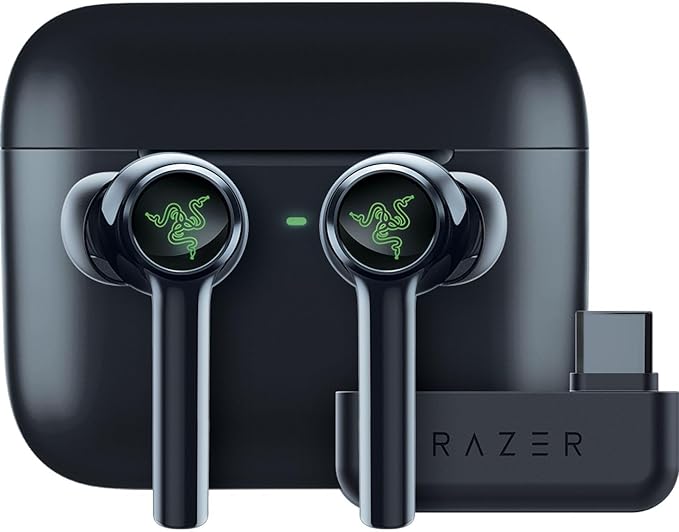
Razer Hammerhead Pro HyperSpeed 8/10
Why you: you split time between PC, PlayStation and Switch and want one dongle-based pair for all of it. ANC scores 8.4, the best cancellation figure in this roundup, and wireless charging is on board.
Trade-off: the dongle has no storage slot in the case, which is an odd miss on a product built around its dongle, and battery life is mid-pack at 30 hours total. Lose the loose dongle and you lose the main event.
Bluetooth 5.3 · Standard ANC · 30h with case · Wireless charging · 2.4GHz dongle
The Pro HyperSpeed is the household pick. One pair covers the gaming PC, the console under the television and the handheld, with ANC strong enough to double as travel earbuds. Sound at 8.2 keeps music respectable between sessions. The loose dongle is the daily annoyance to plan around: give it a fixed home, a small pouch or a spare USB port it lives in, because the case will not hold it for you.
Best value with a dongle: JBL Quantum TWS

JBL Quantum TWS 7.7/10
Why you: you want a proper 2.4GHz dongle and adaptive ANC without paying the top tier. Value scores 8.4, the best value bar among the six main picks, and multipoint is included.
Trade-off: it is an older model, so battery life at 24 hours total and ANC trail the newer picks, and QuantumSURROUND needs JBL’s PC software to work. On console, you get the dongle link without the surround processing.
Adaptive ANC · Multipoint · 8h buds · 24h with case · 2.4GHz dongle
The Quantum TWS is the sensible PC buy. The dongle does the important work, adaptive ANC handles a noisy room, and the sound tuning is game-first in the way JBL’s Quantum line usually is, with footsteps and effects given room to read clearly. Treat the surround feature as a PC bonus rather than a reason to buy, since it depends on JBL’s software. As an older model it gives up battery and cancellation ground to the picks above it, and the value score says the trade is fair.
Best for PlayStation and Discord: Razer Hammerhead HyperSpeed

Razer Hammerhead HyperSpeed 7.7/10
Why you: you play on PlayStation and live in Discord. This listing is the PlayStation edition, it also works on PC and mobile, and it pairs a HyperSpeed dongle with ANC and multipoint.
Trade-off: comfort and battery are the middling bars at 7.6 and 7.0, and total battery is 30 hours. Long-session players should note the fit score before committing to marathon use.
Bluetooth 5.2 · Anc ANC · Multipoint · 30h with case · 2.4GHz dongle
Two Razer models in one roundup needs explaining, and the explanation is editions. This HyperSpeed is the PlayStation-optimised sibling of the Pro above, built for console players whose second screen is a Discord call. Calls score 7.8, joint best in this list, which is why it suits team chat. If you play mostly on PC, the Pro model is the better Razer. If the console is home base, this is the one tuned for you.
Best for PC plus phone: ASUS ROG Cetra True Wireless SpeedNova

ASUS ROG Cetra True Wireless SpeedNova 7.6/10
Why you: you game on PC through a dongle and want your phone connected at the same time. Hybrid multipoint holds both links, total battery is the longest here at 46 hours, and Sound scores 8.3.
Trade-off: the case is big and the RGB styling will not suit every desk. Comfort is the low bar at 7.0, and call quality is good rather than class-leading, so try the fit early if you can.
Bluetooth 5.3 · Adaptive ANC · Multipoint · IPX4 · 5.8h buds · 46h with case · 2.4GHz dongle
The SpeedNova is the desk-setup pick. The dongle feeds the PC, Bluetooth holds the phone, and the 46-hour total battery means the case rarely asks for a cable. That battery figure needs one honest note: the buds themselves are rated at 5.8 hours per charge, so the endurance lives in the case rather than in a single session. The ROG styling is loud, literally lit, and the case is the bulkiest here. Players who want their desk calm should look at the GameBuds instead.
Best for VR and console passthrough: Soundcore VR P10

Soundcore VR P10 6.6/10
Why you: you play on Quest, console or PC and want a USB-C dongle that can charge your device while it works. Value scores 8.4 and the dongle design solves the handheld problem of one port doing two jobs.
Trade-off: there is no noise cancelling at all, which is why the ANC bar sits at 2.0, and total battery is a modest 24 hours. In a loud room, these buds have no answer.
Multipoint · 24h with case · 2.4GHz dongle
The VR P10 is a specialist, and its scorecard says so plainly. An ANC bar of 2.0 would sink a general pick; here it is a declared trade. What you get instead is a dongle built for headsets and handhelds, with passthrough charging so a Quest session does not end when the headset battery does. Sound at 7.6 is fine for game audio. Buy it for the VR and handheld job it was designed for, not as your only earbuds.
Also consider
TOZO G1: the cheapest credible gaming mode
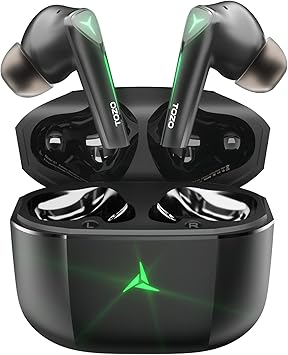
TOZO G1 6.6/10
Why you: you want the cheapest credible low-latency gaming earbuds for casual and mobile play. Value scores 8.8, the highest value bar in this roundup, and total battery is a healthy 36 hours.
Trade-off: there is no dongle and no noise cancelling, and the single built-in mic is basic. This is a Bluetooth gaming-mode pick, not a competitive console tool.
36h with case
The G1 earns its place as the honest budget door into this category. For mobile games and casual sessions, its low-latency mode is enough, and the battery outlasts several pricier picks. The moment a console or a competitive PC ladder enters the picture, step up to a dongle pick above.
Latency, judged by the games you play
Shooters and fighting games
This is where delay stops being a spec and starts being a result. In a shooter, footsteps, reload sounds and callouts are information, and information that arrives late is information you act on late. Fighting games are stricter still, because audio cues sit inside frame-tight reactions. For these genres the dongle is not an upgrade path, it is the entry ticket, and it is why every main pick in this roundup carries one. Bluetooth, even in a gaming mode, leaves enough delay that a practiced player can feel the sound trailing the action.
Story games, racers and everything else
Single-player and slower multiplayer games forgive far more. Dialogue, engine notes and soundtrack cues do not punish a small delay, and many players game happily on Bluetooth earbuds in these genres for years. That honesty matters for the also-consider pick: the TOZO G1 has no dongle, and for a story game on a phone or a handheld in the sofa corner, that is fine. Buy the dongle when your games punish delay, not because a list told you to.
Dongle practicalities nobody puts on the box
Where the dongle lives
A dongle you cannot find is a feature you do not own. The GameBuds store theirs in the case, which is the tidy answer. The Hammerhead Pro HyperSpeed, as its card notes, gives the dongle no storage slot in the case at all, so it needs a home you choose deliberately: a spare port on the PC, a labelled pouch in the controller drawer, anywhere that is the same place every time. Players who swap between a desk PC and a living-room console should also think about the walk between them, because the dongle will make that walk with you, in a pocket, every session.
One port, two jobs
Handhelds expose the other dongle problem: a single USB-C port that must carry the dongle and the charging cable, and cannot do both. The VR P10 answers it with passthrough charging on the dongle itself, which is why a mid-scoring specialist keeps its place in this list. If you play long handheld sessions away from a dock, check how your chosen pick handles charging while connected before you buy, not during the first long session.
Editions are a compatibility spec
Treat the console edition printed on the box the way you would treat a voltage rating. The GameBuds PlayStation edition covers PC and PS5; Xbox needs its own edition. The Hammerhead HyperSpeed listing here is the PlayStation edition that also works on PC and mobile. Retailers list editions side by side with near-identical names, so read the edition line at checkout as carefully as the product name. This single check prevents most returns in this category.
How to choose
Start with your platform, not the sound
Every pick here sounds good enough to game on. The failures in this category are compatibility failures: the wrong console edition, a dongle with nowhere to live, a single USB-C port already busy. List your devices first, check the edition second, and only then compare sound and battery.
Know what ANC is worth to you
ANC in gaming earbuds ranges from the Pro HyperSpeed’s 8.4 to the VR P10’s none at all. If you game in a quiet room, ANC is a bonus. If you game in a shared, loud house, it is the feature that keeps you in the game. Pay for it only if your room demands it.
For platform-specific depth, our guide to the best earbuds for PC gaming goes further on PC setups, and players on a strict budget should cross-check the gaming earbuds under 100 list before deciding.
Verdict
The Arctis GameBuds are the best gaming earbuds for most players because they answer the platform question best: a real dongle, real ANC, the joint-longest battery and sound that holds up for music. Pick the Razer Pro HyperSpeed for a multi-platform house, the JBL Quantum TWS for value with a dongle, and the VR P10 only for its VR and handheld speciality. Choose by console first and this list will not steer you wrong.
Frequently asked questions
Do gaming earbuds need a dongle?
For competitive play, yes. Plain Bluetooth adds enough delay that footsteps and gunshots land late. Every main pick here carries a 2.4GHz USB dongle that cuts that delay to a level most players stop noticing. Bluetooth-only gaming modes on ordinary earbuds are a compromise, fine for casual play and story games.
Which gaming earbuds work on Xbox?
Check the edition before you buy. The SteelSeries Arctis GameBuds need the Xbox edition of the dongle for Xbox support, while the PlayStation edition covers PC and PS5. The Razer Hammerhead HyperSpeed listing here is the PlayStation edition, which also works on PC and mobile. Xbox is the platform where the wrong box costs you a return.
Are gaming earbuds good for music and calls?
The top picks are respectable all-rounders. The GameBuds score 8.4 for Sound and carry real ANC, so they double as daily earbuds. Call scores sit between 7.4 and 7.8 across this list, which is fine for Discord and team chat but short of call-first earbuds. Buy these for play first.
Can I use gaming earbuds with a phone?
Yes. Every pick pairs over Bluetooth with a phone for music, video and casual mobile games, and several hold the dongle connection and a Bluetooth connection at the same time, so a call can come in while you play on PC or console.
What is the cheapest credible gaming earbud here?
The TOZO G1 in the also-consider section. It scores 6.6 overall with Value at 8.8, the highest value bar in this roundup. There is no dongle and no noise cancelling, so it is a low-latency Bluetooth gaming mode pick for casual and mobile play rather than a competitive console tool.

I am the founder of Sound Mavericks, where I provide the polite truth about audio equipment. I started this site because consumer electronics reviews are often too technical. Instead of using a silent lab, I test headphones, earbuds, and Bluetooth speakers in the real world – like on a noisy subway or in a busy coffee shop.
To stay independent, I buy my own review units (mostly from the United States) rather than accepting free gifts from brands. Once I finish testing a product, I sell it locally to our community. My goal is to help you understand sound quality, active noise cancellation (ANC), and battery life without the marketing hype.