For Zoom and Teams calls, the earbuds that matter are the ones with a microphone system that keeps your voice clear in a real room, multipoint Bluetooth so they can sit on your laptop and phone at once, and a fit you can wear through a two-hour planning session. Our top pick is the Jabra Elite 10 Gen 2. If your laptop’s Bluetooth is flaky, the Logitech Zone True Wireless below sidesteps it with a USB receiver.
Why earbuds instead of a headset? They live in a pocket, they do not flatten your hair before a camera call, and one bud in one ear keeps the other ear free for the doorbell. What you give up is a boom mic near your mouth, and we are honest about that trade below.
How this list was built: research-based picks from manufacturer specifications, certification listings and published call-quality testing. No hands-on claims. Rankings weigh microphone performance first, then multipoint and connection options, then battery and comfort.
Top pick: Jabra Elite 10 Gen 2: the safest all-day meeting choice
For bad laptop Bluetooth: Logitech Zone True Wireless: USB receiver, certified for Teams and Zoom
For Mac users: Apple AirPods Pro 3
Best all-rounder: Sony WF-1000XM6
For noisy homes: Bose QuietComfort Ultra Earbuds (2nd Gen)
Budget pick: EarFun Air Pro 4
Quick Comparison
| Earbuds | Call strength | Multipoint | Battery (buds, ANC on) | Buy |
|---|---|---|---|---|
| Jabra Elite 10 Gen 2 | 6-mic array, strong wind handling | Yes | Up to 6 hours | Check Price |
| Logitech Zone True Wireless | Certified mics, USB receiver option | Yes, plus receiver | Around 6 hours talk time | Check Price |
| Apple AirPods Pro 3 | Voice isolation, best on Apple devices | Apple devices auto-switch | Up to 8 hours listening | Check Price |
| Sony WF-1000XM6 | AI noise reduction for calls | Yes | Up to 8 hours | Check Price |
| Bose QuietComfort Ultra Earbuds (2nd Gen) | Best-in-class noise cancelling around you | Yes | Up to 6 hours | Check Price |
| EarFun Air Pro 4 | 6 mics with cVc 8.0 noise reduction | Yes | Up to 7.5 hours | Check Price |
What Actually Matters on a Zoom Call
The microphone, not the driver. Music specs tell you little about calls. What decides if colleagues hear you clearly is the mic array and the noise processing behind it. A fan, a kettle and a dog in the next room are the real test, and that is where the picks below separate from music-first earbuds.
Multipoint is close to mandatory. Your laptop runs the meeting, your phone takes the calls in between. Multipoint earbuds stay connected to both and switch without a trip into Bluetooth settings. Every pick here except the AirPods (which auto-switch inside Apple’s ecosystem instead) has proper multipoint.
A USB receiver beats laptop Bluetooth. Some work laptops have weak or locked-down Bluetooth. A receiver presents the earbuds as a USB audio device, pair-free, and it is the reason the Logitech pick exists on this list.
Talk time is shorter than music time. A microphone transmitting all day drains buds faster than playback does. Figures in the table are per charge with noise cancelling on; a case top-up at lunch is normal practice on heavy meeting days.
1. Jabra Elite 10 Gen 2: Top Pick for All-Day Meetings
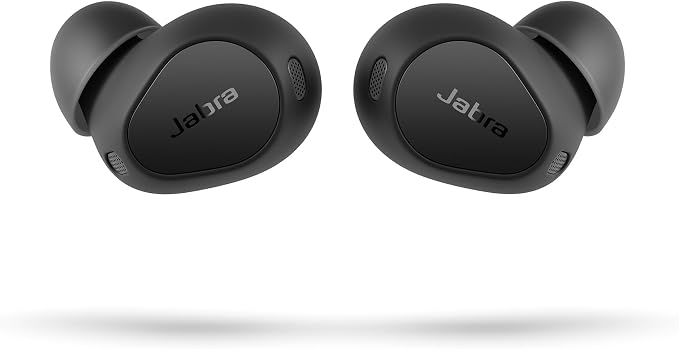
Jabra builds for calls first, and the Elite 10 Gen 2 is the pair we would hand to someone with five meetings a day. The six-microphone array does a better job than most of keeping a voice steady when the room gets noisy, and published call tests consistently place Jabra’s processing at or near the top of the earbud class. Multipoint holds a laptop and a phone together without drama.
Two Gen 2 details matter for desk work. The charging case can stream audio from USB-C sources, so a laptop with its Bluetooth disabled by IT policy can still feed the buds through the case. And the oval gel tips are genuinely comfortable over long stretches, which is where many earbuds fail a full workday. Battery runs about 6 hours per charge with ANC on and up to 27 hours with the case, with wireless charging on top.
The honest limits: music tuning leans warm rather than detailed, and the price sits at the top of this list. For call-heavy work, neither bothers us much.
- 6-microphone call array with wind-noise handling
- Multipoint Bluetooth, plus USB-C audio streaming via the case
- Up to 6 hours per charge (ANC on), 27 hours with the case
- IP57 buds, wireless charging
2. Logitech Zone True Wireless: Best for Teams Calls and Problem Laptops

The search query that built this article asked about Zoom, but the same question arrives for Teams every day, and this is the pick aimed squarely at both. The Zone True Wireless is certified for Microsoft Teams, Zoom and Google Meet, and it connects two ways: ordinary Bluetooth, or the included USB receiver. The receiver is the point. It gives a stable, pair-free connection on laptops where Bluetooth is weak, old or restricted, and Zoom and Teams see a proper USB audio device.
Call quality is businesslike rather than flashy. The mics are tuned for speech, noise cancelling takes the edge off an open-plan office, and multipoint keeps a phone in the loop alongside the receiver. Talk time is rated around 6 hours, with the case extending that across a working week of meetings.
It is an older design now, so music playback and codec support lag the newer consumer picks here. As a meeting tool bought for work, that trade is fine.
- Certified for Microsoft Teams, Zoom and Google Meet
- USB receiver plus Bluetooth, multipoint on top
- Around 6 hours of talk time per charge
- ANC with transparency mode, Qi wireless charging
3. Apple AirPods Pro 3: Best for Mac Users

If your work laptop is a MacBook, the AirPods Pro 3 are the low-effort answer. Pairing, device switching between a Mac, iPhone and iPad, and updates all happen inside Apple’s ecosystem with no apps to manage. On calls, Apple’s voice isolation does heavy work in the background: in published tests it keeps speech intelligible in street noise that defeats most earbuds.
Battery life improved again in this generation, up to 8 hours of listening with noise cancelling on, and the noise cancelling itself is the strongest Apple has shipped. For Zoom specifically, a Mac treats them as a first-class audio device, and the in-ear fit seals well enough that most people can skip the over-ear headphones they used to keep for calls.
The catch is the walled garden. On Windows, you lose the settings app, the automatic switching and some mic processing polish. Windows-first workers should take the Jabra or the Logitech instead.
- H3 chip, voice isolation for calls
- Automatic switching across Apple devices
- Up to 8 hours per charge with ANC on
- USB-C MagSafe charging case
4. Sony WF-1000XM6: Best All-Rounder

Sony’s flagship earbuds have historically been a music pick with acceptable call quality. The WF-1000XM6 closes that gap: Sony added AI-based noise reduction to the call path, and voices come through cleaner in wind and traffic noise than the previous generation managed. If your day mixes meetings with music and a commute, this is the pair that does all three without an obvious weak spot.
Multipoint is present and stable, battery runs up to 8 hours per charge with noise cancelling on (24 hours with the case), and LDAC support means Android phones get proper high-resolution audio between meetings. The fit is smaller than the XM5’s, which helps on long call days.
Two small gripes: touch controls can be triggered when you adjust a bud mid-call, and Sony’s app buries the call settings deeper than it should. Neither is a deal-breaker at this level.
- AI noise reduction on the call microphone path
- Multipoint Bluetooth and LDAC high-resolution audio
- Up to 8 hours per charge (ANC on), 24 hours with the case
- IPX4 splash resistance
5. Bose QuietComfort Ultra Earbuds (2nd Gen): Best for Noisy Home Offices

Some home offices are quiet. Others have a toddler, a washing machine and a neighbour renovating, all audible on every call. The QC Ultra Earbuds (2nd Gen) earn their place here for the second group: Bose’s noise cancelling is still the strongest in the earbud class, so what reaches your ears sounds calm, and the mic system does a solid job of keeping household noise out of what colleagues hear.
Multipoint is on board, the fit uses stability bands that stay put through long sessions, and battery runs up to 6 hours per charge with 24 hours in the case. Call quality in quiet rooms is good rather than class-leading; the Jabra sounds a touch more natural in a silent room. In a loud one, the Bose wins on points.
No wireless charging at this price is a genuine miss, and the case is the bulkiest here. Buy these for the silence, tolerate the case.
- Strongest noise cancelling in this roundup
- Multipoint Bluetooth
- Up to 6 hours per charge, 24 hours with the case
- IPX4 rating, USB-C charging
6. EarFun Air Pro 4: Best Budget Pick for Office Calls

The Air Pro 4 is the answer to “best earbuds for office calls” when the budget is your own money rather than a company card. The six-microphone array with cVc 8.0 noise reduction keeps voices clear in ordinary home-office noise, and multipoint is included, which is still not guaranteed at this end of the market. Battery is generous: up to 7.5 hours per charge with ANC on and 52 hours from the case.
You also get things budget earbuds used to skip: in-ear detection that pauses when you pull a bud out, wireless charging, LDAC and aptX Lossless for music, and a proper app with EQ. Call quality in heavy wind is where the price shows; the Jabra and Sony handle gusts better. Indoors, where Zoom calls actually happen, the gap is small.
For a second pair that lives in a laptop bag, or a first pair for a new remote job, this is where we would spend.
- 6 mics with cVc 8.0 call noise reduction
- Multipoint, in-ear detection, wireless charging
- Up to 7.5 hours per charge (ANC on), 52 hours with the case
- LDAC and aptX Lossless for music
Set Your Earbuds Up for Zoom Properly
Good earbuds can still sound bad on a call if the app is using the wrong device or the wrong settings. Three checks fix most complaints.
Pick the earbuds as both speaker and microphone. In Zoom’s audio settings, select the earbuds in both dropdowns. On Windows, Bluetooth devices often appear twice, once as a stereo playback device and once as a hands-free device. If music sounds fine but your voice is muffled, the app is usually listening through the laptop’s built-in mic while you hear through the buds, or the reverse. The receiver on the Logitech pick removes this problem class entirely, because Windows treats it as one USB audio device.
Let the earbuds do the noise work. Zoom and Teams both apply their own background-noise suppression, and stacking aggressive app suppression on top of earbud mic processing can make voices sound thin and watery. Set the app’s suppression to low or auto, then raise it only if people at the other end actually complain about your room. Test with the app’s built-in mic test before a real meeting, and record ten seconds in a noisy moment, not a quiet one.
Mind the Bluetooth codec switch. On most earbuds, entering a call drops the connection from the high-quality music codec to a call profile with lower audio bandwidth in both directions. That is normal Bluetooth behaviour, not a fault, and it is why a pair can sound rich for music and merely clear for meetings. Clarity is the goal on a call. If colleagues say you sound distant, the usual cause is fit: a bud sitting loose puts the mics at a worse angle and breaks the seal the noise processing expects. Try the next tip size up before blaming the earbuds.
Earbuds or a Headset for Meetings?
One honest paragraph. A boom microphone sits inches from your mouth, and on pure voice pickup a good office headset still beats every earbud here, especially in noise. If you present all day or record customer calls, start with our guide to the best office headsets. If you prefer over-ears for focus time, the best headphones for online meetings roundup covers that shape. Earbuds win on portability, comfort with glasses, and the one-ear monitoring habit many people have on internal calls. And if your calls are mostly phone calls rather than video meetings, our best noise cancelling earbuds for phone calls list ranks the same field by phone-call testing instead.
FAQ
What are the best bluetooth earbuds for Teams calls?
The Logitech Zone True Wireless is the pick built for it: it is certified for Microsoft Teams and ships with a USB receiver, so it connects to a work laptop without relying on Bluetooth pairing. For a consumer pair, the Jabra Elite 10 Gen 2 handles Teams just as well over multipoint Bluetooth.
What are the best earbuds for computer Zoom calls?
For a computer, connection type matters as much as the earbuds. A model with a USB receiver, like the Logitech Zone True Wireless, avoids laptop Bluetooth problems entirely. If your laptop’s Bluetooth is healthy, any multipoint pick here works; the Jabra Elite 10 Gen 2 and Sony WF-1000XM6 are the most consistent on Windows and macOS.
What are the best earbuds for office calls at home?
Start with how noisy your home is. In a quiet room, the EarFun Air Pro 4 covers office calls at a budget price. With kids, pets or street noise in the background, the Bose QuietComfort Ultra Earbuds (2nd Gen) are worth it for the noise cancelling, and the Jabra Elite 10 Gen 2 keeps your voice clearest for the people listening.
Can I wear just one earbud on Zoom calls?
Yes. Every pick here works in single-bud mode, so you can keep one ear open for the room around you. Battery drain is slightly uneven between the buds if you always use the same side, so alternate sides across the day.
Do I need multipoint for Zoom and phone calls?
If your meetings run on a laptop and your calls land on a phone, yes. Multipoint keeps both connected and switches automatically, which removes the daily ritual of disconnecting from one device to join from the other. The AirPods Pro 3 do the same job, but only inside Apple’s ecosystem.

I am the founder of Sound Mavericks, where I provide the polite truth about audio equipment. I started this site because consumer electronics reviews are often too technical. Instead of using a silent lab, I test headphones, earbuds, and Bluetooth speakers in the real world – like on a noisy subway or in a busy coffee shop.
To stay independent, I buy my own review units (mostly from the United States) rather than accepting free gifts from brands. Once I finish testing a product, I sell it locally to our community. My goal is to help you understand sound quality, active noise cancellation (ANC), and battery life without the marketing hype.