
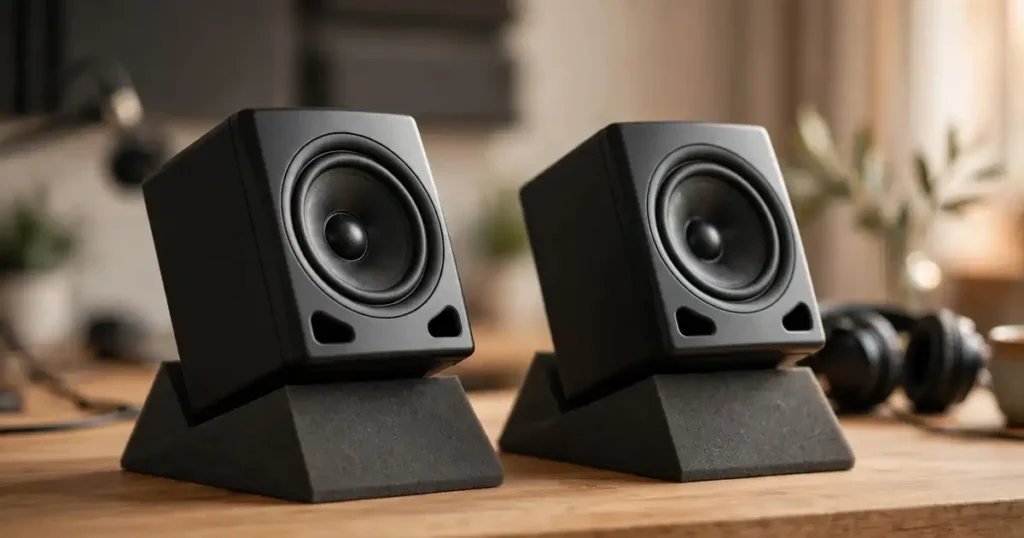
If your listening life revolves around headphones, your desk speakers are probably an afterthought — set straight on the desk, vibrating against the same surface your keyboard rattles on. You’ve likely already dialed in your headphone chain (see our guide to getting the best sound quality from headphones), but your speakers deserve the same care. Foam isolation pads are the cheapest meaningful upgrade a desk setup can get, and placing them correctly matters more than most people realize. Here’s the SoundMavericks method, plus our six pad picks for 2026.
Why Foam Pads Under Your Speakers Matter
When a speaker plays, its cabinet vibrates — not just the air in front of it. Sit that cabinet directly on a desk or shelf and the two surfaces couple together acoustically: the desk hums, buzzes, and smears low frequencies, and that coloration reaches your ears blended with the drivers’ actual output. The result is muddier bass, a less stable stereo image, and a midrange that never quite cleans up.
Foam isolation pads break that coupling. Sitting between the cabinet and the supporting surface, they absorb the vibrational energy the speaker would otherwise dump into the desk — a process called decoupling. The practical payoff is tighter, more defined bass and a clearer midrange, which is why isolation pads are standard kit in recording studios and why SoundMavericks suggests them first when a reader’s desk setup sounds boomy or vague. They don’t change what the speaker produces; they stop your furniture from editorializing it.
One honest caveat: pads fix mechanical coupling, not room acoustics. They won’t tame wall reflections or standing waves — that’s what acoustic treatment is for. But for desk-bound speakers, decoupling is the upgrade with the highest return for the lowest effort.
How to Place Foam Pads Under Speakers: Step by Step
Follow these steps in order for the full benefit.
Step 1: Measure your speakers and choose pads that fit
Measure the footprint of each speaker’s cabinet (width × depth) and check its weight. The pad should support the entire bottom surface — no overhang off the edges. The same logic applies to passive bookshelf speakers as to powered monitors: weight and footprint are what matter, not what’s inside the box. (New to the powered-vs-passive question? Our preamp vs amp guide covers how built-in amplification changes the setup.)
Step 2: Set the pads on a rigid, flat surface
Pads only work on something solid. A desk, shelf, or dedicated speaker stand is ideal; avoid soft or wobbly surfaces, since pads on a mousepad or cloth runner can’t decouple anything — the whole assembly still moves. Place one pad under each speaker, centered so the cabinet’s weight sits evenly. Give each speaker its own pad; sharing one long pad re-couples the pair through the foam.
Step 3: Start flat, then angle the tweeters toward your ears
Put the pads down flat first and listen to a few tracks you know intimately. Then address aiming: tweeters should fire at ear level from your listening position. If your speakers sit below ear height — the classic desk scenario — use the pad’s wedge pieces to tilt the cabinet up; if they’re on a high shelf, tilt them down. Most quality pads offer fixed angles (the Auralex designs give you -8°, -4°, 0°, +4°, and +8°). Change one setting at a time and re-listen — the right tilt is where the high end snaps into focus and the stereo image locks in.
Step 4: Position the speakers around the pads
The pads don’t replace good speaker placement; they stack with it. Arrange your speakers and your listening chair as an equilateral triangle, toe each speaker inward so they cross just behind your head, and keep them symmetrical in the room — the same distance from each side wall. Pull monitors at least a couple of feet from the wall behind them to keep bass from bloating. This triangle-and-toe-in geometry is established nearfield practice (Sweetwater’s monitor setup guide describes the same layout), and it holds for bookshelf speakers flanking a desk just as it does for studio monitors.
Step 5: Listen, then fine-tune
Play familiar reference tracks with strong low-end content and listen for two things: tighter, more defined bass (less boom, more pitch), and a midrange that sounds less smeared. If one speaker sounds duller than the other, check both pads use the same angle configuration. If the improvement is subtle at low volumes but obvious when you turn it up, that’s normal: coupling problems scale with volume.
Common Mistakes to Avoid
- Using pads smaller than the cabinet. If the speaker overhangs the pad, the exposed portion still couples to the desk through vibration transfer around the foam. Measure first.
- Placing pads on a soft surface. Foam on foam doesn’t decouple — it just wobbles. The pad needs a rigid surface underneath to do its job.
- Stacking two sets of pads. More foam isn’t more isolation. Stacked pads can over-damp the coupling and let the cabinet rock, which blurs the stereo image. Use one set, configured correctly.
- Mismatched angles. If the left speaker is tilted up 8° and the right is flat, your center image will drift. Set both pads identically.
- Expecting pads to fix room problems. Pads stop desk resonance. They don’t absorb reflections, fix a bad room layout, or replace acoustic treatment. Pair them with sensible placement (Step 4 above) and treat them as one layer of a good setup, not the whole fix.
- Forgetting horizontal speakers. Center channels and horizontally placed monitors need wide pads that support the full width — the standard narrow strips meant for vertical monitors won’t cut it.
The Best Foam Pads Under Speakers in 2026
Every pad below is sold as a pair, so one set covers a stereo setup.
1. Auralex Acoustics MoPAD — Best Overall

The MoPAD is the pad everything else is measured against. Each wedge pair supports monitors up to 100 lbs, and the two-piece design gives five positioning options — flat, ±4°, and ±8° — to dial tweeter aim precisely from a low desk or high shelf. At 12″ × 4″ × 2″ it suits most nearfield monitors and compact bookshelf speakers. If you buy one thing from this list, SoundMavericks recommends this.
- Why it fits: five angle settings, 100-lb support per pair of wedges, proven decoupling design
- Dimensions: 12″ × 4″ × 2″ per pad
- Best for: nearfield studio monitors and compact bookshelf speakers
2. Auralex MoPAD-XL — Best for Large Monitors and Bookshelf Speakers

The XL is the MoPAD concept scaled up: 12″ × 8.75″ × 2″ pads wide enough for 8-inch monitors, large bookshelf speakers, and horizontal center-channel placement. It keeps the five-position wedge system (-8° to +8°), and each pad supports up to 100 lbs — a pair can carry a 200-lb horizontal loudspeaker. If the standard MoPAD leaves your cabinets overhanging, step up to this.
- Why it fits: full-width support for large cabinets, same five angle settings, high weight capacity
- Dimensions: 12″ × 8.75″ × 2″ per pad
- Best for: 8-inch studio monitors, large bookshelf speakers, horizontal center channels
3. Auralex ProPAD — Best Premium Upgrade

The ProPAD is Auralex’s step up from the MoPAD: a three-layer, highly damped construction built around a flat PlatFoam base with an included wedge for angled setups. The denser foam targets structural resonance and sympathetic vibration with a stiffer platform that resists cabinet rocking — the kind of movement that smears stereo imaging. At 2.125″ × 8″ × 13″ it’s sized for standard stereo and surround monitors. Choose this when placement is already dialed and you want the most controlled decoupling foam can offer.
- Why it fits: three-layer damped construction, flat PlatFoam base plus angling wedge, reduced cabinet movement
- Dimensions: 2.125″ × 8″ × 13″ per pad (without wedge)
- Best for: critical listening and mixing setups where imaging precision matters most
4. Sound Addicted SMPad 5 — Best Budget Pick

You don’t need to spend much to decouple a desk setup. The SMPad 5 uses 50kg/m³ high-density acoustic foam — dense enough to hold its shape under monitors up to 24 lbs — with multiple angle configurations for aiming tweeters. At 7.5″ × 11″ × 1.6″ it’s sized for popular 5-inch monitors (Yamaha HS5, JBL 305P MkII, KRK Rokit 5, and similar). SoundMavericks’ value pick for a first isolation upgrade on a tight desk.
- Why it fits: high-density 50kg/m³ foam, multiple angle configurations, sized for popular 5-inch monitors
- Dimensions: 7.5″ × 11″ × 1.6″ per pad; holds up to 24 lbs
- Best for: first-time isolation upgrades on 5-inch studio monitors
5. Gator Frameworks GFW-ISOPAD-MD — Best for 6.5-Inch Monitors

Gator Frameworks’ medium pads slot between 5-inch and 8-inch options: they’re designed for 6.5-inch studio monitors vertically, or smaller speakers placed horizontally. Each pair includes two base platforms and two reversible, removable angling pieces for tilting toward the listening position. At 12.9″ × 10.45″ × 1.56″ they give mid-size cabinets full footprint support without XL bulk.
- Why it fits: sized for 6.5-inch monitors, reversible angling pieces, works vertically or horizontally
- Dimensions: 12.9″ × 10.45″ × 1.56″ per pad
- Best for: 6.5-inch monitors and horizontal bookshelf placement
6. PreSonus ISPD-4 — Most Flexible Configuration

The ISPD-4 takes a different approach: each of the two large pads (10.4″ × 13″ × 1.6″) splits into halves, giving seven positioning configurations. Use half a pad per side for small vertical speakers, the full pad for standard monitors, or two half-pads side by side for wide or horizontal cabinets. The most versatile foam here for mixed setups — or one purchase that adapts to whatever you own next.
- Why it fits: splittable design, seven positioning options, adapts to vertical or horizontal speakers
- Dimensions: 10.4″ × 13″ × 1.6″ per pad (splits into halves)
- Best for: mixed setups and anyone who wants one pad that fits future speaker upgrades
Do You Need Anything Besides Foam Pads?
Foam pads are the minimum effective dose, but they’re one part of a desk setup. Dedicated speaker stands raise monitors off the desk entirely — the gold standard when you have floor space — and pads work just as well on stands, so the two stack. Choosing speakers for a desk rig? Our 2-way vs 3-way speaker guide breaks down what the extra driver buys you. And if your signal chain starts at a headphone amp or DAC on that same desk, our headphone amp roundup covers clean sources that feed both headphones and powered monitors. Pads won’t fix a noisy source — but with a clean chain and sensible placement, they’re the finishing touch that lets you hear what your speakers are actually doing.
Frequently Asked Questions
Do foam pads under speakers actually improve sound?
Yes — specifically by reducing the vibration your speaker cabinet transfers into the desk or shelf it sits on. That mechanical coupling adds boom and smear, particularly in the bass and midrange. Decoupling tightens the low end and clarifies the midrange, with the biggest gains at higher volumes where desk resonance is strongest.
Should speaker isolation pads be flat or angled?
Start flat, then angle if needed. The goal is to aim the tweeters at your ears from your normal listening position. Many pads offer fixed settings like -8°, -4°, 0°, +4°, and +8° — pick the angle where the highs sound clearest and the stereo image is most stable, and set both speakers identically.
What size isolation pads do I need for my speakers?
Measure your cabinet’s footprint and match the pad to it: the pad should support the full bottom surface with no overhang. As a guide, standard 12″ × 4″ pads suit most 5-inch nearfield monitors, wide XL pads suit 8-inch monitors and bookshelf speakers, and medium 12.9″ × 10.45″ pads suit 6.5-inch monitors. Also check the weight rating — pads compress and lose effectiveness if overloaded.
Can I use foam pads with passive bookshelf speakers, not just studio monitors?
Absolutely. Pads decouple based on weight and footprint, not electronics, so they work identically for passive bookshelf speakers. The same rules — rigid surface, tweeters aimed at ears, equilateral triangle with the listening position — apply.
Can I stack two sets of pads for extra isolation?
No — stacking is a common mistake. Extra layers can over-damp the coupling and let the cabinet rock, which blurs the stereo image and shifts tonal balance. One correctly configured set, sized to your speakers, outperforms a stack. If one set isn’t enough, the problem is usually placement or the room, not a lack of foam.
Are foam pads better than speaker stands?
They solve different parts of the problem. Stands get the speakers off the desk and let you set ideal height and distance; pads decouple the cabinet from whatever it sits on. The best setups use both — pads on top of stands. If you only have desk space, pads alone are a major upgrade over speakers sitting directly on the surface.

I am the founder of Sound Mavericks, where I provide the polite truth about audio equipment. I started this site because consumer electronics reviews are often too technical. Instead of using a silent lab, I test headphones, earbuds, and Bluetooth speakers in the real world – like on a noisy subway or in a busy coffee shop.
To stay independent, I buy my own review units (mostly from the United States) rather than accepting free gifts from brands. Once I finish testing a product, I sell it locally to our community. My goal is to help you understand sound quality, active noise cancellation (ANC), and battery life without the marketing hype.