The best Bluetooth earbuds for a MacBook are the AirPods Pro 3. They appear in macOS without a pairing step when they share an Apple account with your iPhone, they switch between Mac and phone on their own, and their microphones work well with the Voice Isolation built into macOS. Call-heavy workers and non-Apple phone owners have better options below, and one codec fact about Macs changes how the whole list should be read.
This is a research-based roundup, built from manufacturer specifications, verified Amazon US listings and published review consensus, not hands-on testing. One boundary note: this guide covers earbuds only. If you want over-ear headphones for a Mac setup, read our best headphones for iPhone and iPad guide instead. The wider field sits in our best Bluetooth earbuds roundup.
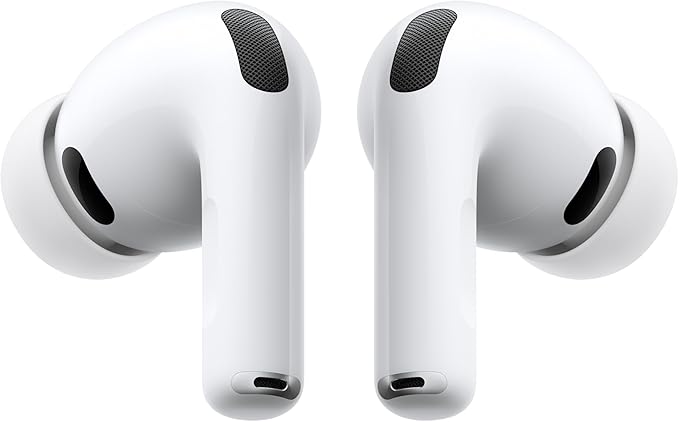
Apple AirPods Pro 3 8.6/10
Why you: you work on a MacBook and carry an iPhone, and want earbuds that switch between them on their own and sound clear on calls.
Trade-off: the best features need Apple devices, and Android owners get plain Bluetooth playback instead.
H2 chip · Adaptive ANC · Up to 8 h buds, 24 h with case · USB-C case · IP57
The shortlist at a glance
| Product | Best for | Key point | Check Price |
|---|---|---|---|
| Apple AirPods Pro 3 | MacBook overall | Automatic switching, spatial audio, strongest Apple fit | Check Price |
 Apple AirPods 4 with ANC | Open-ear for the desk | ANC with no ear tips, light fit for long sessions | Check Price |
 Jabra Elite 10 Gen 2 | Calls and meetings | Best call quality here, multipoint, very comfortable | Check Price |
 Sony WF-1000XM6 | Sound quality on Mac | Top sound, two-device multipoint for iPad plus phone | Check Price |
 Bose QuietComfort Ultra Earbuds (2nd Gen) | Focus and flights | Strongest noise cancelling, immersive spatial audio | Check Price |
 EarFun Air Pro 4 | Budget pick | Multipoint, LDAC and 52-hour total battery at a low tier | Check Price |
Best for macbook overall: Apple AirPods Pro 3
The AirPods Pro 3 are the default MacBook answer for a simple reason: macOS treats them as part of the machine. Once they are set up with an iPhone on the same Apple account, they appear in the Mac’s Control Center with no pairing step. Take them out of the case during a call and the Mac offers them. Voice Isolation in macOS also works with AirPods, which thins out room noise behind your voice on calls.
Apple rates battery at up to eight hours with noise cancelling on, and the USB-C case matches current MacBook cables. Adaptive Audio handles a cafe or an office without manual switching between cancelling and transparency. The limits are the familiar Apple ones: the equaliser control on a Mac is coarse, LDAC and aptX do not exist on macOS anyway, and on a Windows laptop these become ordinary Bluetooth buds.
Best for open-ear for the desk: Apple AirPods 4 with ANC
Apple AirPods 4 with ANC 8.0/10
Why you: you sit at a MacBook all day, hate sealed ear tips, and want to hear a doorbell or a colleague without taking a bud out.
Trade-off: four hours per charge with ANC on is short, and an open fit leaks more sound in loud rooms than sealed buds.
H2 chip · Open-ear ANC · Up to 4 h with ANC, 20 h with case · USB-C, wireless charging · IP54
The AirPods 4 with ANC are the desk pick for people who cannot wear sealed tips for eight hours. The open shell rests in the ear, so there is no pressure in the canal and no plugged feeling during long writing or coding sessions. ANC still takes the edge off an air conditioner or a busy room, even if it cannot match a sealed bud on a train.
They share the H2 chip with the Pro model, so automatic switching between Mac and iPhone, spatial audio and Conversation Awareness all carry over. The battery is the trade you make: up to four hours per charge with ANC on, 20 hours with the case, so a midday case break becomes part of the routine. The case charges over USB-C and wirelessly. Buy these for comfort through a workday of short calls and music, not for a long-haul flight.
Best for calls and meetings: Jabra Elite 10 Gen 2
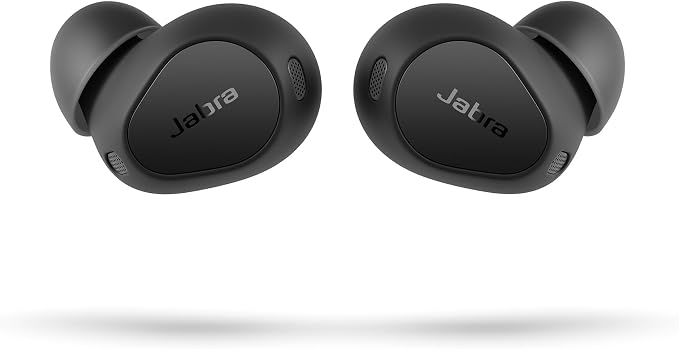
Jabra Elite 10 Gen 2 8.5/10
Why you: your MacBook day is mostly meetings, and you want the clearest voice pickup and the most comfortable long-wear fit in this list.
Trade-off: Jabra has wound down its consumer earbud line, so long-term app and firmware support is a fair question to weigh.
Advanced ANC · Multipoint (2 devices) · Dolby spatial sound · Up to 6 h buds with ANC · Wireless charging
The Jabra Elite 10 Gen 2 are the meeting pick. The six-microphone array and Jabra’s call processing give the clearest voice in this group in published call tests, and the buds sit shallow with an oval tip that most people can wear through a full afternoon of calls. Bluetooth multipoint holds the MacBook and a phone at once, so a mobile call interrupts a laptop meeting cleanly and the laptop takes over again after.
The charging case adds a trick no rival here has: it can stream audio from a USB-C source, which helps on a work laptop where Bluetooth is locked down or flaky. Dolby spatial sound is fine for video, though call quality is the real reason to buy. One honest flag: Jabra has wound down its consumer earbud line, so check that you are comfortable with the support outlook before paying flagship money. The hardware itself is not the risk in that sentence.
Best for sound quality on mac: Sony WF-1000XM6
Sony WF-1000XM6 8.6/10
Why you: you listen to music between calls on your MacBook and want the most detailed sound and the strongest tuning control here.
Trade-off: there is no Apple automatic switching, so moving to a Mac means a manual reconnect, and the case is bulkier than the AirPods case.
Adaptive ANC · Multipoint (2 devices) · LDAC and AAC · Up to 8 h buds, 24 h with case · Wireless charging
Sony’s WF-1000XM6 are the sound pick, with a catch every Mac buyer should know before ordering. On a MacBook these buds run AAC, like every other pair in this guide, because macOS does not support LDAC or aptX at all. The LDAC badge on the box pays off with an Android phone or a dedicated player, not with your laptop. Judged on AAC alone, the XM6 still lead this group for detail and low-end control.
Multipoint keeps a MacBook and a phone connected together, and the Sony app on the phone carries the full equaliser and ANC controls, since there is no Sony Mac app. Battery is rated at up to eight hours per charge, 24 with the case. If your day is calls first, buy the Jabra. If it is music first with calls in between, buy these.
Best for focus and flights: Bose QuietComfort Ultra Earbuds (2nd Gen)
Bose QuietComfort Ultra Earbuds (2nd Gen) 8.3/10
Why you: you do deep work in noisy places and travel with your MacBook, and you want the strongest noise cancelling on this list.
Trade-off: six hours per charge is the shortest flagship figure in this list, and immersive audio drains the battery faster.
Bose ANC · Immersive Audio · Multipoint · Up to 6 h buds, 24 h with case · USB-C · IPX4
Bose wrote the noise-cancelling playbook, and the second-generation QuietComfort Ultra Earbuds have the strongest ANC here. For focused work in a shared office, a cafe, or a cabin, that is the feature that decides the day. This generation added Bluetooth multipoint, so a MacBook and a phone can stay connected, closing the gap that used to push buyers toward Sony.
Immersive Audio gives films and spatial mixes a wider stage, at a cost in battery. Bose rates the buds at up to six hours per charge, the shortest figure among the flagships here, with 24 hours in total from the case. Calls are good rather than class-leading, and the Jabra and AirPods sound clearer to the other side. Buy Bose when silence is the job. Look elsewhere when your day is wall-to-wall meetings.
Best for budget pick: EarFun Air Pro 4
EarFun Air Pro 4 8.5/10
Why you: you want multipoint between a MacBook and a phone, real noise cancelling and long battery life, at a budget tier.
Trade-off: call quality drops in wind, the case feels cheaper than the flagships, and there is no spatial audio for films.
Adaptive hybrid ANC · Multipoint · Bluetooth 5.4 · Up to 52 h total · LDAC and aptX Lossless
The EarFun Air Pro 4 close this list because they cover the MacBook basics better than anything else at their tier. Bluetooth multipoint links a MacBook and a phone at the same time. The adaptive hybrid ANC takes real bite out of office and street noise. Battery totals up to 52 hours with the case, so charging stops being a weekly thought.
On a Mac these run AAC, and the aptX Lossless and LDAC support in the spec sheet only matters with a phone that supports those codecs. Call quality is fine indoors and ordinary in wind. There is no spatial audio and the case plastics feel their tier. None of that undermines the core point: a student or a home worker with a MacBook Air gets about ninety percent of the daily experience here, for a fraction of flagship money.
The codec fact that shapes this whole list
macOS supports two Bluetooth audio codecs: AAC and the basic SBC. It does not support LDAC, aptX, aptX HD or aptX Lossless, on any Mac, with any earbuds. That has a practical consequence. A Sony or EarFun badge advertising hi-res wireless audio earns its keep with a phone, not with your laptop. On the Mac, flagship earbuds from every brand meet on AAC, which is a good codec, and the contest returns to fit, ANC, microphones and switching. Our Bluetooth audio codecs explainer walks through what each codec does and where it actually works.
Switching, multipoint and calls: how to choose
Apple’s automatic switching and Bluetooth multipoint solve the same problem with different rules. AirPods follow your Apple account, so a Mac, iPhone and iPad can all be in play, and the buds move to whichever device starts audio. Multipoint, on the Sony, Jabra, Bose and EarFun picks, holds exactly two devices at once, but those devices can be anything: a MacBook and an Android phone is a normal pairing. For calls, microphone quality separates this list more than sound does. Jabra leads, AirPods follow with help from macOS Voice Isolation, and Bose sit last of the flagships on calls while winning on silence. Match the pick to your calendar: meeting-heavy days point to Jabra or Apple, music-heavy days to Sony, noisy rooms to Bose.
FAQ
What are the best Bluetooth earbuds for a MacBook?
For most Mac users, the AirPods Pro 3, because macOS includes them automatically when they share an Apple account with your iPhone, and switching needs no pairing step. For call-heavy work, the Jabra Elite 10 Gen 2 sound clearer and hold a MacBook and a phone together over multipoint. The EarFun Air Pro 4 are the budget pick with multipoint included.
Do AirPods work better with a MacBook than other earbuds?
In convenience, yes. AirPods switch automatically between a Mac, iPhone and iPad on the same Apple account, support Voice Isolation on calls, and show battery status in macOS without extra software. In sound codec terms there is no gap to exploit: every earbud here runs AAC on a Mac, including the AirPods, so rival flagships are not held back by the laptop.
Can earbuds connect to a MacBook and iPhone at the same time?
Yes, two ways. AirPods use Apple’s automatic switching, moving between devices on the same account as you use them. Sony, Jabra, Bose and EarFun models in this guide use Bluetooth multipoint, holding two live connections at once regardless of brand. Beats Studio Buds + and other single-connection buds need a manual reconnect each time you change device.
Why do my Sony earbuds not use LDAC on my MacBook?
Because macOS does not support LDAC or aptX. Apple limits Bluetooth audio on the Mac to AAC and SBC, no matter which earbuds you connect. The earbuds are not faulty and no setting changes it. LDAC works from a compatible Android phone or player, while the same buds fall back to AAC, at good quality, on the Mac.
Which earbuds are best for Zoom and Teams calls on a Mac?
The Jabra Elite 10 Gen 2 lead this group for calls, with the clearest voice pickup in published tests and a fit that stays comfortable through long meetings. The AirPods Pro 3 run close and add Voice Isolation in macOS. Whatever you buy, set the earbuds as both the output and the microphone in System Settings, then Sound, so the call app does not fall back to the laptop mic.
Do earbuds work with both MacBook Air and MacBook Pro?
Yes. Pairing, codecs and features are set by macOS, not by the laptop model, so every pick here behaves the same on a MacBook Air and a MacBook Pro. The steps are identical too: System Settings, then Bluetooth, put the buds in pairing mode, and choose Connect next to their name.
Verdict
Start with the AirPods Pro 3 if your phone is an iPhone and your Mac is your main machine. Choose the Jabra Elite 10 Gen 2 if calls fill your day, the Sony WF-1000XM6 if music quality does, and the Bose QuietComfort Ultra Earbuds (2nd Gen) if noise is the enemy. The AirPods 4 with ANC suit long desk days in an open fit, and the EarFun Air Pro 4 are the sensible spend. Every pick runs AAC on a Mac, so buy on fit, microphones and switching, not on codec badges.

I am the founder of Sound Mavericks, where I provide the polite truth about audio equipment. I started this site because consumer electronics reviews are often too technical. Instead of using a silent lab, I test headphones, earbuds, and Bluetooth speakers in the real world – like on a noisy subway or in a busy coffee shop.
To stay independent, I buy my own review units (mostly from the United States) rather than accepting free gifts from brands. Once I finish testing a product, I sell it locally to our community. My goal is to help you understand sound quality, active noise cancellation (ANC), and battery life without the marketing hype.