Ethernet is still king for competitive gaming, but not every gaming PC sits next to the router. If running a cable is not an option, the best WiFi adapter for PC gaming is the difference between stable low-latency matches and rubber-banding through every team fight. This guide compares the strongest USB and PCIe WiFi 6E and WiFi 7 adapters for 2026 — built from manufacturer specifications and what actually matters for gaming latency: clean 6 GHz spectrum, MU-MIMO and OFDMA traffic handling, and antennas you can position for a strong signal.
Our top pick is the MSI BE6500 WiFi 7 USB Adapter: tri-band WiFi 7 with Multi-Link Operation, high-gain external antennas, and USB 3.2 Gen 1 speeds that keep up with a modern gaming connection. If you have a free PCIe slot and want the most permanent solution, the TP-Link BE9300 PCIe WiFi 7 card is the internal alternative. Every adapter below was verified live on Amazon before this guide was written.
The Best WiFi Adapters for PC Gaming at a Glance
| Adapter | Interface | Wi-Fi Standard | Top Rated Speed | Best For |
|---|---|---|---|---|
| MSI BE6500 WiFi 7 USB Adapter | USB 3.2 Gen 1 | WiFi 7 (802.11be) | 2880 Mbps | Best overall |
| NETGEAR Nighthawk A9000 | USB 3.0 | WiFi 7 (802.11be) | Up to 6.5 Gbps | Best WiFi 7 USB alternative |
| TP-Link BE9300 PCIe WiFi 7 | PCIe | WiFi 7 (802.11be) | BE9300 | Best PCIe WiFi 7 |
| ASUS PCE-AXE59BT | PCIe | WiFi 6E (802.11ax) | AX5400 | Best WiFi 6E PCIe |
| TP-Link Archer TXE75E | PCIe | WiFi 6E (802.11ax) | AXE5400 | Best value WiFi 6E PCIe |
| TP-Link Archer TX20U Plus | USB 3.0 | WiFi 6 (802.11ax) | AX1800 | Best budget USB |
Our Top WiFi Adapter Picks for Gaming PCs in 2026
1. MSI BE6500 WiFi 7 USB Adapter — Best Overall WiFi Adapter for PC Gaming

The MSI BE6500 is the adapter we would buy first for a gaming desktop in 2026. It is a tri-band WiFi 7 USB adapter rated at 688 Mbps on 2.4 GHz and 2880 Mbps on each of the 5 GHz and 6 GHz bands, and it carries the full modern feature set that matters for gaming: Multi-Link Operation (MLO) for more resilient connections, OFDMA and MU-MIMO for handling crowded airwaves, beamforming, and WPA3 security.
What makes it the gaming pick rather than just a fast adapter is the physical design. Two high-gain tri-band antennas on an adjustable mount, plus a desktop cradle, let you place the adapter where the signal is strongest instead of burying it behind a PC case under a desk — which is where most USB dongles go to die. It connects over USB 3.2 Gen 1 and works with Windows 10 and 11 (Windows 11 unlocks the full WiFi 7 feature set). Backward compatible with WiFi 6, 5, and 4 networks, so it is not a paperweight if your router is older.
- Why it wins: Tri-band WiFi 7 with MLO, adjustable high-gain antennas with desktop cradle, strong Windows driver support.
- Keep in mind: WiFi 7’s headline features need a WiFi 7 router; full capability requires Windows 11.
2. NETGEAR Nighthawk A9000 — Best WiFi 7 USB Alternative

The NETGEAR Nighthawk A9000 is the other heavyweight USB option: a BE6500-class tri-band WiFi 7 adapter with combined wireless speeds up to 6.5 Gbps across 2.4, 5, and 6 GHz. Like the MSI, it includes an adjustable antenna and a USB cradle for optimal desktop placement — a meaningful advantage for signal stability during long gaming sessions.
It connects over USB 3.0, supports WPA3 security, and works with any router or mesh system, so you are not locked into the NETGEAR ecosystem. The main caveat is operating system support: NETGEAR specifies Windows 11 for this adapter, so Windows 10 holdouts should look at the MSI BE6500 instead. If you are on Windows 11 with a WiFi 7 router, the A9000 and the MSI are functionally neck-and-neck — pick whichever is in stock.
- Why it wins: BE6500 tri-band WiFi 7, adjustable antenna plus cradle for placement, WPA3, router-agnostic.
- Keep in mind: Windows 11 only; WiFi 7 benefits require a WiFi 7 router.
3. TP-Link BE9300 PCIe WiFi 7 Card — Best PCIe WiFi 7 Adapter
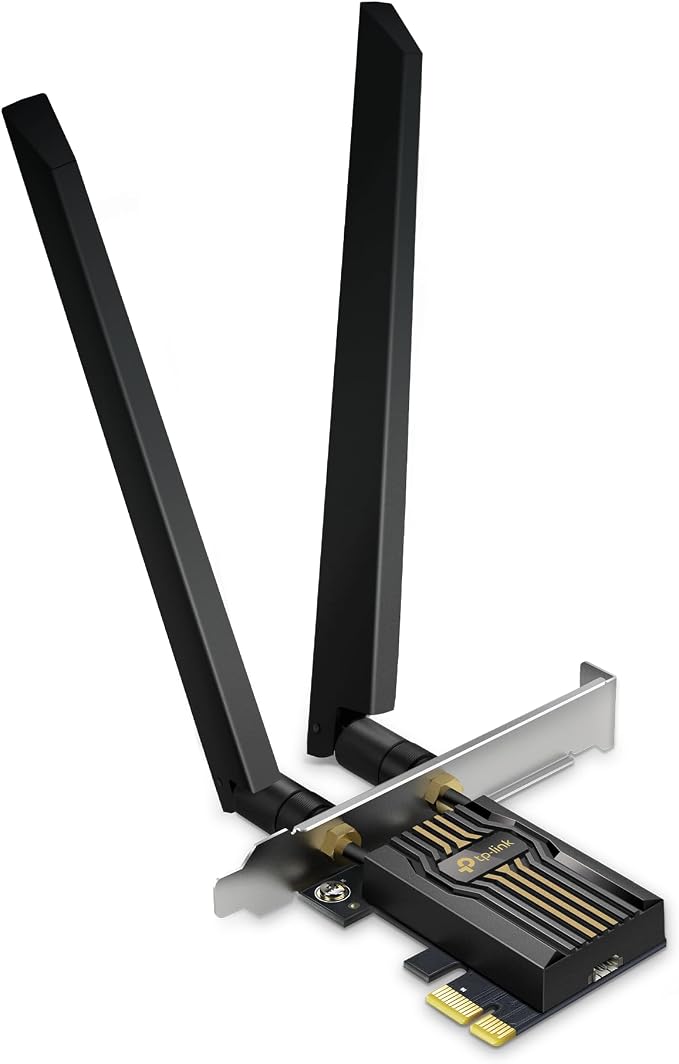
If your desktop has a free PCIe x1 slot, an internal card is the cleanest permanent solution — no USB port occupied, no dongle to knock loose. The TP-Link BE9300 brings WiFi 7 to a PCIe card with tri-band operation, a high-gain antenna (with base for flexible placement), and Bluetooth 5.4 onboard — handy for wireless controllers, headsets, and other gaming peripherals.
PCIe cards draw power directly from the motherboard and generally deliver the most consistent throughput of any adapter type, since they are not sharing USB bus bandwidth. The trade-off is installation: you will open the case and seat the card, which takes about ten minutes but is not plug-and-play like USB. For a stationary gaming rig, that one-time effort buys you the most reliable wireless connection on this list.
- Why it wins: Tri-band WiFi 7 in a permanent PCIe install, high-gain antenna with base, Bluetooth 5.4 included.
- Keep in mind: Requires a free PCIe slot and opening the case; desktop-only.
4. ASUS PCE-AXE59BT — Best WiFi 6E PCIe Adapter

WiFi 7 routers are still spreading; WiFi 6E is the mature sweet spot, and the ASUS PCE-AXE59BT is the most polished way to get it inside a desktop. This AX5400 PCIe card adds the 6 GHz band — the key gaming benefit of WiFi 6E, since 6 GHz is far less congested than 2.4 and 5 GHz — along with 160 MHz channel support, OFDMA, and MU-MIMO.
ASUS includes two external antennas on a magnetized base, so you can stick the antenna base on top of the case or a nearby shelf for the clearest line to the router, plus Bluetooth 5.2 and WPA3 security. For gamers whose router tops out at WiFi 6E, this card delivers essentially everything WiFi 7 would in practice, with more mature drivers and typically a lower cost of entry.
- Why it wins: 6 GHz band for uncongested gaming traffic, magnetized antenna base, Bluetooth 5.2, mature WiFi 6E drivers.
- Keep in mind: Needs a free PCIe slot; the 6 GHz band needs a WiFi 6E or newer router.
5. TP-Link Archer TXE75E — Best Value WiFi 6E PCIe Card

The TP-Link Archer TXE75E is built around Intel’s AX210 chipset — the same silicon found in many premium laptop WiFi modules — in an AXE5400 PCIe card. You get the 6 GHz band, OFDMA and MU-MIMO, Bluetooth 5.2, and a magnetic antenna base for placement, at a price point that usually undercuts the ASUS equivalent.
The Intel AX210 is a known quantity with excellent driver support across Windows, which matters more than spec sheets suggest: flaky drivers cause exactly the micro-stutters and disconnects that ruin games. If you want 6 GHz gaming spectrum on a budget and have a spare PCIe slot, the TXE75E is the value play. Pair it with our best gaming headsets roundup to complete the setup.
- Why it wins: Intel AX210 chipset with rock-solid drivers, 6 GHz WiFi 6E, Bluetooth 5.2, magnetic antenna base.
- Keep in mind: PCIe install required; not the newest WiFi 7 standard.
6. TP-Link Archer TX20U Plus — Best Budget USB WiFi Adapter for Gaming

Not everyone needs WiFi 7. The TP-Link Archer TX20U Plus is an AX1800 dual-band WiFi 6 USB adapter with high-gain dual antennas — and it is the cheapest way to get a genuinely gaming-capable wireless connection on this list. WiFi 6’s OFDMA and MU-MIMO handle congested household airwaves far better than older WiFi 5 dongles, which is where most “WiFi is bad for gaming” complaints actually come from.
The dual high-gain antennas are the standout at this tier: most budget adapters use tiny internal antennas, while the TX20U Plus gives you real, aimable antennas on a USB 3.0 adapter. It is the right pick for older routers, secondary PCs, or anyone who wants a meaningful upgrade for minimal outlay. Just plug it into a USB 3.0 port (not USB 2.0) to avoid throttling the adapter.
- Why it wins: Real high-gain antennas at a budget tier, WiFi 6 traffic handling, USB 3.0, dead-simple setup.
- Keep in mind: No 6 GHz band; top speeds trail the WiFi 6E/7 picks.
USB vs PCIe WiFi Adapter for Gaming: Which Is Better?
For a desktop that never moves, PCIe is technically the better connection. A PCIe card draws dedicated power, does not share USB bus bandwidth, and sits on an internal bus with lower overhead — all of which translate to slightly more consistent throughput and fewer micro-stutters. Installation takes about ten minutes with a screwdriver.
USB wins on convenience and flexibility. No case opening, works on laptops as well as desktops, and you can move it between machines or reposition it with a cradle or extension for the best signal. Modern USB 3.x adapters are fast enough that the interface is not the bottleneck — the airwaves are. Our take: choose PCIe for a permanent gaming rig with a free slot; choose USB for laptops, rentals, or any setup where you value placement flexibility. Either way, buy an adapter with external, positionable antennas — the single biggest real-world factor after the WiFi standard itself.
WiFi 7 vs WiFi 6E vs WiFi 6: What Actually Matters for Gaming Latency
Gaming cares about latency and stability, not headline throughput — a 50 Mbps game stream does not need a 2880 Mbps link. What each generation buys you:
- WiFi 6 (802.11ax): OFDMA and MU-MIMO let the router serve many devices efficiently. The big leap over WiFi 5 for busy households. The 5 GHz band is crowded, but WiFi 6 manages the crowd far better.
- WiFi 6E: Adds the 6 GHz band — fresh, uncongested spectrum with no legacy devices. For gaming, this is the single most meaningful upgrade: your traffic stops competing with every neighbor’s network.
- WiFi 7 (802.11be): Adds Multi-Link Operation (use multiple bands simultaneously for resilience), wider 320 MHz channels, and lower theoretical latency. Real benefits today, but you need a WiFi 7 router to unlock them.
SoundMavericks’ take: match the adapter to your router. WiFi 6 router? A WiFi 6 or 6E adapter is the sensible buy — a WiFi 7 adapter will work but cannot use its best tricks. WiFi 7 router? Buy WiFi 7 and get the 6 GHz band plus MLO. And whatever you buy, put your gaming PC on the 5 or 6 GHz band, never 2.4 GHz, which is slow and interference-prone.
What to Check Before You Buy a WiFi Adapter
- Router match: An adapter cannot exceed what your router speaks. Check your router’s WiFi generation first and buy to match — or buy one generation ahead if a router upgrade is coming.
- USB port version: USB adapters must go in a USB 3.0 (blue) port or faster. A USB 2.0 port caps throughput and adds latency — the most common self-inflicted wound in WiFi gaming setups.
- Operating system: WiFi 7’s full feature set needs Windows 11. Check OS support on the listing before buying, especially for the newest adapters.
- Antenna placement: The adapter should sit where the signal is, not where the PC is. Prefer models with a cradle, extension cable, or magnetic antenna base, and keep antennas clear of the metal case.
- Bluetooth bonus: Several PCIe cards include Bluetooth — useful for wireless controllers and headsets without a separate dongle. For dedicated gaming audio, see our best IEMs for gaming and gaming noise cancelling headphones guides.
Frequently Asked Questions About WiFi Adapters for PC Gaming
Does a WiFi adapter affect ping in games?
Yes — the adapter is one link in the latency chain. A modern WiFi 6 or newer adapter with a clean 5 or 6 GHz signal typically adds only a few milliseconds over Ethernet in good conditions. An old WiFi 4/5 dongle on congested 2.4 GHz can add tens of milliseconds plus jitter, which is what players feel as lag. The adapter matters, but so do router quality, distance, and band choice.
Is USB or PCIe better for a gaming WiFi adapter?
PCIe is marginally better for a permanent desktop: dedicated power, no shared USB bus, and typically more consistent throughput. USB is more flexible — it works on laptops, needs no installation, and can be repositioned with a cradle for the best signal. For most gamers the practical difference is small; antenna quality and WiFi generation matter more than the interface.
Is WiFi 7 worth it for gaming?
Only if your router supports WiFi 7. With a WiFi 7 router, you get the 6 GHz band plus Multi-Link Operation, which improves connection resilience — genuinely useful for gaming. With an older router, a WiFi 7 adapter falls back to older standards and you pay for features you cannot use. Match the adapter to the router.
Do I need the 6 GHz band for gaming?
It is the biggest practical upgrade WiFi 6E and WiFi 7 offer gamers. The 6 GHz band is free of legacy devices and neighbor interference, so latency is more consistent — especially in apartments. You need both a 6 GHz-capable router and adapter. If your area has congested airwaves, prioritize 6 GHz over raw speed ratings.
Will a WiFi adapter work with any router?
Yes. WiFi standards are backward compatible: a WiFi 7 adapter connects to a WiFi 5 router, just at WiFi 5 capabilities. Every adapter in this guide works with any modern router or mesh system. You only unlock an adapter’s headline features when the router speaks the same generation.
Can I use these WiFi adapters on a laptop?
The USB adapters (MSI BE6500, NETGEAR A9000, TP-Link TX20U Plus) work on laptops with a free USB 3.0 port and a supported Windows version. The PCIe cards are desktop-only — they require a free PCIe slot inside the case.
Is WiFi good enough for competitive gaming, or do I need Ethernet?
Ethernet is still the gold standard: lowest latency, zero interference, no shared airwaves. But a good WiFi 6E/7 setup on a clean 6 GHz signal gets close enough that most players will not feel the difference outside of the highest levels of competition. If you cannot run a cable, a quality adapter on the right band is a legitimate setup — not a compromise to apologize for.
Ready to ditch the lag?
Match the adapter to your router, plug USB adapters into a USB 3.0 port, and put your gaming traffic on 5 or 6 GHz. Our top pick remains the MSI BE6500 for most gaming desktops.
Check Price on Amazon
I am the founder of Sound Mavericks, where I provide the polite truth about audio equipment. I started this site because consumer electronics reviews are often too technical. Instead of using a silent lab, I test headphones, earbuds, and Bluetooth speakers in the real world – like on a noisy subway or in a busy coffee shop.
To stay independent, I buy my own review units (mostly from the United States) rather than accepting free gifts from brands. Once I finish testing a product, I sell it locally to our community. My goal is to help you understand sound quality, active noise cancellation (ANC), and battery life without the marketing hype.