
You are sitting in a coffee shop, your laptop open, headphones on. You are deep in focus, watching a video tutorial or maybe just catching up on Netflix. Suddenly, your phone buzzes on the table. It is an important call.
Panic sets in.
You rip the headphones off your head. You fumble for your phone. You try to answer, but now you are holding the phone to your ear like it is 1999. Or worse, you try to answer on Bluetooth, but your headphones are still held hostage by your laptop. By the time you navigate the Settings menu to disconnect from the computer and connect to the phone, the caller has hung up.
This is the Unpairing Dance. It is clumsy, frustrating, and unnecessary.
There is a feature that solves this problem instantly. It is called Bluetooth Multipoint. For a long time, this was a secret weapon found only in expensive business headsets for call centers. But today, it is arriving in consumer earbuds from Sony, Jabra, and even budget brands.
But is it actually useful for you? Or is it just another battery-draining gimmick? Let’s break it down.
Bluetooth Multipoint: What Does It Do?
In simple terms, Bluetooth Multipoint allows your headphones to maintain an active connection with two devices at the same time.
Most standard headphones operate on a one-to-one basis. They are monogamous. If they are married to your phone, they ignore your laptop. To get them to talk to your laptop, you have to divorce (disconnect) the phone first.
Multipoint changes the rules. It lets your headphones have two partners. Your headphones stay connected to both your laptop and your phone simultaneously. They sit in the middle, listening to both, ready to play audio from whichever one demands attention.
The Big Myth: It Is Not a Mixer Before you get too excited, we need to clear up the biggest misunderstanding about this technology. Bluetooth Multipoint is a switcher, not a mixer.
Think of a DJ mixer. A DJ can play two songs at the exact same time, and you hear both tracks overlapping. Multipoint does not do this. You cannot listen to a podcast on your phone and hear the audio from a Zoom call on your laptop at the same time.
Instead, think of it like a television remote. You can switch between Channel 4 and Channel 5 instantly, but you can only watch one channel at a time. Multipoint creates a bridge so you can flip the switch automatically, without digging through menus.
How It Actually Works
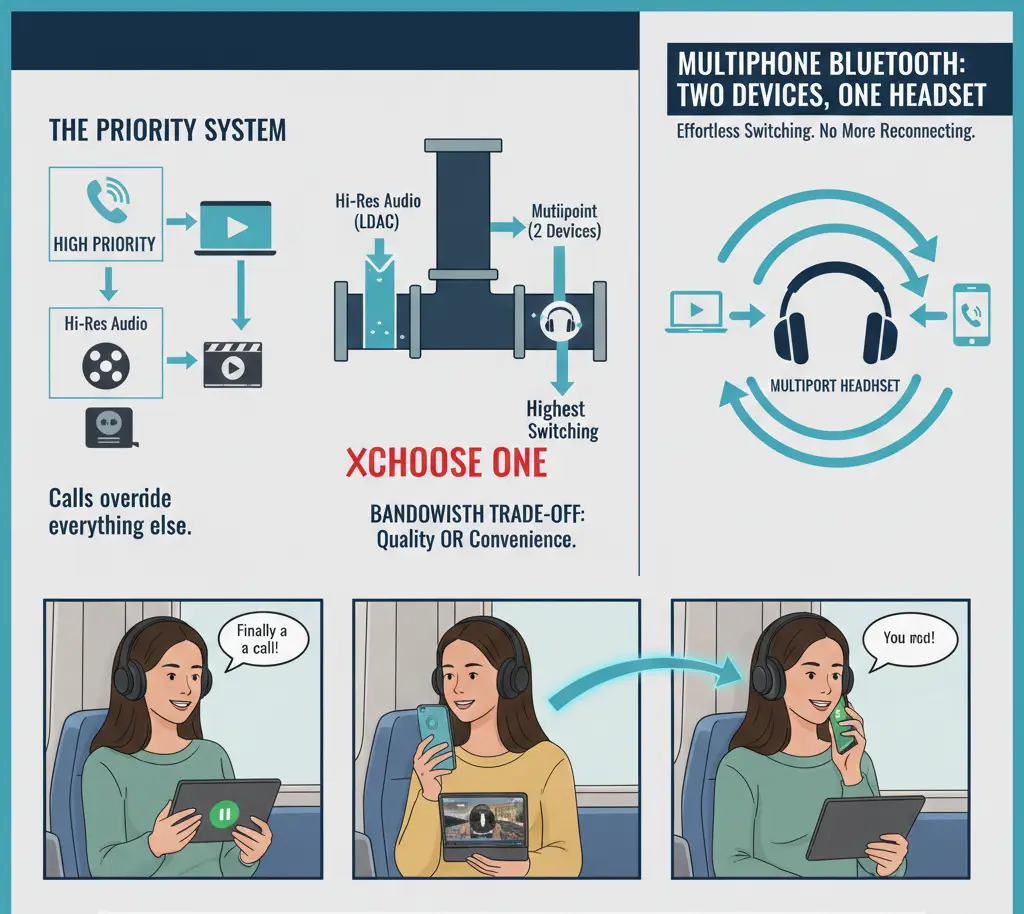
So, if it doesn’t play both sounds at once, how does it decide what to play? It uses a strict Priority System.
Your headphones are smart enough to know that some audio is more important than other audio.
- High Priority: Phone calls, video calls (Teams/Zoom).
- Low Priority: Music, videos, system sounds (clicks and beeps).
The Handshake Mechanism
When you turn on your headphones, they send out a digital handshake to the last two devices they were paired with. Once connected, they enter Standby Mode for both.
Here is how the switch happens in real time:
- Step 1: You press play on Spotify on your laptop. The headphones detect audio and open the gate for the laptop. You hear music.
- Step 2: Your phone rings. The headphones recognize the Call Profile signal. This is a High Priority alert.
- Step 3: The headphones automatically send a Pause command to your laptop (stopping the music) and immediately switch the audio gate to your phone. You hear the ringtone.
- Step 4: You tap your headphones to answer. You take the call.
- Step 5: You hang up. The headphones switch the gate back to the laptop and (usually) resume the music.
Simple vs. Advanced Multipoint
For 95% of people, Multipoint means two devices. This is the industry standard. However, there are some professional-grade office headsets (like those from Jabra or Poly) that support triple connectivity (e.g., a desk phone, a mobile phone, and a computer). But for consumer gear like the Sony WH-1000XM5 or Pixel Buds Pro, the limit is strictly two.
Real World Scenarios: Who Is This For?
Technology is only useful if it solves a problem in your actual life. Here are the three most common scenarios where Multipoint wins.
1. The Office Worker (The Power User)
This is the number one reason to buy Multipoint gear. If you sit at a desk with a computer and a phone, this feature is essential.
- The Setup: You are wearing noise-canceling headphones to block out office chatter. You are connected to your laptop for Microsoft Teams meetings. You are also connected to your personal phone for music or emergency calls from family.
- The Benefit: You never miss a call because you were zoned out on your computer. You also don’t have to take your headset off every time your phone buzzes. You stay in your flow state.
2. The Gamer / Streamer
- The Setup: You are playing a casual game on your Steam Deck or Nintendo Switch. You want to hear the game audio. But you are also waiting for a friend to text you back, or you are listening to a podcast on your phone while you grind through a level.
- The Benefit: You can keep the game audio running. When you want to listen to a voice note on your phone, you just press play on the phone. The game audio mutes, the voice note plays, and then the game audio returns. It saves you the hassle of juggling two pairs of earbuds.
3. The Commuter
- The Setup: You are on a train or a bus. You have a tablet (iPad or Android) propped up to watch a movie. Your phone is in your pocket.
- The Benefit: If you get a call, the movie audio pauses automatically. You take the call through the headphones. When you hang up, the movie resumes. Without Multipoint, you would have to pause the movie, take off the headphones, dig out your phone, and hold it to your ear—impossible to do gracefully in a crowded train car.
The Downsides (Why You Might Turn It Off)
If Multipoint is so great, why doesn’t everyone use it all the time? There are two main reasons: Sound Quality and Glitches.
The Audiophile Sacrifice (LDAC vs. Multipoint)
Bluetooth is like a pipe. It can only carry so much water (data) at once.
High-resolution audio codecs, like Sony’s LDAC, try to shove a massive amount of data through that pipe to give you the best possible sound quality. Multipoint requires the pipe to be split into two lanes to maintain connection with two devices.
Often, the pipe isn’t big enough for both. On many Sony headphones, for example, you have to make a choice in the app: Do you want the highest audio quality (LDAC) OR do you want Multipoint? You usually cannot have both active at the same time. If you are a casual listener, you won’t hear the difference. If you are a purist who listens to lossless FLAC files, you will want to turn Multipoint off.
The Ghost Notification
Sometimes, the technology is too sensitive. Imagine you are listening to your favorite song on your laptop. Your phone receives a spam email. Even though your phone is on silent, it might wake up the Bluetooth connection for a split second to acknowledge the notification. Result: Your music on the laptop pauses for two seconds of silence, then starts again. It is a ghost interruption. If you have a very active phone, this can make listening to music on a second device annoying.
Buying Guide: Is It A Dealbreaker?
Should you refuse to buy headphones if they don’t have Multipoint?
Yes, if:
- You work from home or in an office.
- You constantly juggle a laptop and a smartphone.
- You carry two phones (work and personal).
No, if:
- You only use your headphones with your phone.
- You are an audiophile who demands the highest bitrate possible.
- You use only Apple products (AirPods use iCloud Switching, which is different but acts similarly within the Apple ecosystem).
Top Picks for Multipoint:
- Jabra: They are the kings of this. Almost all their earbuds handle switching flawlessly.
- Technics: Their new earbuds allow for three devices at once, which is rare.
- Sony: The XM4 and XM5 series have it, but remember the LDAC trade-off.
Frequently Asked Questions (FAQ)
Yes, but the difference is small. Your headphones have to keep two radio connections alive instead of one. However, in modern Bluetooth 5.0+ devices, this might only cost you 10-15 minutes of playtime per charge. It is rarely noticeable.
Yes. This is a very common use case for people who have a dedicated Work Phone and a Personal Phone. You can hear ringtones from both.
Yes. Bluetooth Multipoint is a universal standard. It does not care about the brand. You can connect a MacBook and a Samsung Galaxy phone, or an iPad and a Windows PC. They will play nicely together.

I am the founder of Sound Mavericks, where I provide the polite truth about audio equipment. I started this site because consumer electronics reviews are often too technical. Instead of using a silent lab, I test headphones, earbuds, and Bluetooth speakers in the real world – like on a noisy subway or in a busy coffee shop.
To stay independent, I buy my own review units (mostly from the United States) rather than accepting free gifts from brands. Once I finish testing a product, I sell it locally to our community. My goal is to help you understand sound quality, active noise cancellation (ANC), and battery life without the marketing hype.